Get upto 60% Discount

Get upto 60% Discount
Unlimited Access:
$3.59 Original price was: $3.59.$2.99Current price is: $2.99.
Available Download Files

Tired of Restrictions?
Go Unlimited!
Join Our Membership to Download 8400+ Plugins & Themes

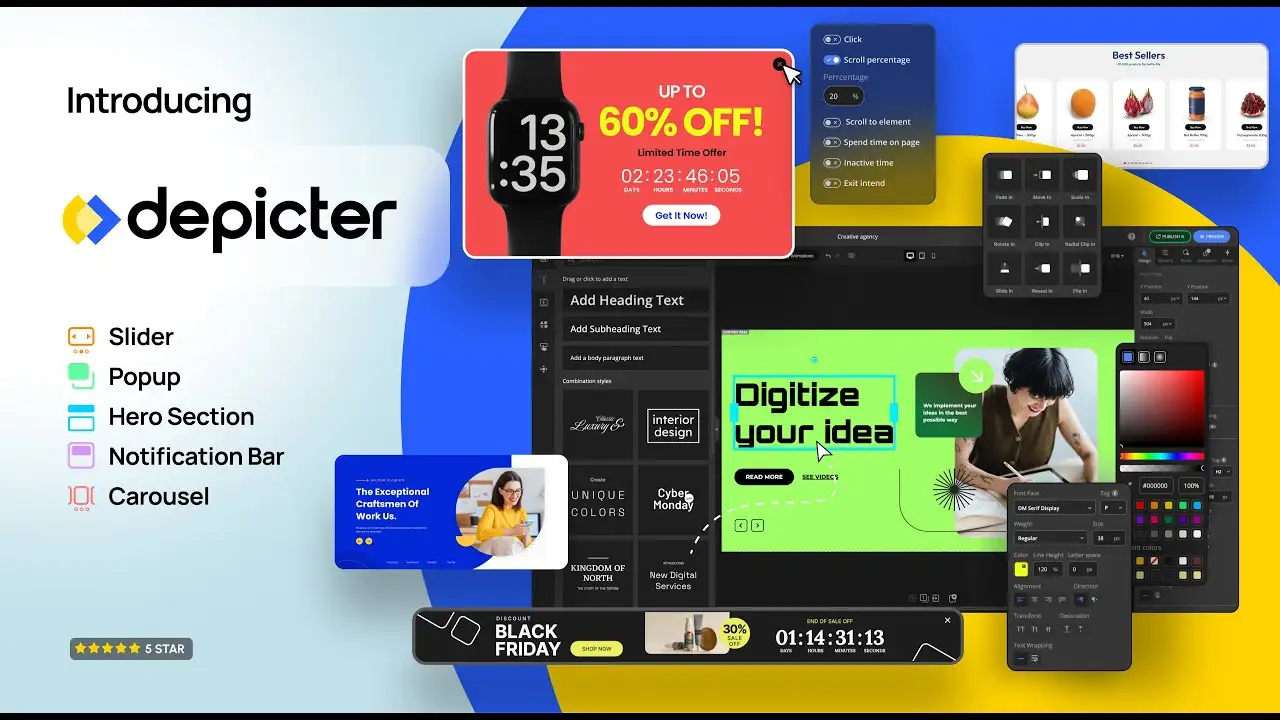
Depicter Pro is an AI-powered pop-up and slider builder for WordPress.
If you are searching for a Depicter Pro download or want to test the Depicter plugin free download, this page explains what you are installing, how it works in real projects, and when it actually makes sense to use it.
When WordPress sites grow beyond a basic blog, visual content quickly becomes a bottleneck.
Hero sections feel static. Sliders slow pages down. Popups conflict with themes or page builders. Most site owners end up stacking multiple plugins just to handle sliders, banners, popups, and notification bars,e and performance suffers as a result.
This is where Depicter positions itself differently.
Most WordPress slider plugins are built around a single use case: rotating images.
As soon as you try to:
the system breaks down.
You either:
Depicter approaches this problem as a visual content system, not a single-purpose slider tool.
Depicter is a visual builder that lets you create:
…all from the same editor.
Instead of relying on shortcodes or heavy JavaScript libraries, Depicter outputs clean, optimized markup and uses a performance-first rendering approach. This is why many users look specifically for a Depicter download when replacing older slider or popup plugins.
You can start with the Depicter plugin free download, which already includes:
Depicter Pro is distributed under the GPL license, which allows users to install, test, and modify the plugin on their own WordPress sites.
If you are searching for Depicter Pro free download, make sure you understand these differences so you know exactly what features you are activating.
One of Depicter’s defining features is its AI builder.
Instead of starting from a blank canvas, you can:
This reduces setup time significantly, especially for non-designers.
AI popups and notification bars are actively expanding, making Depicter more than just a slider plugin.
Animations are usually where WordPress sites slow down.
Depicter avoids this by letting you animate individual elements, not entire pages.
You can:
All animations are optimized for modern browsers and mobile devices.
Depicter includes built-in logic for when and where content appears.
Audience Targeting Options
Display Triggers
This makes Depicter suitable for lead generation funnels, promotions, and multi-step campaigns — without installing additional popup plugins.
Depicter includes a native form builder, allowing you to collect:
Forms can be placed directly inside sliders, popups, or carousels, removing the need for separate form plugins in many cases.
For WooCommerce sites, Depicter can dynamically display:
Product sliders are fully responsive and optimized for touch devices, making Depicter useful for storefronts, landing pages, and promotional sections.
Depicter is built with SEO and speed in mind:
This is one reason many users replace older slider plugins after installing a Depicter Pro download.
If you are looking for a Depicter Pro plugin free download, UltraPlugins provides a straightforward installation process:
Once activated, you can immediately start building sliders, popups, and animated sections.
Depicter is not just a slider plugin. It is a visual content system designed to:
If your site relies heavily on visual sections, popups, or dynamic sliders, a Depicter download makes more sense than stacking single-purpose plugins.
Is Depicter free to use?
Yes. A free version is available with core features. Advanced functionality is included in the Pro version.
Can I use Depicter with Elementor or Gutenberg?
Yes. Depicter works with Elementor, Gutenberg, Divi, WPBakery, Beaver Builder, Oxygen, and more.
Is Depicter SEO-friendly?
Yes. Depicter outputs clean markup, supports modern image formats, and avoids heavy dependencies.
Does Depicter support WooCommerce?
Yes. You can create product sliders, carousels, and promotional popups using WooCommerce data.
Is Depicter Pro the right choice for every site?
Depicter is best suited for sites that rely heavily on visual sections, sliders, or popups. For simple blogs that only need static images, a full visual builder may be unnecessary.
For Installation or Technical Related Queries check FAQ Page
Our Website also have older version of the plugins and theme. So you can test your website with compatible plugins or Rollback plugins in case of any bug or compatibility issues.
UNZIP the file downloaded from our website, the zip file might contain other files like Template, Docs etc. So make sure you upload correct file.
To Install Plugins:
To Install Themes:
Sometimes theme/plugin might ask you for license, just ignore. Because we have already activated the product with out legal key, which we have purchased for you.
When a New version appears and is available on our website you’ll find it in My Account “Downloads section”.
For Destination Already Exists error:
Make sure to Delete the version of theme/plugin that you have on your website before you upload our premium version, it might cause a conflict during installation and activation.
Or WordPress will say “destination already exists” when trying to upgrade using a zip file and will fail to upgrade the theme or plugin.
If you faced “destination already exists” error installing this Plugin will solve the issue – Easy Theme and Plugin Upgrades.
Our business hours are Monday to Saturday from 10:00 am to 8:00 pm, any request made outside these hours will be answered until next business day. Support and Updates can take 24 to 48 hours. Support provided is for product installation. Please be aware of possible time zone differences when waiting for our reply.
If you have any Queries, Feel Free to Contact Us:
Abuse Warning:
For more information please read FAQs & Terms of Use.