Get upto 60% Discount

Get upto 60% Discount
Unlimited Access:
$15.00 Original price was: $15.00.$4.99Current price is: $4.99.

Tired of Restrictions?
Go Unlimited!
Join Our Membership to Download 8400+ Plugins & Themes

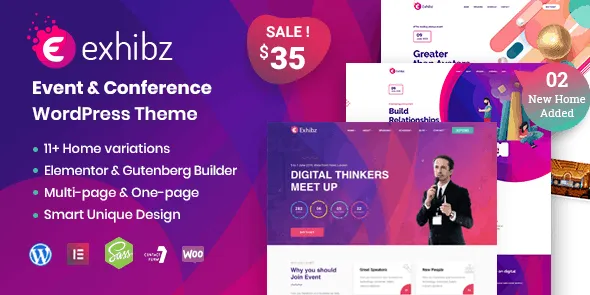
Exhibz – Event Conference WordPress Theme is built for modern event websites where clarity, timing, and presentation need to work together. Conference visitors usually arrive with a purpose—checking schedules, exploring speakers, or understanding event details—and the theme is structured to support exactly that behavior.
Rather than acting as a generic design, Exhibz is typically used to organize event content in a way that reduces friction for users. This makes it a practical choice for conferences where information needs to be accessible without unnecessary complexity.
In most conference websites, the challenge is not just design but organization. Visitors often need to move between schedules, sessions, and speaker profiles quickly.
Exhibz approaches this by structuring content into clear segments, allowing users to navigate between different parts of the event without confusion. This is particularly useful for multi-day conferences where multiple sessions run in parallel.
Instead of overwhelming the user, the theme focuses on guiding them through the event flow.
Exhibz uses a layout style that prioritizes hierarchy. Important information such as schedules, speakers, and session details is presented in a logical order rather than scattered across pages.
This approach improves readability and helps users locate key information faster. It also reduces dependency on additional plugins for basic event structuring.
For event organizers, this means less time spent adjusting layouts and more time focusing on actual event content.
While Exhibz is structured, it does not limit customization.
Users can adjust visual elements such as colors, typography, and section layouts using standard WordPress customization options. It also supports page builders like Elementor, allowing visual editing when needed.
This balance between structure and flexibility makes it suitable for both technical and non-technical users.
Event websites often experience peak traffic close to the event date. Stability during these periods is important.
Exhibz is designed to maintain consistent performance by avoiding unnecessary complexity in its codebase. This helps ensure faster loading times and smoother interaction, even when accessed from mobile devices.
It also remains compatible with commonly used plugins, reducing the risk of conflicts during critical event periods.
Exhibz is most effective in environments where structured presentation is required.
It is commonly used for:
Technology and startup conferences
Corporate summits and business events
Educational seminars and workshops
Online and hybrid events
Its layout can be reused for recurring events by updating schedules and speaker information rather than rebuilding the site.
Setting up Exhibz follows the standard WordPress theme installation process.
Download the theme file from this page.
Navigate to Appearance → Themes → Add New → Upload Theme.
Upload the .zip file and install it.
Activate the theme after installation.
After activation, users can import demo content if available and replace it with their own event data.
To get the best results from Exhibz, it helps to prepare event content in advance.
This includes structuring session timelines, organizing speaker details, and defining the flow of the event. Since the theme is designed around structured presentation, having this information ready makes setup faster and more efficient.
Using the theme as intended—focused on conferences and structured events—typically leads to better usability.
Is Exhibz suitable for multi-day conferences?
Yes. It supports structured layouts for complex event schedules.
Can it be used for virtual or hybrid events?
Yes. It works for both physical and online event formats.
Does it support Elementor or other builders?
Yes. It is compatible with popular page builders for customization.
Can it handle registrations or attendee management?
Yes. It can integrate with plugins that manage registrations and event workflows.
Version 3.0.13
Updated compatibility with latest WordPress version
Improved layout consistency for schedule sections
Minor performance optimizations
Tested with modern browsers
Compatible with PHP 7.4 and above
For Installation or Technical Related Queries check FAQ Page
Our Website also have older version of the plugins and theme. So you can test your website with compatible plugins or Rollback plugins in case of any bug or compatibility issues.
UNZIP the file downloaded from our website, the zip file might contain other files like Template, Docs etc. So make sure you upload correct file.
To Install Plugins:
To Install Themes:
Sometimes theme/plugin might ask you for license, just ignore. Because we have already activated the product with out legal key, which we have purchased for you.
When a New version appears and is available on our website you’ll find it in My Account “Downloads section”.
For Destination Already Exists error:
Make sure to Delete the version of theme/plugin that you have on your website before you upload our premium version, it might cause a conflict during installation and activation.
Or WordPress will say “destination already exists” when trying to upgrade using a zip file and will fail to upgrade the theme or plugin.
If you faced “destination already exists” error installing this Plugin will solve the issue – Easy Theme and Plugin Upgrades.
Our business hours are Monday to Saturday from 10:00 am to 8:00 pm, any request made outside these hours will be answered until next business day. Support and Updates can take 24 to 48 hours. Support provided is for product installation. Please be aware of possible time zone differences when waiting for our reply.
If you have any Queries, Feel Free to Contact Us:
Abuse Warning:
For more information please read FAQs & Terms of Use.