Get upto 60% Discount

Get upto 60% Discount
Unlimited Access:
$10.00 Original price was: $10.00.$4.99Current price is: $4.99.

Tired of Restrictions?
Go Unlimited!
Join Our Membership to Download 8400+ Plugins & Themes

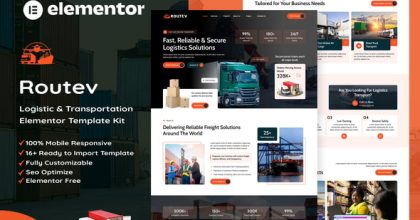
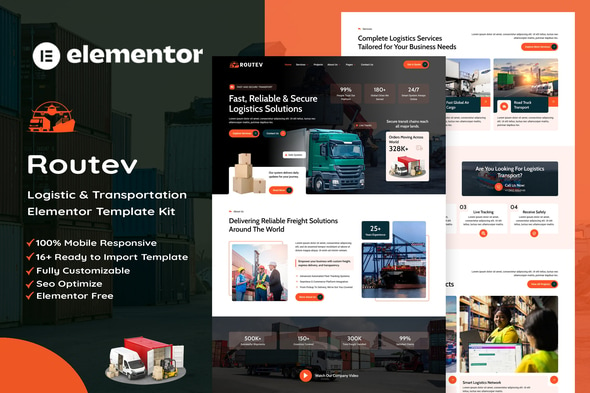
Planning a website for a transport company, freight forwarder, or courier business? Routev – Logistics & Transportation Elementor Template Kit provides a coordinated set of WordPress page designs that help you present your services, projects, people, and contact information in a professional way. Instead of assembling each page from a blank canvas, you can import the layouts into Elementor, replace the sample information, and shape the site around your business.
Transport customers often need clear answers before they contact a provider: what can you move, which services do you offer, and how can they request details? Routev helps organize these answers through dedicated service, service-detail, project, pricing, and contact layouts. A separate team page and blog templates also give growing logistics brands space to build familiarity and explain their expertise.
The design is suited to companies that want a structured corporate presentation without writing custom page layouts from scratch.
The download package is described by its creator as including these templates:
Routev can be adapted for logistics companies, courier businesses, trucking providers, cargo handlers, shipping agencies, freight forwarders, and warehouse service providers. A local delivery company might emphasize service areas and contact details, while a freight operator could feature cargo services, completed projects, and a dedicated enquiry workflow. Replace the sample copy with verified information about your routes, coverage, vehicles, and services.
Start with the Services page and make each offering specific: explain the type of cargo, service region, and how a prospect can request a quotation. Use the Service Details template for processes or requirements that deserve their own page. On the Contact page, configure the MetForm form to send messages to the correct address and test a submission.
The project and blog layouts are useful places for case studies, delivery insights, packaging guidance, or service announcements. Write original titles, image alternative text, and location-specific service information to make the finished website more helpful to search visitors. Shipment tracking, real-time pricing, and booking systems are not included by the template kit itself; add suitable functionality separately if your business needs it.
Routev is an Elementor Template Kit, not a WordPress theme. The kit supplies editable designs, not hosting, transportation operations software, or an automatically finished business website. Demo photography may require a separate image license; use properly licensed assets or your own photos for a live commercial site. Elementor compatibility, installed addons, and form configuration should be checked against your current WordPress setup.
Is Routev a WordPress theme?
No. It is a collection of Elementor layouts imported into an existing WordPress installation and theme.
Does Routev need Elementor Pro?
The original listing says Elementor Pro is not required. Install the free Elementor builder and the addons requested during import.
Can I use Routev for a courier or trucking company?
Yes. Its service pages, project layout, and enquiry form design can be customized for those business types.
Does the kit include a package tracking system?
No built-in live tracking system is advertised. You would need a separate integration for tracking, booking, or automated rate calculations.
Why am I getting a missing style.css error?
This usually happens when a template kit is uploaded as a WordPress theme. Use the Template Kit Import workflow rather than Appearance > Themes.
Can I edit the colors, content, and logo?
Yes. Elementor and the kit’s global styling options let you adapt the appearance and replace the demo content.
Are the demo images ready for commercial use?
Not necessarily. The creator notes that demo photos from Envato Elements need appropriate licensing or replacement.
For Installation or Technical Related Queries check FAQ Page
Our Website also have older version of the plugins and theme. So you can test your website with compatible plugins or Rollback plugins in case of any bug or compatibility issues.
UNZIP the file downloaded from our website, the zip file might contain other files like Template, Docs etc. So make sure you upload correct file.
To Install Plugins:
To Install Themes:
Sometimes theme/plugin might ask you for license, just ignore. Because we have already activated the product with out legal key, which we have purchased for you.
When a New version appears and is available on our website you’ll find it in My Account “Downloads section”.
For Destination Already Exists error:
Make sure to Delete the version of theme/plugin that you have on your website before you upload our premium version, it might cause a conflict during installation and activation.
Or WordPress will say “destination already exists” when trying to upgrade using a zip file and will fail to upgrade the theme or plugin.
If you faced “destination already exists” error installing this Plugin will solve the issue – Easy Theme and Plugin Upgrades.
Our business hours are Monday to Saturday from 10:00 am to 8:00 pm, any request made outside these hours will be answered until next business day. Support and Updates can take 24 to 48 hours. Support provided is for product installation. Please be aware of possible time zone differences when waiting for our reply.
If you have any Queries, Feel Free to Contact Us:
Abuse Warning:
For more information please read FAQs & Terms of Use.