Exclusive Sale! Grab Flat 10% OFF* | On All Products

Festival Events – Elementor Template Kit

Festival Events – Elementor Template Kit

  Unlimited Access:

Original price was: $10.00.Current price is: $2.99.

Or

Tired of Restrictions?
Go Unlimited!

Join Our Membership to Download 8400+ Plugins & Themes

Membership Banner image for ultraplugins store

Festival Events Elementor Template Kit

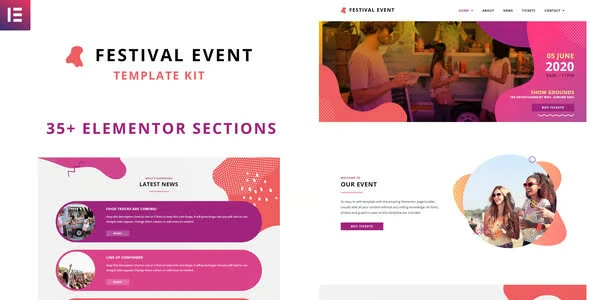
Festival Events by BakerWebDev is a vibrant website template package for event organizers, street markets, music festivals, concerts, and similar public gatherings. Its visual style combines purple, pink, and orange tones with rounded blob shapes and abstract wavy graphics, giving the site a lively appearance without making the content difficult to follow.

The kit includes more than 35 visual layouts for homepages and inner pages, along with dedicated sections for schedules, timetables, event information, and ticket sales. The Festival Events Elementor Template Kit download package is suited to teams that need a polished starting point and want to adjust the presentation themselves through Elementor.

What the Kit Includes

  • Festival Focused Visual Direction: Bold purple, pink, and orange colors create an energetic look that fits live events and creative markets. Blob shapes and abstract waves add character to banners, content blocks, and calls to action.
  • 35 Plus Ready Made Layouts: The extensive layout library covers multiple homepage concepts and a wide selection of inner pages. This gives organizers room to choose a structure that matches the size and style of their event.
  • Elementor Editing: Pages can be edited with the Elementor drag and drop builder, without writing code. Text, fonts, colors, images, and section arrangements can be changed directly in the visual editor.
  • Event Information Sections: Pre-designed areas help present the details visitors need before attending. Schedules, timetables, event descriptions, and ticket sales can each have a clear place within the site.
  • Quick Access Architecture: The layouts are optimized for speed so visitors can reach important event information without unnecessary delay. This is useful for people checking venue details or schedules shortly before an event.
  • Mobile Responsive Structure: The design adapts to phones, tablets, and desktop screens. Since many attendees search for directions, lineups, and ticket information on their phones, mobile presentation is a central part of the kit.
  • Global Theme Styles: Global styling controls make it easier to update the overall color palette. Organizers can align the design with their festival identity instead of editing every section separately.
  • Theme Compatibility: Festival Events works with most WordPress themes that support Elementor. This makes it practical for sites that already have a compatible theme installed and configured.

Installation and Setup

  1. Install and activate a WordPress theme that supports Elementor.
  2. Install Elementor and confirm that the builder is active before importing templates.
  3. Complete the Festival Events Elementor Template Kit download, then upload or import the kit using the template import option available in your Elementor setup.
  4. Import the global styles first, followed by the selected homepage and inner page templates.
  5. Replace the sample text, imagery, schedules, ticket links, and contact details with information for your event.
  6. Set the preferred homepage, check the mobile layout, and test every ticket or registration link before publishing.

Questions About Festival Events

Can the colors be changed for a different festival brand?

Yes. Global theme styles allow the main palette to be adjusted across the imported layouts. This helps match the site to an existing logo, poster, or event identity.

Does the kit include timetable and schedule layouts?

Yes. The package includes event-specific sections for schedules and timetables, making it easier to organize performers, activities, dates, and times.

Is coding required to edit the pages?

No. The templates are designed for visual editing through Elementor. Users can modify fonts, colors, imagery, and content blocks from the page builder.

Will the layouts work well on mobile phones?

Yes. The kit uses a responsive structure intended for phones, tablets, and desktop screens. It is still wise to review each page after changing text or images.

Can it be used with an existing WordPress theme?

Festival Events is compatible with most Elementor-supported WordPress themes. Check that Elementor is active and that the current theme does not apply conflicting layout styles before importing the templates.

For Installation or Technical Related Queries check FAQ Page

Our Website also have older version of the plugins and theme. So you can test your website with compatible plugins or Rollback plugins in case of any bug or compatibility issues.

UNZIP the file downloaded from our website, the zip file might contain other files like Template, Docs etc. So make sure you upload correct file.

To Install Plugins:

  • Download the latest .ZIP file from UltraPlugins Store.
  • Log into your WordPress site.
  • Go to Plugins > Add New.
  • Click the “Upload Plugin” button at the top of the page.
  • Select the zip file with the new plugin version to install.
  • Click the “Install Now” button.


To Install Themes:

  • Download the latest .ZIP file from UltraPlugins Store.
  • Some Theme needs to be extracted before installing & some don’t. So extract the theme, main theme and child should be inside.
  • Log into your WordPress site.
  • Go to Appearance > Themes.
  • Click the “Add New” button at the top of the page.
  • Click the “Upload Theme” button at the top of the page.
  • Select the zip file with the new theme version to install.
  • Click the “Install Now” button.


Sometimes theme/plugin might ask you for license, just ignore. Because we have already activated the product with out legal key, which we have purchased for you.

When a New version appears and is available on our website you’ll find it in My Account “Downloads section”.

For Destination Already Exists error:

Make sure to Delete the version of theme/plugin that you have on your website before you upload our premium version, it might cause a conflict during installation and activation.

Or WordPress will say “destination already exists” when trying to upgrade using a zip file and will fail to upgrade the theme or plugin.

If you faced “destination already exists” error installing this Plugin will solve the issue – Easy Theme and Plugin Upgrades.

Our business hours are Monday to Saturday from 10:00 am to 8:00 pm, any request made outside these hours will be answered until next business day. Support and Updates can take 24 to 48 hours. Support provided is for product installation. Please be aware of possible time zone differences when waiting for our reply.

If you have any Queries, Feel Free to Contact Us: 


Abuse Warning:

  • Please note that accounts are monitored and redistribution of our content is not allowed and will not be tolerated.
  • Our system may detect patterns of downloading items from non-end users outside of our fair use policy.
  • Any violation of our terms of use will result in permanent account suspension and no refunds will be issued.
  • Subscriptions can be cancelled at any time from your account control panel.
  • Downloads are strictly subject to our fair use policy.


For more information please read FAQs & Terms of Use.
Related Products
Select your currency