Get upto 60% Discount

Get upto 60% Discount
Unlimited Access:
$15.00 Original price was: $15.00.$4.99Current price is: $4.99.
Available Download Files

Tired of Restrictions?
Go Unlimited!
Join Our Membership to Download 8400+ Plugins & Themes

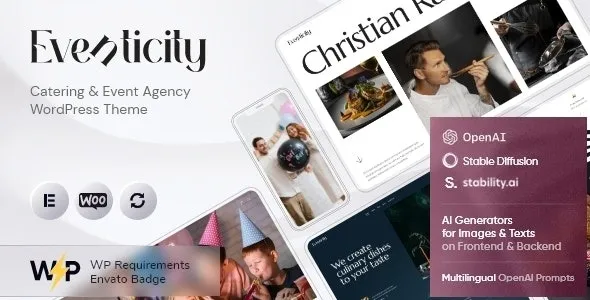
Eventicity – Catering & Event Agency WordPress Theme is designed for businesses that manage events, catering services, and client-based bookings where presentation and trust are essential. It provides a structured layout for showcasing services, portfolios, and event-related offerings without requiring complex setup.
This page explains how Eventicity is used in real scenarios, what kind of websites it fits best, and how to install it properly within a WordPress environment.
Eventicity is typically used by catering companies, event planners, and agencies that need to present their services in a professional and organized format.
In real-world use, these websites focus on showcasing past events, highlighting service offerings, and guiding potential clients toward inquiry or booking actions. Eventicity supports this by providing layouts that emphasize visual presentation along with clear service descriptions.
It is commonly used for wedding planners, catering businesses, corporate event agencies, and local service providers where client trust and presentation directly impact conversions.
Eventicity includes features tailored for service-based event websites rather than general-purpose use.
It provides sections for displaying services, event galleries, testimonials, and team information. These sections help businesses present their work clearly without requiring custom development.
The theme supports customization through standard WordPress tools, allowing users to adjust colors, typography, and layouts without editing core files.
It is compatible with popular plugins such as Elementor, WooCommerce, and contact form plugins, making it suitable for handling inquiries, bookings, or service listings.
Eventicity is designed to balance visual presentation with performance. Event agency websites often rely on images and portfolios, so maintaining loading speed is important.
The theme avoids unnecessary scripts and keeps its structure optimized to ensure consistent performance across devices. This is particularly useful for users browsing on mobile devices or slower connections.
It follows standard WordPress coding practices, which helps maintain compatibility with plugins and future updates.
Eventicity is best suited for websites that focus on services rather than content-heavy publishing.
It is commonly used for:
Catering service providers
Wedding and event planners
Corporate event management agencies
Party and venue service businesses
It can also be adapted for freelancers or small teams offering event-related services.
Installing Eventicity follows the standard WordPress theme installation method.
Download the theme file from this page.
Go to Appearance → Themes → Add New → Upload Theme in your WordPress dashboard.
Upload the .zip file and install it.
Activate the theme after installation.
Once activated, users can configure settings and import demo content if available to quickly set up their website structure.
Before using Eventicity, it is recommended to prepare your service structure, including types of events, service packages, and portfolio content.
Since the theme is designed for presentation, having clear images and service descriptions will help achieve better results without heavy customization.
Using it within its intended scope—service-based event websites—typically provides the best performance and usability.
Is Eventicity suitable for catering businesses?
Yes. It is specifically designed for catering and event service websites.
Can it be used for wedding or corporate events?
Yes. It works well for both personal and corporate event services.
Does it support page builders like Elementor?
Yes. It is compatible with popular page builders for easy customization.
Can it handle bookings or inquiries?
Yes. It works with contact form and WooCommerce plugins for handling inquiries or services.
Version 1.9.0
Updated compatibility with latest WordPress version
Improved service layout responsiveness
Minor design and performance optimizations
Tested with modern browsers
Compatible with PHP 7.4 and above
For Installation or Technical Related Queries check FAQ Page
Our Website also have older version of the plugins and theme. So you can test your website with compatible plugins or Rollback plugins in case of any bug or compatibility issues.
UNZIP the file downloaded from our website, the zip file might contain other files like Template, Docs etc. So make sure you upload correct file.
To Install Plugins:
To Install Themes:
Sometimes theme/plugin might ask you for license, just ignore. Because we have already activated the product with out legal key, which we have purchased for you.
When a New version appears and is available on our website you’ll find it in My Account “Downloads section”.
For Destination Already Exists error:
Make sure to Delete the version of theme/plugin that you have on your website before you upload our premium version, it might cause a conflict during installation and activation.
Or WordPress will say “destination already exists” when trying to upgrade using a zip file and will fail to upgrade the theme or plugin.
If you faced “destination already exists” error installing this Plugin will solve the issue – Easy Theme and Plugin Upgrades.
Our business hours are Monday to Saturday from 10:00 am to 8:00 pm, any request made outside these hours will be answered until next business day. Support and Updates can take 24 to 48 hours. Support provided is for product installation. Please be aware of possible time zone differences when waiting for our reply.
If you have any Queries, Feel Free to Contact Us:
Abuse Warning:
For more information please read FAQs & Terms of Use.