Exclusive Sale! Grab Flat 10% OFF* | On All Products

Saxxy – Music Band & Musician Elementor Template Kit

Saxxy - Music Band & Musician Elementor Template Kit

  Unlimited Access:

Original price was: $10.00.Current price is: $2.99.

Or

Tired of Restrictions?
Go Unlimited!

Join Our Membership to Download 8400+ Plugins & Themes

Membership Banner image for ultraplugins store

Saxxy Music Band & Musician Elementor Template Kit

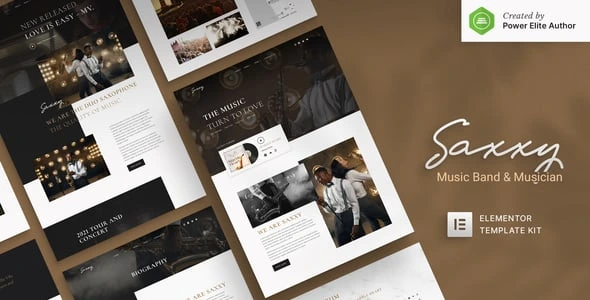
Saxxy Music Band & Musician Elementor Template Kit is a polished website design package for musicians, bands, rappers, DJs, and other music industry artists. It provides a strong digital stage where you can present your sound, promote upcoming performances, share releases, and build a closer connection with your audience.

Built with a clean dark aesthetic, Saxxy gives music websites a confident and modern visual identity. Its layouts are easy to adapt in Elementor, so you can replace images, update content, and adjust colors without editing code. Whether you are launching a new artist website or refreshing an established band platform, this kit provides a focused starting point. The Saxxy Music Band & Musician Elementor Template Kit download is a practical choice for creating a professional site with free tools.

What Makes Saxxy Suitable for Music Websites

  • No Elementor Pro Required: Saxxy is designed to work with free plugins, helping you create the website without committing to a premium Elementor subscription. This makes the kit suitable for independent artists and smaller creative teams.
  • 15+ Ready To Use Templates: The package includes essential layouts such as Home, Biography, Album, News, and Contact pages. You can combine these templates into a complete artist website instead of building each page from the beginning.
  • Event and Tour Management: Dedicated Tour listing and Single Tour detail templates help organize performance schedules clearly. Add venue information, dates, locations, and event details in a format that fans can quickly scan.
  • MetForm Integration: MetForm support provides flexible contact and booking forms for inquiries, event requests, media communication, and fan messages. Forms can be customized to match the purpose of your website.
  • Required Plugins: The kit relies on Elementor, ElementsKit Lite, and Jeg Elementor Kit for its page-building and advanced layout functionality. These plugins support the intended editing experience and template features.
  • Responsive and Retina Ready: Layouts are prepared for mobile phones and high-density Apple Retina screens. Promotional artwork, artist photography, and album visuals remain sharp across supported screen sizes.
  • Modern Dark Design: The dark visual direction creates a dramatic presentation for music-related content. It gives album artwork, tour announcements, and artist portraits room to stand out.
  • Cross Browser Support: Saxxy has been tested for compatibility with Chrome, Firefox, Safari, and Opera. Visitors can access your artist content through the browser they prefer.

Installation and Setup Steps

  1. Install and activate Elementor, ElementsKit Lite, and Jeg Elementor Kit on your WordPress website.
  2. Install MetForm if you plan to use the included contact or booking form layouts.
  3. Download the Saxxy Music Band & Musician Elementor Template Kit files and upload the kit through the supported template import option.
  4. Import the global settings and core templates first, followed by the Home, Biography, Album, News, Tour, and Contact layouts.
  5. Open each page with Elementor and replace the demo text, images, album information, and tour details with your own content.
  6. Configure the MetForm forms, check responsive views, and publish the finished pages.

Questions Before Building Your Artist Website

Can I use Saxxy without Elementor Pro?

Yes. Saxxy is built around free plugins and does not require Elementor Pro. Install the listed required plugins to access the intended templates and functionality.

Is there a dedicated page for each tour event?

Yes. The kit includes both a Tour listing layout and a Single Tour detail template. This lets you show multiple events and provide expanded information for individual performances.

Can the forms be used for booking requests?

Yes. MetForm integration supports customizable forms that can be adapted for booking inquiries, contact messages, press requests, or event collaborations.

Is Saxxy useful for a solo rapper or DJ?

Absolutely. Although the design suits bands, its Biography, Album, News, and Tour layouts also work well for solo artists, rappers, DJs, and producers.

Will the website display correctly on mobile devices?

Yes. The layouts are responsive and Retina ready, helping your artist imagery and tour content remain clear on mobile phones and high-resolution displays.

For artists who want a focused website with strong visuals and practical tour tools, Saxxy Music Band & Musician Elementor Template Kit delivers a reliable foundation. The Saxxy Music Band & Musician Elementor Template Kit download gives you a quicker route to publishing a memorable music website with free Elementor-based tools.

For Installation or Technical Related Queries check FAQ Page

Our Website also have older version of the plugins and theme. So you can test your website with compatible plugins or Rollback plugins in case of any bug or compatibility issues.

UNZIP the file downloaded from our website, the zip file might contain other files like Template, Docs etc. So make sure you upload correct file.

To Install Plugins:

  • Download the latest .ZIP file from UltraPlugins Store.
  • Log into your WordPress site.
  • Go to Plugins > Add New.
  • Click the “Upload Plugin” button at the top of the page.
  • Select the zip file with the new plugin version to install.
  • Click the “Install Now” button.


To Install Themes:

  • Download the latest .ZIP file from UltraPlugins Store.
  • Some Theme needs to be extracted before installing & some don’t. So extract the theme, main theme and child should be inside.
  • Log into your WordPress site.
  • Go to Appearance > Themes.
  • Click the “Add New” button at the top of the page.
  • Click the “Upload Theme” button at the top of the page.
  • Select the zip file with the new theme version to install.
  • Click the “Install Now” button.


Sometimes theme/plugin might ask you for license, just ignore. Because we have already activated the product with out legal key, which we have purchased for you.

When a New version appears and is available on our website you’ll find it in My Account “Downloads section”.

For Destination Already Exists error:

Make sure to Delete the version of theme/plugin that you have on your website before you upload our premium version, it might cause a conflict during installation and activation.

Or WordPress will say “destination already exists” when trying to upgrade using a zip file and will fail to upgrade the theme or plugin.

If you faced “destination already exists” error installing this Plugin will solve the issue – Easy Theme and Plugin Upgrades.

Our business hours are Monday to Saturday from 10:00 am to 8:00 pm, any request made outside these hours will be answered until next business day. Support and Updates can take 24 to 48 hours. Support provided is for product installation. Please be aware of possible time zone differences when waiting for our reply.

If you have any Queries, Feel Free to Contact Us: 


Abuse Warning:

  • Please note that accounts are monitored and redistribution of our content is not allowed and will not be tolerated.
  • Our system may detect patterns of downloading items from non-end users outside of our fair use policy.
  • Any violation of our terms of use will result in permanent account suspension and no refunds will be issued.
  • Subscriptions can be cancelled at any time from your account control panel.
  • Downloads are strictly subject to our fair use policy.


For more information please read FAQs & Terms of Use.
Related Products
Select your currency