Get upto 60% Discount

Get upto 60% Discount
Unlimited Access:
$15.00 Original price was: $15.00.$4.99Current price is: $4.99.

Tired of Restrictions?
Go Unlimited!
Join Our Membership to Download 8400+ Plugins & Themes

Golf course websites tend to drift into two extremes. Either they become a brochure that never changes, or they turn into a patchwork of event posts, PDF scorecards, and third-party booking links that do not match the rest of the site. Uplands Golf Course WordPress Theme is designed for that middle ground where you need a strong visual identity, clear navigation for visitors, and a workflow your staff can actually maintain.
If you are here to get the theme installed quickly and start publishing tee time information, membership details, course updates, and events, this page focuses on what matters in practice. You will also find a safe, step-by-step setup and notes on what people usually get wrong in the first week. For many site owners, the fastest route is to complete the Uplands Golf Course WordPress Theme download, install it cleanly, and then shape the content around your course operations instead of around page builder tricks.
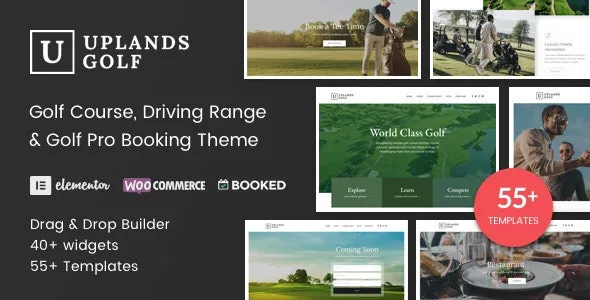
Uplands Golf Course WordPress Theme helps you present the essentials in a way that reduces friction for visitors. Think tee times or booking pathways, course overview pages, rates, membership tiers, tournaments, lessons, facilities, and contact or directions. The value is not that it adds a single magic feature. It is that it gives you a coherent structure so your content reads like a course, not like a generic small business site.
In practical terms, the theme is most useful when you want to:
The common time sink is not writing content. It is the constant micro-edits. One staff member updates rates on a PDF, another changes a page, and a third posts a tournament flyer as an image. Visitors then see three different versions of the same information.
With Uplands Golf Course WordPress Theme, you can centralize the key pages and keep updates in WordPress where they are searchable and easier to audit. That matters for Google indexing too. Search engines can crawl and understand text-based pages better than image flyers or scattered PDFs, especially when your internal linking is consistent.
A frequent mistake is creating multiple pages that target the same intent: “Rates”, “Green Fees”, “Pricing”, and “Fees” all saying nearly the same thing. That splits relevance and can slow down crawl prioritization on smaller sites. A theme like Uplands makes it easier to consolidate into one authoritative page and then link to it from the header, footer, and relevant sections.
If your goal is a clean setup that does not create theme conflicts or messy demo leftovers, use this workflow.
A general multipurpose theme can work, but it often pushes you into heavy customization. You end up spending time making golf-specific pages look intentional, especially rates tables, event listings, and course information sections.
Uplands Golf Course WordPress Theme is typically the better choice when you want a layout that already “expects” golf content. That reduces layout decisions and lets you focus on accuracy and freshness. If you are trying to rank locally, updating key pages and keeping internal links tight is often more impactful than endless design tweaks.
When you are ready to start, the quickest path is to do the Uplands Golf Course WordPress Theme download, install it, and publish your foundational pages before importing large demo sets you might not keep.
Most course sites are not huge, so indexing issues are usually self-inflicted. The biggest culprits are oversized hero images, sliders that load multiple background assets, and page builder sections that generate bloated markup.
With Uplands, you still need basic discipline. Use properly sized images for course photography and compress them. Keep your home page focused on key pathways instead of stacking every section you can think of.
Importing everything and then deleting half of it. This often leaves behind orphaned pages and media that still get crawled. If you use demo content, prune it carefully and remove unused pages from menus.
Building separate pages for every small update. For example, creating a new page for each seasonal rate change. Instead, maintain one Rates page and update it. That page can accumulate authority over time.
Relying on image-only flyers. Flyers look familiar, but they are harder to index and harder for visitors to scan. Publish event details as text on a page and optionally attach a PDF for printing.
If your course already has a strong website and you only need a single landing page for an event or charity tournament, a full theme change may be unnecessary. Likewise, if your booking and membership experience is entirely handled on a third-party platform and your site is truly just a signpost, a lightweight template could be enough.
Uplands Golf Course WordPress Theme makes the most sense when your WordPress site is the primary place people go for course information and updates, not just a directory listing.
Many courses use an external booking provider. The theme is typically used to present the booking call-to-action clearly and consistently, then link out or embed the provider’s widget if available. Confirm your booking system supports embedding before you redesign around it.
Keep “Rates” focused on pay-to-play pricing and visitor fees. Keep “Membership” focused on tiers, benefits, and joining steps. Cross-link them, but avoid repeating the same tables on both pages.
A theme change can affect layouts, internal linking, and page speed. Preserve existing URLs where possible, keep your key pages accessible from navigation, and verify that headings and on-page copy remain intact after switching.
Resize images to the maximum display size you need, compress them, and avoid loading multiple large background images in sliders. A few strong images placed intentionally usually perform better than a rotating hero.
Yes. Use posts for updates like aeration notices, tournament recaps, and seasonal announcements. Keep evergreen information on pages. Then link from posts back to the relevant evergreen page so authority consolidates.
Yes. Save your theme package and repeat the same upload process in WordPress. If you are troubleshooting, do a fresh Uplands Golf Course WordPress Theme download so you know the file is complete, then re-upload it.
If you are ready to proceed, treat the Uplands Golf Course WordPress Theme download as the beginning of a content workflow, not just a design change. Create your core pages, consolidate duplicate topics, and keep updates in text where they can be crawled and indexed.
For most course operators, the best results come from a simple sequence: complete the Uplands Golf Course WordPress Theme download, install it cleanly, publish the core navigation pages, then iterate based on what visitors actually click. If you keep your Rates, Membership, and Events information authoritative and easy to find, the theme does its job.
When you are ready, complete your Uplands Golf Course WordPress Theme download, activate it, and start with the pages that answer real visitor questions first.
For Installation or Technical Related Queries check FAQ Page
Our Website also have older version of the plugins and theme. So you can test your website with compatible plugins or Rollback plugins in case of any bug or compatibility issues.
UNZIP the file downloaded from our website, the zip file might contain other files like Template, Docs etc. So make sure you upload correct file.
To Install Plugins:
To Install Themes:
Sometimes theme/plugin might ask you for license, just ignore. Because we have already activated the product with out legal key, which we have purchased for you.
When a New version appears and is available on our website you’ll find it in My Account “Downloads section”.
For Destination Already Exists error:
Make sure to Delete the version of theme/plugin that you have on your website before you upload our premium version, it might cause a conflict during installation and activation.
Or WordPress will say “destination already exists” when trying to upgrade using a zip file and will fail to upgrade the theme or plugin.
If you faced “destination already exists” error installing this Plugin will solve the issue – Easy Theme and Plugin Upgrades.
Our business hours are Monday to Saturday from 10:00 am to 8:00 pm, any request made outside these hours will be answered until next business day. Support and Updates can take 24 to 48 hours. Support provided is for product installation. Please be aware of possible time zone differences when waiting for our reply.
If you have any Queries, Feel Free to Contact Us:
Abuse Warning:
For more information please read FAQs & Terms of Use.