Exclusive Sale! Grab Flat 10% OFF* | On All Products

Textilery – Textile & Garment Industry FSE WordPress Theme

Textilery – Textile & Garment Industry FSE WordPress Theme

  Unlimited Access:

Original price was: $15.00.Current price is: $4.99.

Or

Tired of Restrictions?
Go Unlimited!

Join Our Membership to Download 8400+ Plugins & Themes

Membership Banner image for ultraplugins store

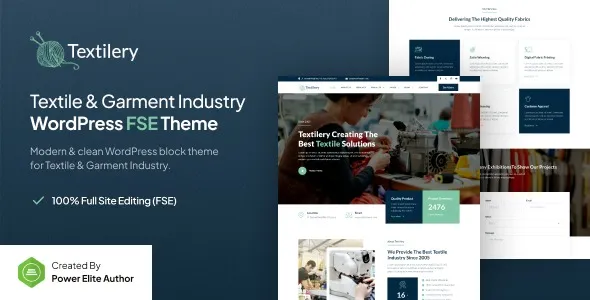
Textilery – Textile & Garment Industry FSE WordPress Theme is a WordPress theme designed for textile manufacturers, garment businesses, and fabric production companies that need a professional platform to showcase their products and industrial capabilities. It is built to help businesses present their production process, product range, and industry expertise in a structured and accessible way.

For companies operating in the textile and garment industry, having a clear and well-organized website is essential to attract buyers, partners, and clients. This theme provides a reliable framework to achieve that.

Built for Textile and Garment Businesses

Websites in the textile industry are often used to display product catalogs, manufacturing capabilities, and business information.

Textilery – Textile & Garment Industry FSE WordPress Theme is structured to present:
Fabric collections and product categories
Garment manufacturing services
Production capabilities and processes
Export and supply chain information

This helps potential clients understand your business quickly.

Showcase Product Collections and Fabric Range

The theme allows you to highlight your product offerings in a clean and organized way.

You can display:
Fabric types and materials
Garment collections
Industrial textile products
Custom manufacturing options

This improves product visibility and helps attract buyers.

Designed for B2B Textile Businesses

Most textile websites are focused on business-to-business interactions.

The theme supports presenting:
Bulk production services
Manufacturing capacity
Export capabilities
Industry certifications

This helps build trust with potential partners and clients.

SEO Optimization for Textile Keywords

Textilery – Textile & Garment Industry FSE WordPress Theme is built with a structured layout that supports search engine visibility.

It helps your website rank for keywords such as:
textile wordpress theme
garment industry wordpress theme
fabric manufacturer wordpress theme
clothing production wordpress theme

This improves your chances of attracting targeted industry traffic.

Mobile Optimization and Performance

The theme is fully responsive and optimized for fast loading.

This ensures a smooth browsing experience across devices and improves user engagement.

Customization and Flexibility

You can customize layouts, colors, and typography using WordPress settings.

It also supports Elementor for easy page design and updates.

How to Install Textilery – Textile & Garment Industry FSE WordPress Theme

Download → Upload → Install → Activate

FAQs

Is this theme suitable for textile businesses?
Yes.

Can I showcase product collections?
Yes.

Is it beginner-friendly?
Yes.

Changelog

Version 1.0.1
Performance improvements
Compatibility updates

For Installation or Technical Related Queries check FAQ Page

Our Website also have older version of the plugins and theme. So you can test your website with compatible plugins or Rollback plugins in case of any bug or compatibility issues.

UNZIP the file downloaded from our website, the zip file might contain other files like Template, Docs etc. So make sure you upload correct file.

To Install Plugins:

  • Download the latest .ZIP file from UltraPlugins Store.
  • Log into your WordPress site.
  • Go to Plugins > Add New.
  • Click the “Upload Plugin” button at the top of the page.
  • Select the zip file with the new plugin version to install.
  • Click the “Install Now” button.


To Install Themes:

  • Download the latest .ZIP file from UltraPlugins Store.
  • Some Theme needs to be extracted before installing & some don’t. So extract the theme, main theme and child should be inside.
  • Log into your WordPress site.
  • Go to Appearance > Themes.
  • Click the “Add New” button at the top of the page.
  • Click the “Upload Theme” button at the top of the page.
  • Select the zip file with the new theme version to install.
  • Click the “Install Now” button.


Sometimes theme/plugin might ask you for license, just ignore. Because we have already activated the product with out legal key, which we have purchased for you.

When a New version appears and is available on our website you’ll find it in My Account “Downloads section”.

For Destination Already Exists error:

Make sure to Delete the version of theme/plugin that you have on your website before you upload our premium version, it might cause a conflict during installation and activation.

Or WordPress will say “destination already exists” when trying to upgrade using a zip file and will fail to upgrade the theme or plugin.

If you faced “destination already exists” error installing this Plugin will solve the issue – Easy Theme and Plugin Upgrades.

Our business hours are Monday to Saturday from 10:00 am to 8:00 pm, any request made outside these hours will be answered until next business day. Support and Updates can take 24 to 48 hours. Support provided is for product installation. Please be aware of possible time zone differences when waiting for our reply.

If you have any Queries, Feel Free to Contact Us: 


Abuse Warning:

  • Please note that accounts are monitored and redistribution of our content is not allowed and will not be tolerated.
  • Our system may detect patterns of downloading items from non-end users outside of our fair use policy.
  • Any violation of our terms of use will result in permanent account suspension and no refunds will be issued.
  • Subscriptions can be cancelled at any time from your account control panel.
  • Downloads are strictly subject to our fair use policy.


For more information please read FAQs & Terms of Use.

Related Products
Select your currency