Get upto 60% Discount

Get upto 60% Discount
Unlimited Access:
$3.59 Original price was: $3.59.$2.99Current price is: $2.99.

Tired of Restrictions?
Go Unlimited!
Join Our Membership to Download 8400+ Plugins & Themes

When you own a domain that is not yet tied to a full site, the default experience is usually messy. Visitors hit a blank WordPress install, a generic “coming soon” page, or a thin placeholder that looks abandoned. That hurts trust, and it also wastes the small but valuable stream of type-in traffic many domains still get.
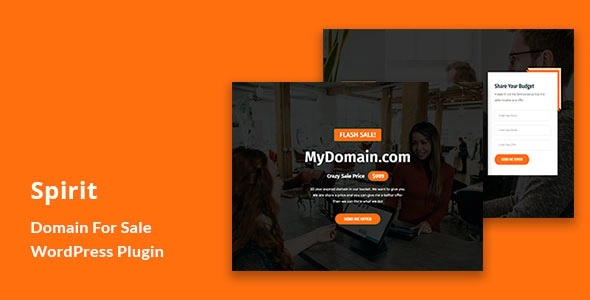
Spirit Domain for Sale WordPress Plugin is built for a simple goal: present a focused “this domain is for sale” page that looks intentional, provides a clear way to contact you, and avoids the clutter that makes buyers bounce. If you are evaluating a Spirit Domain for Sale WordPress Plugin download, the biggest win is that it compresses a lot of manual setup into a repeatable, low-maintenance page you can deploy quickly.
At its core, the plugin helps you publish a dedicated domain-sale landing page inside WordPress without building a theme template from scratch. Instead of improvising with a generic page builder layout, you get a purpose-built page structure: a clear sale message, a contact path, and a layout that is meant to be read fast.
It is not a marketplace, a broker, or an automated escrow system. It does not magically find buyers. What it does well is remove friction for interested visitors so you can capture inquiries reliably, and it keeps the page consistent across multiple domains if you run a portfolio.
Most site owners start with a normal WordPress page and a contact form plugin. It works, but the page often ends up looking like a blog page with one sentence on it. Navigation menus, sidebars, recent posts, and SEO plugin breadcrumbs can distract from the only action that matters: contacting you about the domain.
Another common issue is intent mismatch. A visitor who typed the domain expects a direct answer. If they land on a multi-section homepage template, they assume the domain is in use and leave. A focused domain-sale page avoids that confusion.
If you are selling one name, you usually want a clean landing page that signals legitimacy without looking like a spammy parking page. The plugin helps you keep the page minimal, with one clear CTA and no unnecessary site sections to maintain.
For multiple domains, consistency is the hard part. You do not want to rebuild a “for sale” page each time, and you do not want to forget key details like a contact email, a preferred message format, or a price note. A consistent landing page pattern reduces mistakes and makes inquiries easier to triage.
When a domain gets type-in traffic, you want the page to load quickly and communicate the point immediately. A specialized landing page tends to be lighter than a full theme homepage and less likely to distract users with unrelated content.
If your goal is speed without breaking an existing WordPress setup, treat installation like a small deployment. Here is a safe, repeatable approach.
Update WordPress core and your active theme first. If the domain is already live, take a quick backup (database and files) so you can roll back if needed.
Download the plugin ZIP file to your computer, then verify it is intact before uploading. If you manage multiple sites, keep a clean copy of the ZIP so you are not re-downloading from random locations later.
In the WordPress dashboard, go to Plugins, then Add New, then Upload Plugin. Choose the ZIP file from your Spirit Domain for Sale WordPress Plugin download and click Install Now.
Activate the plugin, then locate its settings panel. Add the essentials first: sale headline, contact method, and any price guidance you are comfortable sharing. If you prefer negotiation, keep pricing language neutral and focus on “make an offer” style inquiries.
If the plugin provides a dedicated landing page, set it as the homepage in Settings, then Reading. This prevents visitors from landing on a default blog feed or a theme demo homepage.
Open the domain in an incognito window on mobile and desktop. Submit a test inquiry and confirm it reaches the right inbox. Also check that your contact form does not get blocked by caching, security rules, or missing SMTP configuration.
Domain-sale pages can become thin or repetitive across a portfolio, which is where indexing problems start. The goal is not to publish dozens of near-identical pages that look like doorway content. The goal is a single, clear page that matches the intent of the domain itself.
Keep the on-page copy specific. Mention the domain name naturally, add a line about potential use cases (industry, brand fit, memorability), and keep the rest consistent. If you are managing many domains, avoid spinning the same paragraphs across sites. Even small, honest differences help search engines see the page as intentional rather than mass-produced.
A dedicated sale landing page is intentionally narrow. That is the point, but it also means it is not ideal if you are simultaneously trying to build content, rank for informational queries, or run a full business site on the same domain.
Also, do not overestimate what the plugin can do for lead quality. You still need a reliable inbox setup, basic spam protection, and a fast way to respond. The plugin can capture interest, but it cannot replace follow-up, negotiation, or buyer verification.
People often bury the email address behind multiple clicks or rely on a generic contact page in the menu. Put the contact option directly on the sale page and keep it obvious.
“This domain might be for sale” sounds uncertain. If it is for sale, say so clearly. If you want offers, say you accept offers. Clarity improves response rate.
It is common to install a form and assume it works. Test delivery. Consider SMTP if your host blocks PHP mail. A lost inquiry is worse than no traffic.
Yes, but decide what you want visitors to see first. If the domain’s only purpose is selling, set the sale landing page as the homepage. If you still need parts of the site, keep navigation minimal so the sale intent stays clear.
It depends on how Spirit Domain for Sale WordPress Plugin handles inquiries in your setup. If it includes a built-in inquiry form, you may not need another plugin. If you want advanced spam controls, file uploads, or integrations, pairing it with a form plugin can be worthwhile.
Use basic protections: a simple challenge field, rate limiting, or a lightweight anti-spam tool. Also avoid publishing your email as plain text if you see scraping. Test your form from multiple devices after enabling any security plugin.
Yes. The main discipline is operational: keep a checklist for each domain (headline, contact, price stance, and testing). If you are doing repeated deployments, keep your Spirit Domain for Sale WordPress Plugin download archived so you can install the same version consistently.
Pricing filters time-wasters but can also anchor negotiations. If you have a firm expectation, a price or range can improve lead quality. If the domain value depends on the buyer’s use case, “make an offer” may produce better conversations.
If you want a clean, single-purpose landing page and you do not want to design it from scratch, this is a practical choice. It fits especially well when you care about credibility, fast setup, and a consistent inquiry path across domains.
If you are ready to deploy, start with a Spirit Domain for Sale WordPress Plugin download, install it on a minimal WordPress setup, and test the inquiry flow end to end. For portfolio owners, repeat the same process domain by domain so every visitor gets a clear answer and an easy way to reach you.
Keep a verified copy of your Spirit Domain for Sale WordPress Plugin download, document your preferred settings, and re-test after theme or WordPress updates. That small routine prevents silent failures and protects the one thing that matters on a sale page: receiving inquiries.
For anyone searching specifically for Spirit Domain for Sale WordPress Plugin download, focus on getting it installed cleanly, keeping the page simple, and making the contact step effortless. A good landing page does not need to be long. It needs to be certain, fast, and easy to act on.
For Installation or Technical Related Queries check FAQ Page
Our Website also have older version of the plugins and theme. So you can test your website with compatible plugins or Rollback plugins in case of any bug or compatibility issues.
UNZIP the file downloaded from our website, the zip file might contain other files like Template, Docs etc. So make sure you upload correct file.
To Install Plugins:
To Install Themes:
Sometimes theme/plugin might ask you for license, just ignore. Because we have already activated the product with out legal key, which we have purchased for you.
When a New version appears and is available on our website you’ll find it in My Account “Downloads section”.
For Destination Already Exists error:
Make sure to Delete the version of theme/plugin that you have on your website before you upload our premium version, it might cause a conflict during installation and activation.
Or WordPress will say “destination already exists” when trying to upgrade using a zip file and will fail to upgrade the theme or plugin.
If you faced “destination already exists” error installing this Plugin will solve the issue – Easy Theme and Plugin Upgrades.
Our business hours are Monday to Saturday from 10:00 am to 8:00 pm, any request made outside these hours will be answered until next business day. Support and Updates can take 24 to 48 hours. Support provided is for product installation. Please be aware of possible time zone differences when waiting for our reply.
If you have any Queries, Feel Free to Contact Us:
Abuse Warning:
For more information please read FAQs & Terms of Use.