Get upto 60% Discount

Get upto 60% Discount
Unlimited Access:
$10.00 Original price was: $10.00.$2.99Current price is: $2.99.
Available Download Files

Tired of Restrictions?
Go Unlimited!
Join Our Membership to Download 8400+ Plugins & Themes

Most sites lose conversions for a simple reason. Visitors do not get timely reassurance. They do not see what other people are doing on the site, and they do not receive a gentle nudge at the moment they are ready to act.
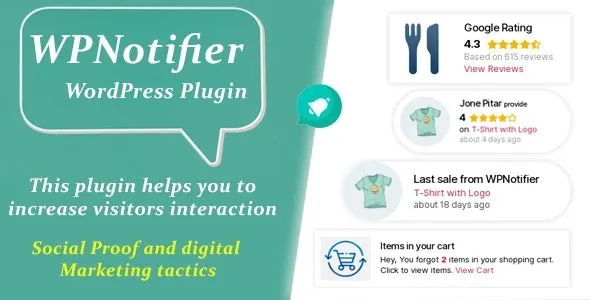
WPNotifier Notification WordPress Marketing Plugin For Visitors Attention and Social Proof is typically downloaded to solve that attention gap with on-site notifications that create context. Done well, it makes a store or service site feel active and trustworthy without forcing users into popups or long funnels.
If your intent is practical, the “WPNotifier – Notification WordPress Marketing Plugin For Visitors Attention and Social Proof download” is usually about one outcome. You want visitors to notice key actions and feel confident enough to continue, whether that means adding to cart, booking, subscribing, or simply staying longer.
After you activate WPNotifier Notification WordPress Marketing Plugin For Visitors Attention and Social Proof, the biggest shift is behavioral rather than visual. You start shaping micro-moments: “someone just purchased,” “a signup happened,” “a limited-time action is underway,” or other proof cues that reduce hesitation.
What it does not do is replace your core marketing. If your offer, pricing, or product pages are unclear, notifications can amplify confusion. The plugin works best when your pages already answer the basics and you want to add subtle momentum.
A common post-download friction point is configuration overload. Users often turn on too many notification types at once. The result is noise, not trust. A better approach is to start with one notification that matches your main conversion path and measure whether it improves clicks or checkout progression.
For a safe setup, treat the WPNotifier Notification WordPress Marketing Plugin For Visitors Attention and Social Proof download like any other production change. Download the plugin package, keep a copy of the ZIP, and confirm you are installing the intended version before uploading it to WordPress.
Typical installation flow is straightforward. In your WordPress dashboard, go to Plugins, Add New, then Upload Plugin. Upload the ZIP, install, and activate. Right after activation you should see the plugin’s menu entry and initial settings. That is when you decide what notification type is appropriate for your site first, rather than enabling everything.
Inside this step, it is normal to search again for “WPNotifier – Notification WordPress Marketing Plugin For Visitors Attention and Social Proof download” when you are verifying you have the correct file and a clean install-ready copy. If you maintain staging, activate it there first and confirm the front end loads normally, then replicate the settings on live.
Immediately after activation, do three quick checks:
1) Load your homepage and a high-traffic landing page in an incognito window and confirm notifications display only where you expect.
2) Check caching behavior. If you use page caching, confirm the notifications are not stuck showing stale data or repeating too aggressively.
3) Review mobile layout. Notifications that look fine on desktop can cover navigation on smaller screens.
WPNotifier Notification WordPress Marketing Plugin For Visitors Attention and Social Proof is a fit when your site benefits from timely reassurance. For example, ecommerce stores with multiple products, service sites that rely on inquiries, or membership sites where signups are the key conversion.
It can be unnecessary if your conversion is already driven by a single focused page with minimal navigation and strong proof baked into the content. In those cases, adding notifications sometimes distracts from the one action you want. Another situation where people download it and later remove it is when they only needed a one-off announcement. A lightweight banner or a single site notice can handle that without ongoing notification logic.
If you are comparing approaches, WordPress itself can show basic notices in the admin area, and many themes include simple announcement bars. Those tools do not create the same on-page social proof experience, but they are often enough for static messaging. WPNotifier Notification WordPress Marketing Plugin For Visitors Attention and Social Proof is more relevant when you want ongoing, behavior-oriented signals that update over time.
For users who are still deciding, it helps to think in terms of intent. A “download WPNotifier – Notification WordPress Marketing Plugin For Visitors Attention and Social Proof” decision makes sense when you want to influence visitor confidence during browsing, not after they have already converted.
Start with one notification type tied to your primary conversion. Configure placement, frequency, and display rules conservatively. Then review the site as a visitor on desktop and mobile before expanding to additional notifications.
Download the ZIP, install it on a staging site if available, and confirm pages load correctly with your theme and caching setup. Then repeat the same install on live and apply the settings. This reduces the risk of layout surprises or rule conflicts.
Any front-end script can add overhead, especially if it loads on every page. Keep notification types limited, avoid overly aggressive triggers, and test key pages after setup. If you use optimization plugins, confirm the notification scripts are not delayed in a way that breaks timing or causes layout shifts.
This usually happens when frequency is too high, targeting is too broad, or the message does not match the page context. Reduce the number of notifications, add page-level rules, and ensure the notification aligns with what the visitor is currently viewing.
Yes. Social proof and attention cues can support service inquiries, webinar signups, lead magnets, and membership registrations. The key is to choose notifications that reinforce the next step, rather than trying to mimic store activity if it does not apply.
Verify you have the correct plugin file, confirm it installs cleanly in WordPress without errors, and check that the settings panel appears after activation. Then test front-end display rules in a private window to confirm notifications show only where intended.
Many users who proceed with a WPNotifier – Notification WordPress Marketing Plugin For Visitors Attention and Social Proof download are not looking for more features. They are trying to remove hesitation at the exact moment visitors decide. If that matches your goal, download and install WPNotifier – Notification WordPress Marketing Plugin For Visitors Attention and Social Proof with a light initial configuration, then expand only after you see clear value.
For Installation or Technical Related Queries check FAQ Page
Our Website also have older version of the plugins and theme. So you can test your website with compatible plugins or Rollback plugins in case of any bug or compatibility issues.
UNZIP the file downloaded from our website, the zip file might contain other files like Template, Docs etc. So make sure you upload correct file.
To Install Plugins:
To Install Themes:
Sometimes theme/plugin might ask you for license, just ignore. Because we have already activated the product with out legal key, which we have purchased for you.
When a New version appears and is available on our website you’ll find it in My Account “Downloads section”.
For Destination Already Exists error:
Make sure to Delete the version of theme/plugin that you have on your website before you upload our premium version, it might cause a conflict during installation and activation.
Or WordPress will say “destination already exists” when trying to upgrade using a zip file and will fail to upgrade the theme or plugin.
If you faced “destination already exists” error installing this Plugin will solve the issue – Easy Theme and Plugin Upgrades.
Our business hours are Monday to Saturday from 10:00 am to 8:00 pm, any request made outside these hours will be answered until next business day. Support and Updates can take 24 to 48 hours. Support provided is for product installation. Please be aware of possible time zone differences when waiting for our reply.
If you have any Queries, Feel Free to Contact Us:
Abuse Warning:
For more information please read FAQs & Terms of Use.