
Get upto 60% Discount

Get upto 60% Discount
Unlimited Access:
$15.00 Original price was: $15.00.$4.99Current price is: $4.99.
Available Download Files

Tired of Restrictions?
Go Unlimited!
Join Our Membership to Download 8400+ Plugins & Themes

Logistics and trucking companies often start with a generic business theme and then patch in contact forms, service pages, and a few photos. It works until you need to communicate coverage areas, fleet capability, shipment types, and trust signals quickly. Visitors do not have time to hunt.
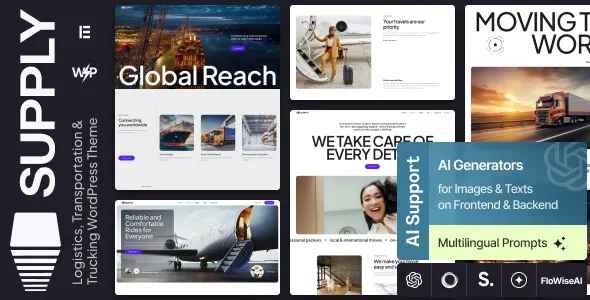
Supply Logistics, Transportation & Trucking WordPress Theme focuses on that specific friction. It gives you a layout system built around dispatch style navigation, service clarity, and lead capture, without forcing you to invent a logistics website structure from scratch. If you are evaluating a Supply Logistics, Transportation & Trucking WordPress Theme download, the key question is whether your site needs logistics-first page patterns rather than another multipurpose design.
The core value is speed to a credible, conversion-ready logistics presence. Instead of spending days deciding how to present freight services, warehousing, last-mile delivery, or brokerage, you start from a vocabulary your customers already understand.
In practice, this theme helps you do three things efficiently. First, present services with consistent hierarchy so users can self-select fast. Second, build confidence with operational details like coverage, compliance, equipment, and process. Third, route visitors to the right action, usually quote requests and calls, without burying those paths under generic “Contact” links.
This theme is a strong fit for carriers, freight forwarders, 3PLs, warehousing providers, courier services, and regional transport businesses that need a clean service catalog and fast inquiry flow.
It is not always necessary for a single-truck owner-operator who only needs a one-page site and a phone number. In that case, a lightweight landing page can outperform a full theme because there is less to maintain.
The most frequent mistake is importing a demo and leaving placeholder service pages live. That creates thin, duplicated intent pages that compete with your real pages and can waste crawl attention.
Another issue is publishing too many near-identical “service area” pages with only the city name changed. If you need location coverage, build a smaller set of high-quality regional pages and support them with a single well-structured coverage hub. That is usually easier to keep accurate, and it avoids duplicate-intent bloat.
Also watch your media. Fleet photos and hero sliders can become your largest files. Compress images, set meaningful alt text, and avoid auto-playing video on the homepage if speed is a priority.
Update WordPress core, then update active plugins. If your site is already live, take a full backup so you can roll back quickly if a builder or widget conflicts.
Download the theme ZIP file from your chosen source. If you are doing a Supply Logistics, Transportation & Trucking WordPress Theme download for a production site, confirm the package includes the theme file and any required companion plugins or demo importer files.
In the WordPress dashboard, go to Appearance > Themes > Add New > Upload Theme. Upload the ZIP and activate it. If the ZIP contains documentation and multiple folders, upload only the installable theme ZIP inside the package.
After activation, WordPress may prompt you to install companion plugins. Install them one at a time and activate. Avoid adding extra page builders or slider plugins unless you truly need them, since each additional plugin increases maintenance and can slow down pages.
Demo import can speed layout creation, but treat it as scaffolding. Replace text, images, and service blocks before you publish. Delete unused demo posts and pages so search engines do not crawl low-value URLs.
Set your permalink structure to “Post name”. Create your primary pages: Home, Services, Industries (optional), About, Contact, and Quote Request. Add a single primary call to action in the header and repeat it consistently across templates.
Test on mobile, confirm forms send successfully, and verify that headings are not skipped (for example, jumping from H2 to H4). Clean heading structure helps clarity for users and avoids messy page outlines.
Most logistics sites are updated by busy staff, not dedicated web teams. The theme works best when you decide early who owns which page and what “done” looks like for each service.
A practical workflow is to build a service hub page that lists all offerings with short summaries, then create one page per core service with details that answer sales calls. Include shipment types, equipment, typical timelines, documentation requirements, and what affects pricing. This content tends to earn long-tail searches and reduces unqualified inquiries.
For credibility, add a “How it works” block that matches your actual process. Quote request, dispatch confirmation, pickup, tracking updates, proof of delivery. When users see the steps, they trust the operation more, and sales teams spend less time explaining basics.
You can build a trucking site with any modern multipurpose theme. The difference is time and consistency. With a general theme, you often end up designing every section from scratch, then trying to keep typography and spacing consistent across pages.
Supply Logistics, Transportation & Trucking WordPress Theme is more opinionated. That can feel limiting if you want a highly creative layout, but it usually helps when your goal is clarity and lead flow. If you are comparing options before a Supply Logistics, Transportation & Trucking WordPress Theme download, consider how much custom layout work you want to maintain over the next year.
Logistics websites frequently rely on large imagery, route maps, and icon sets. That combination can quietly slow down mobile performance if you are not careful.
Keep your homepage focused. One hero, one service overview, one credibility band, and one strong call to action can outperform a long scrolling page filled with heavy sections. If the theme includes sliders, use them sparingly, and disable unused scripts where possible.
Also, avoid publishing separate blog posts that repeat your service pages. Blog content should support services with operational insights: packaging tips, compliance updates, seasonal capacity planning, or how to prepare freight for pickup. That is how you build topical authority without cannibalizing your own keywords.
A logistics-focused theme typically assumes you want a certain site structure. If your company sells multiple unrelated product lines, you may find the templates too service-centric.
Another trade-off is demo dependency. If you rely heavily on demo content and do not rewrite it, your site can look similar to others using the same theme. The fix is simple but requires discipline: rewrite headings, replace stock imagery, and add real operational details that only your company can claim.
Yes, but plan your information architecture first. Create a single Warehousing page with sub-sections for capabilities, then add a Locations hub that links to a small set of warehouse pages with unique inventory handling, hours, and service coverage. Avoid creating dozens of near-identical location pages.
You can. If you already have brand guidelines and copy, starting from a clean install often produces a faster, more unique site. Demo import is best when you need layout direction and can rewrite everything immediately.
Ask for shipment type, pickup and delivery region, weight or pallet count, preferred date, and whether liftgate or special handling is required. Add a short note about typical response time and what information speeds up an accurate quote.
No. A theme can present tracking links or embed a tracking portal, but it does not create carrier-grade tracking by itself. If you need real-time tracking, integrate your existing system and keep the site’s tracking experience simple and reliable.
Create one strong “Industries” hub, then only create separate industry pages when you can add real differences: compliance requirements, handling constraints, temperature control, or documentation. If the page would be 80% identical to another, keep it as a section on the hub instead.
Use a staging site for theme and plugin updates, especially if you rely on a page builder. Update, test key templates and forms, then push changes to production. This prevents unexpected layout shifts on high-intent pages like Services and Quote Request.
If your priority is a logistics-specific site that communicates services quickly and drives quote requests, this theme is a practical starting point. It is most effective when you replace demo content with operationally specific copy and keep your page set lean and purposeful.
For teams that want to move fast without creating duplicate pages or thin content, a careful Supply Logistics, Transportation & Trucking WordPress Theme download plus a disciplined setup can give you a site that indexes cleanly and converts the right visitors.
For Installation or Technical Related Queries check FAQ Page
Our Website also have older version of the plugins and theme. So you can test your website with compatible plugins or Rollback plugins in case of any bug or compatibility issues.
UNZIP the file downloaded from our website, the zip file might contain other files like Template, Docs etc. So make sure you upload correct file.
To Install Plugins:
To Install Themes:
Sometimes theme/plugin might ask you for license, just ignore. Because we have already activated the product with out legal key, which we have purchased for you.
When a New version appears and is available on our website you’ll find it in My Account “Downloads section”.
For Destination Already Exists error:
Make sure to Delete the version of theme/plugin that you have on your website before you upload our premium version, it might cause a conflict during installation and activation.
Or WordPress will say “destination already exists” when trying to upgrade using a zip file and will fail to upgrade the theme or plugin.
If you faced “destination already exists” error installing this Plugin will solve the issue – Easy Theme and Plugin Upgrades.
Our business hours are Monday to Saturday from 10:00 am to 8:00 pm, any request made outside these hours will be answered until next business day. Support and Updates can take 24 to 48 hours. Support provided is for product installation. Please be aware of possible time zone differences when waiting for our reply.
If you have any Queries, Feel Free to Contact Us:
Abuse Warning:
For more information please read FAQs & Terms of Use.



