Get upto 60% Discount

Get upto 60% Discount
Unlimited Access:
$10.00 Original price was: $10.00.$2.99Current price is: $2.99.
Available Download Files

Tired of Restrictions?
Go Unlimited!
Join Our Membership to Download 8400+ Plugins & Themes

Most gym and studio websites fail for one simple reason. They look fine, but they do not answer the questions people actually have when they are deciding to join. What classes run tonight, how do I book, what does it cost, and can I trust this place?
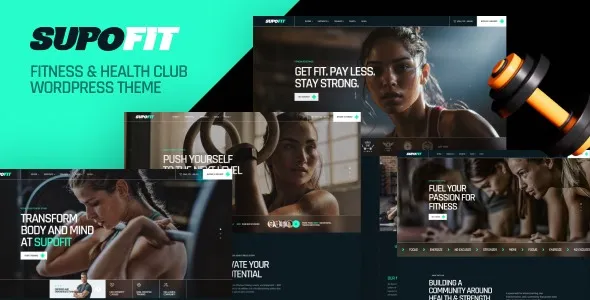
Supofit Fitness & Health Club WordPress Theme download is designed around that decision-making flow. Instead of forcing you to stitch together pages, templates, and scattered plugins, it gives you a cohesive fitness layout system so your schedule, trainers, programs, and calls to action feel like one product.
If you are here with download intent, the most common path is to start with the Supofit – Fitness & Health Club WordPress Theme download, install it on a clean WordPress setup, and then build outward from the schedule and membership pages. That order matters because it keeps the site architecture aligned with how Google and real users navigate fitness services.
Supofit is not just “a theme for gyms.” Its core value is that it turns a generic WordPress site into a structured fitness storefront where the key entities are clear: classes, trainers, programs, pricing, and locations.
From an SEO and indexing perspective, that structure helps you avoid thin pages and duplicate intent. Instead of five near-identical “Class” pages with different hero images, you can build distinct pages that target different intents. Examples include strength training programs, personal training, beginner bootcamps, or rehabilitation-focused sessions. Each page can earn its own rankings because it answers a different query set.
From a conversion perspective, the theme’s layouts typically prioritize scannability. Visitors can move from “What is this?” to “When can I attend?” to “How do I join?” without hunting through menus. That reduces drop-off, especially on mobile where most fitness searches happen.
Fitness sites change constantly. New trainers start, class times shift, seasonal programs launch, and promotions come and go. Supofit’s biggest practical win is how it reduces the friction of those routine edits.
When you add a new coach, you typically need a profile page, an image style, a list of specialties, and links to the classes they lead. With a fitness-focused theme, you can keep those pages consistent so users do not feel like they are jumping between different design systems.
Many gyms bury the schedule behind a PDF or a single page that is hard to scan on phones. A theme built for clubs usually makes the schedule a first-class component. That is not just UX. It helps internal linking because you can connect schedule views to class detail pages and to trainer profiles.
If you run “New Year challenge,” “Summer shred,” or “Back-to-training” campaigns, you need a page that loads fast, matches your brand, and does not require a custom build each time. Supofit is typically used to spin up these pages quickly while keeping the same typography and layout rules as the rest of the site.
If your goal is a clean setup that avoids indexing problems later, treat installation as part of SEO hygiene, not just a design step.
Update WordPress core, then update any existing plugins. If this is a new site, install WordPress on a fresh database and avoid importing demo content from unrelated themes.
After your Supofit – Fitness & Health Club WordPress Theme download, confirm you have the correct theme ZIP file. If the package contains multiple ZIPs, identify the actual theme ZIP that WordPress expects.
Go to Appearance > Themes > Add New > Upload Theme. Upload the ZIP, install, then activate.
Fitness themes often recommend page builders, sliders, or schedule components. Install the required items first. For optional plugins, pause and decide whether you truly need them, since each extra plugin adds maintenance and potential overlap.
Demo import can accelerate layout setup, but it can also create dozens of low-value pages. If you import, immediately delete unused demos, placeholder posts, and duplicate pages. Then adjust permalinks and navigation so only your real pages are indexable.
Configure permalinks, create a sitemap, and set noindex on any temporary pages. Do not publish “Class A,” “Class B,” and “Class C” placeholders. That is a common way fitness sites end up with thin content that Google crawls but never ranks.
Studios often create separate pages for “Fitness Classes,” “Group Classes,” and “Workout Classes,” then write nearly the same copy on each. That splits relevance and can cause Google to rotate which page appears, or none at all. Use Supofit’s structure to consolidate, then create distinct pages only when the intent is genuinely different, like “HIIT classes” versus “Pilates for beginners.”
If the schedule is rendered entirely via scripts without meaningful HTML content, Google may not understand it well. Keep a text-based class overview page that explains your weekly structure and links to individual class pages. That supports both accessibility and indexing.
This is an E-E-A-T issue as much as a branding one. Replace trainer bios with real credentials, coaching philosophy, and what clients can expect. Real photos and specific experience reduce bounce and increase trust signals.
A standard multipurpose theme can work, but you often end up building fitness-specific pages from scratch. That typically leads to inconsistent layouts and “page builder sprawl,” where every page becomes a one-off design.
Supofit is a better fit when your site needs to communicate a repeatable set of information types. Class descriptions, trainer profiles, membership options, and location details are not one-time pages. They are a system you will maintain.
If you are comparing options while deciding on a Supofit – Fitness & Health Club WordPress Theme download, focus on whether the theme helps you publish consistent, indexable pages without relying on heavy add-ons for every section.
No theme solves every workflow, and fitness businesses often overestimate what a theme will automate.
Supofit can present classes and programs cleanly, but real-time booking rules, memberships, and payment logic often live in dedicated plugins or external systems. Plan your stack early so you do not redesign pages later to fit a booking flow.
If the theme is optimized around a specific builder, you will get speed and consistency by staying within that system. Mixing builders or adding multiple layout plugins can increase CSS and script weight, which impacts Core Web Vitals.
After importing, delete unused pages and posts rather than leaving them unpublished. Then check your sitemap and remove any leftovers. If you must keep drafts, set them to private so they do not appear in sitemaps.
Yes, but simplify the navigation. Focus on one main service page, a programs page, testimonials, and a booking contact flow. If you add a schedule component, keep it minimal so it does not look like a full club timetable.
Create your core pages first: Classes, Personal Training, Pricing, About, Contact, and one location page if relevant. Then build internal links from the homepage to each. This helps crawl prioritization and keeps early indexing focused on pages that can rank.
Add intent-specific content. Include who the class is for, intensity level, required equipment, coaching cues, and what results to expect in 4–8 weeks. Also add unique FAQs per class. That avoids duplicate intent and improves long-tail visibility.
It can be, as long as you create separate location pages with unique details such as address, local trainers, local timetable, parking, and photos. Avoid copying the same text across every location page.
If you are ready to publish, do the Supofit – Fitness & Health Club WordPress Theme download, install on a staging site first, and build the schedule and pricing pages before you touch visual polish. Those two pages drive the majority of fitness conversions and they are the easiest to get wrong with duplicate or thin content.
Once the structure is in place, you can expand with individual class pages and trainer profiles that are genuinely informative. That is how Supofit becomes more than a design choice. It becomes a framework for content that Google can understand and members can act on.
For users searching specifically for Supofit – Fitness & Health Club WordPress Theme download, treat the download as the start of a build plan, not the finish line. A focused setup now prevents months of cleanup later.
If you are revisiting your decision, one more Supofit – Fitness & Health Club WordPress Theme download consideration is maintenance. Keep the plugin count lean, publish only pages you want indexed, and update trainer and class content regularly to reflect real operations.
For Installation or Technical Related Queries check FAQ Page
Our Website also have older version of the plugins and theme. So you can test your website with compatible plugins or Rollback plugins in case of any bug or compatibility issues.
UNZIP the file downloaded from our website, the zip file might contain other files like Template, Docs etc. So make sure you upload correct file.
To Install Plugins:
To Install Themes:
Sometimes theme/plugin might ask you for license, just ignore. Because we have already activated the product with out legal key, which we have purchased for you.
When a New version appears and is available on our website you’ll find it in My Account “Downloads section”.
For Destination Already Exists error:
Make sure to Delete the version of theme/plugin that you have on your website before you upload our premium version, it might cause a conflict during installation and activation.
Or WordPress will say “destination already exists” when trying to upgrade using a zip file and will fail to upgrade the theme or plugin.
If you faced “destination already exists” error installing this Plugin will solve the issue – Easy Theme and Plugin Upgrades.
Our business hours are Monday to Saturday from 10:00 am to 8:00 pm, any request made outside these hours will be answered until next business day. Support and Updates can take 24 to 48 hours. Support provided is for product installation. Please be aware of possible time zone differences when waiting for our reply.
If you have any Queries, Feel Free to Contact Us:
Abuse Warning:
For more information please read FAQs & Terms of Use.