Get upto 60% Discount

Get upto 60% Discount
Unlimited Access:
$10.00 Original price was: $10.00.$2.99Current price is: $2.99.
Available Download Files

Tired of Restrictions?
Go Unlimited!
Join Our Membership to Download 8400+ Plugins & Themes

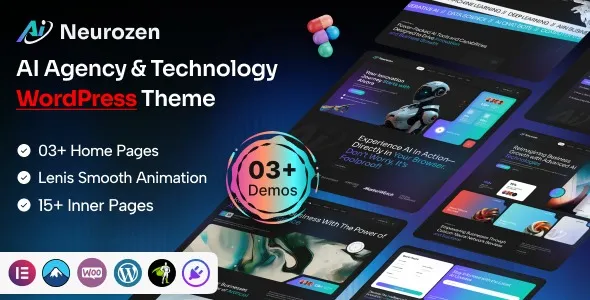
When you are building a site for a neural network startup or an AI consultancy, you aren’t just picking a “pretty layout.” You are selecting a framework that must handle high-density data visualizations and smooth, hardware-accelerated animations. The Neurozen AI Agency & Technology WordPress Theme is a specialized environment that replaces the generic “corporate blue” look with a “Matrix-inspired” deep-tech aesthetic.
In my time as a developer, I have found that Neurozen solves the “lag” issue common in tech themes by utilizing the GSAP (GreenSock) library for its binary background effects, ensuring your site feels like a high-performance terminal rather than a slow WordPress install.
Why Neurozen beats the “AI-Hype” themes of 2026
Most themes in the AI niche are just reskinned agency templates. Neurozen is different because it was built from the ground up for the Model-as-a-Service (MaaS) business model. It doesn’t just give you a portfolio; it gives you specialized widgets to showcase training statistics, neural layer diagrams, and real-time AI API integration points.
The theme runs on the Codestar Framework, which I prefer for high-stakes tech sites because it keeps the “Theme Options” separate from the page content. This means if you ever need to scale or switch styles, your data doesn’t get “stuck” in shortcode hell.
Core pillars of the Neurozen developer ecosystem
Neurozen is a toolkit designed for precision. Here is how it handles the specific needs of a 2026 AI agency.
Binary and Meteor background logic
One of the most unique aspects of the Neurozen download is the Meteor and Binary code background effects. Usually, these would tank your Google PageSpeed score. However, Neurozen executes these via GSAP, which targets the user’s GPU instead of the CPU. This keeps your “Time to Interactive” (TTI) low even with heavy visual effects.
Adaptive Dark/Light mode architecture
The tech world lives in Dark Mode, but your B2B enterprise clients might prefer a clean Light Mode for readability. Neurozen includes a “smart toggle” that doesn’t just flip colors—it swaps CSS variables globally, ensuring that your neon accents remain legible against both white and deep-charcoal backgrounds.
Developer ‘Insider Tips’ from the 2 a.m. Trenches
If you are currently setting up your Neurozen install, listen to these hard-learned lessons:
Technical environment for a stable Neurozen launch
To ensure your Neurozen AI Agency & Technology WordPress Theme download results in a site that actually converts, your server needs to be as optimized as your AI models.
Recommended server stack
Strategic Content for AI Topical Authority
To rank for “Neurozen AI Agency & Technology WordPress Theme” and actually get clients, you need to prove you understand the tech.
FAQs
For Installation or Technical Related Queries check FAQ Page
Our Website also have older version of the plugins and theme. So you can test your website with compatible plugins or Rollback plugins in case of any bug or compatibility issues.
UNZIP the file downloaded from our website, the zip file might contain other files like Template, Docs etc. So make sure you upload correct file.
To Install Plugins:
To Install Themes:
Sometimes theme/plugin might ask you for license, just ignore. Because we have already activated the product with out legal key, which we have purchased for you.
When a New version appears and is available on our website you’ll find it in My Account “Downloads section”.
For Destination Already Exists error:
Make sure to Delete the version of theme/plugin that you have on your website before you upload our premium version, it might cause a conflict during installation and activation.
Or WordPress will say “destination already exists” when trying to upgrade using a zip file and will fail to upgrade the theme or plugin.
If you faced “destination already exists” error installing this Plugin will solve the issue – Easy Theme and Plugin Upgrades.
Our business hours are Monday to Saturday from 10:00 am to 8:00 pm, any request made outside these hours will be answered until next business day. Support and Updates can take 24 to 48 hours. Support provided is for product installation. Please be aware of possible time zone differences when waiting for our reply.
If you have any Queries, Feel Free to Contact Us:
Abuse Warning:
For more information please read FAQs & Terms of Use.