Get upto 60% Discount

Get upto 60% Discount
Unlimited Access:
$10.00 Original price was: $10.00.$2.99Current price is: $2.99.
Available Download Files

Tired of Restrictions?
Go Unlimited!
Join Our Membership to Download 8400+ Plugins & Themes

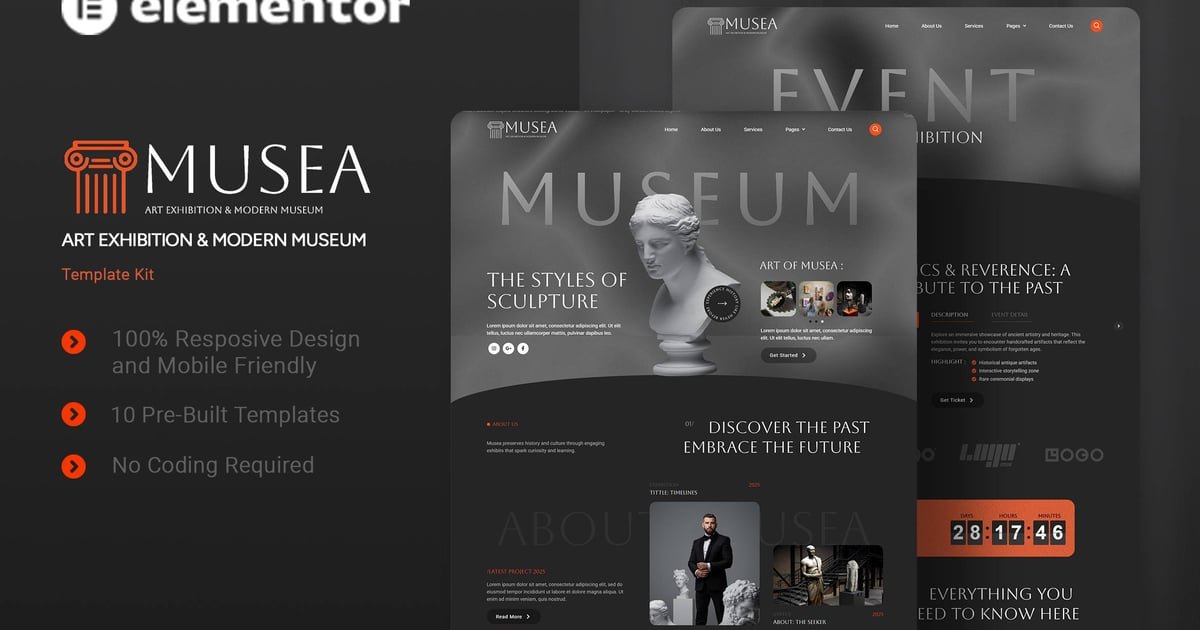
If you are searching for the Musea Art Exhibition & Modern Museum Elementor Template Kit download, the usual goal is simple: publish an art exhibition or museum-style website quickly, without building a design system from scratch.
This kit is best understood as a ready-made set of Elementor page templates and site parts that help you launch a coherent visual identity. Instead of spending hours aligning typography, spacing, and section hierarchy across pages, you start with a curated structure that already “reads” like a cultural venue site. That includes the pacing of pages, the way events and exhibitions are introduced, and how calls to visit or book are placed without overpowering the artwork.
People typically download Musea Art Exhibition & Modern Museum Elementor Template Kit when they need a site that feels intentional on day one. It is especially useful when your content is still evolving, because you can swap images, update exhibition details, and expand pages while keeping the design consistent.
The core value of Musea Art Exhibition & Modern Museum Elementor Template Kit is not “more widgets.” It is the reduction of decision fatigue during site setup.
Most museum and exhibition sites fail early for one of two reasons. Either they look like a generic business theme with art pasted in, or they become a custom design project that never ships. This kit sits in the middle: you get a museum-appropriate layout language that is already assembled, but you still keep Elementor’s flexibility for editing and expanding.
After installation, the practical outcome you should expect is a site that can be published in stages. You can launch with a homepage, an exhibitions page, and a contact or visit page, then add artist profiles, press, education programs, or ticketing details later. The kit’s role is to keep those additions visually aligned so the site does not feel stitched together.
It also helps with stakeholder alignment. If you are building for a gallery director, curator, or client team, a template kit makes review cycles faster because there is a concrete baseline to react to. That matters more than a long feature list when deadlines are tight.
A typical Musea Art Exhibition & Modern Museum Elementor Template Kit download results in a template kit file that you import into Elementor’s Template Kit workflow. In practice, you download the kit package, then go to your WordPress dashboard and use Elementor’s kit import option to bring in the templates and global settings.
Immediately after import, you usually see new templates available for pages and theme parts. The next step is not “activate and done.” Plan to assign templates correctly. If the kit includes header and footer templates, set them in Elementor’s Theme Builder so they apply site-wide. Then create or edit WordPress pages and attach the relevant templates.
Two practical checks right after you download and install Musea Art Exhibition & Modern Museum Elementor Template Kit:
First, confirm fonts and colors. Many kits import global styles. If your brand typography differs, update global fonts and colors early so you do not end up manually fixing every page later.
Second, review image sizing. Art and exhibition sites depend on clean imagery. If your uploads vary widely in aspect ratio, some sections may look uneven until you standardize crops or adjust Elementor image settings.
If you are doing a Musea Art Exhibition & Modern Museum Elementor Template Kit plugin download for a live site, import on staging first. Template kits can change global styling, and it is easier to validate layout and responsiveness before pushing changes to production.
Template kits feel instant until you start replacing demo content with real exhibition materials. The most common friction is content mismatch, not broken layouts.
Exhibition titles can be longer than the demo, artist names may wrap differently, and real-world dates and venue details can add extra lines. If you notice sections “jumping” in height between cards or columns, do not fight it with random padding on each widget. Instead, adjust the layout rules once. For example, set consistent heading sizes, define a maximum excerpt length, or choose a uniform image ratio for grids.
Another common mistake is treating every template as a standalone page. Musea Art Exhibition & Modern Museum Elementor Template Kit works best when you keep global parts global. Build your header, footer, and any repeating callouts once, then reuse them. Otherwise, small changes like updating opening hours turn into a multi-page editing task.
Finally, be realistic about what a template kit does not solve. If you need advanced ticketing, memberships, or a complex event calendar, the kit provides the presentation layer, not the full operational system. You can still integrate other plugins, but plan the content model first so the design supports it cleanly.
It is a template kit designed for Elementor. You import templates and styling into WordPress through Elementor’s kit import process, then apply those templates to your pages and theme parts.
Import the kit, then immediately review global styles (fonts, colors, spacing) and set the header and footer in Elementor’s Theme Builder if they are included. After that, create WordPress pages and assign the imported templates so navigation and site-wide layout are consistent.
In most cases, yes, but results are best with a lightweight theme that does not override styling aggressively. If your theme forces typography or container widths, you may need to adjust theme settings or rely more on Elementor’s global styles to keep the kit’s design consistent.
Real content often has different proportions. Art images may be portrait, landscape, or panoramic, and exhibition descriptions vary in length. Standardize image ratios for grid sections and set consistent typography rules so cards and columns stay aligned as you update content.
Not always. If you already have a polished design system and only need a simple page or two, building with your existing setup can be faster. Musea Art Exhibition & Modern Museum Elementor Template Kit is most useful when you want a museum-style structure and visual rhythm without designing it from scratch.
Yes. The layouts translate well to galleries and short-run exhibition microsites. You may simply simplify navigation, reduce the number of pages you publish initially, and focus on exhibitions, visiting info, and contact or booking pathways.
When you are evaluating a Musea Art Exhibition & Modern Museum Elementor Template Kit download, the key question is whether you want a ready-made museum presentation framework or you prefer to design your own from a blank canvas. If your priority is shipping a credible exhibition site quickly and iterating later, this kit aligns well with that workflow.
For Installation or Technical Related Queries check FAQ Page
Our Website also have older version of the plugins and theme. So you can test your website with compatible plugins or Rollback plugins in case of any bug or compatibility issues.
UNZIP the file downloaded from our website, the zip file might contain other files like Template, Docs etc. So make sure you upload correct file.
To Install Plugins:
To Install Themes:
Sometimes theme/plugin might ask you for license, just ignore. Because we have already activated the product with out legal key, which we have purchased for you.
When a New version appears and is available on our website you’ll find it in My Account “Downloads section”.
For Destination Already Exists error:
Make sure to Delete the version of theme/plugin that you have on your website before you upload our premium version, it might cause a conflict during installation and activation.
Or WordPress will say “destination already exists” when trying to upgrade using a zip file and will fail to upgrade the theme or plugin.
If you faced “destination already exists” error installing this Plugin will solve the issue – Easy Theme and Plugin Upgrades.
Our business hours are Monday to Saturday from 10:00 am to 8:00 pm, any request made outside these hours will be answered until next business day. Support and Updates can take 24 to 48 hours. Support provided is for product installation. Please be aware of possible time zone differences when waiting for our reply.
If you have any Queries, Feel Free to Contact Us:
Abuse Warning:
For more information please read FAQs & Terms of Use.