Get upto 60% Discount

Get upto 60% Discount
Unlimited Access:
$10.00 Original price was: $10.00.$2.99Current price is: $2.99.
Available Download Files

Tired of Restrictions?
Go Unlimited!
Join Our Membership to Download 8400+ Plugins & Themes

Construction businesses often outgrow generic business themes quickly. The first issue is credibility. The second is speed. You need pages that communicate services, locations, past work, and how to request a quote without forcing visitors to hunt.
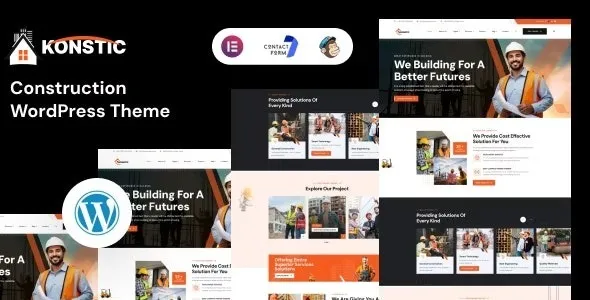
Konstic – Construction WordPress Theme is built for that exact reality. It focuses on the patterns construction customers expect: clear service blocks, project galleries, trust signals, and contact paths that feel obvious on mobile.
If you are here because you want a clean starting point rather than weeks of design decisions, you are in the right place. Many users specifically look for a Konstic – Construction WordPress Theme download to get a ready-to-configure foundation and start publishing content the same day.
The core value of Konstic – Construction WordPress Theme is reducing the gap between “we offer these services” and “a prospect requested a quote.” Instead of building layouts from scratch, you work from construction-specific page structures that already support the sales flow.
In practice, that means you can put your best projects, service areas, certifications, and contact options where users expect them. You spend time on photos, copy, and proof, not on reinventing templates.
It also helps standardize your site as your company grows. When you add a new service line or expand into a new city, you can follow the same layout logic and keep the site consistent.
A common failure pattern is a homepage that looks nice but does not answer basic questions. What do you build? Where do you work? How fast can someone get an estimate? Who has hired you before?
Another frequent issue is navigation that is built for desktop browsing. Many construction leads come from mobile searches, often from job sites or during commutes. If the contact button is buried, you feel it in lead quality and volume.
Konstic – Construction WordPress Theme is typically chosen to avoid those mistakes. Its layouts tend to prioritize service clarity, project proof, and direct calls to action. That is why “Konstic – Construction WordPress Theme download” searches are usually high intent. People want a theme that already understands the industry’s content needs.
Most successful builds follow a simple content-first workflow. You start with the pages that answer buying questions, then you add polish.
Create a short list of services that match how customers search, not how your internal team names things. “Kitchen remodeling” usually performs better than “residential improvements.”
Project galleries work best when each project has a location, scope, and one or two constraints you solved. People hire competence, not just visuals.
Licenses, insurance, certifications, safety practices, and crew experience can be positioned near quote forms or service pages. Avoid stuffing them into a footer where no one reads.
One primary CTA is usually enough. If you offer phone, email, and forms, decide which one is primary and keep it consistent across pages.
If you are planning a Konstic – Construction WordPress Theme download, treat it like any production asset. A careful install prevents broken layouts and import issues later.
Update WordPress core, your active plugins, and your PHP version if your host supports it. Then take a full backup, especially if you are installing on an existing site.
Save the Konstic – Construction WordPress Theme download file to your computer. Keep it in its original ZIP format unless the package includes multiple ZIPs and documentation.
Go to Appearance > Themes > Add New > Upload Theme. Upload the ZIP, install, then activate.
After activation, you will usually see prompts to install companion plugins. Install and activate them before importing any demo content so layouts match the intended design system.
Demo imports are useful for structure, but they can add extra pages you do not need. Import once, then immediately delete unused pages and placeholder posts to avoid index bloat.
Configure your logo, typography, colors, and header/footer settings first. Then edit page content. This prevents repeating the same design fixes across dozens of sections.
Set permalinks to “Post name.” If you imported demo content, ensure only your real pages are indexable. Remove thin pages and duplicate service variants that compete with each other.
Generic themes can work, but they often require extra time to shape into construction-specific messaging. You end up assembling service grids, project showcases, and quote funnels from parts that were not designed to work together.
With Konstic – Construction WordPress Theme, the advantage is not “more features.” It is fewer decisions. The structure is closer to what a contractor site needs, so you can focus on content quality and lead flow.
This is also where download intent matters. People searching Konstic – Construction WordPress Theme download are usually comparing time-to-launch. If your priority is a credible site this week, a construction-focused theme tends to win.
Theme choice can indirectly affect indexing because it influences how many low-value URLs you publish. Demo imports often create tag pages, author archives, and thin placeholder content that wastes crawl attention.
A practical approach is to keep the site lean. Publish a homepage, core services, a projects hub, and a contact page. Then add supporting pages only when you can make them genuinely useful, such as “Service areas” with unique text per location.
If you are using Konstic – Construction WordPress Theme download assets to launch quickly, take an extra hour to remove demo pages and disable archives you do not need. It is one of the simplest ways to avoid duplicate-intent pages that compete in search.
This creates duplicated pages and media, which leads to confusing navigation and duplicate titles. Import once, then build from there.
Indexing placeholder “Project 01” pages can dilute topical relevance. Replace them with real projects or set them to draft.
Construction sites often clone a service template and change only the heading. Search engines treat that as duplicate intent. If you publish separate services, make each page answer different questions, include different project examples, and use distinct FAQs.
Yes. It works well when you keep the site focused. A small contractor site can perform strongly with 4 to 6 pages if each page is specific and includes real photos and clear contact options.
No. Demo content is optional. If you already have your copy and images, building pages manually often results in a cleaner site with fewer leftover URLs.
Typically yes, as long as the layout supports your content. The key is replacing generic “construction” language with trade-specific service pages, proof photos, and a quote form that matches how your customers request estimates.
Install the prompted companion plugins, set your global fonts and colors, then create your navigation. After that, publish your core pages before spending time on animations or secondary sections.
Create location pages only if you can add unique content. Include local project examples, service constraints, and testimonials tied to that area. Avoid copying the same paragraph across every city page.
A theme can support good structure and mobile usability, but rankings come from content quality, relevance, and trust signals. Use the theme to present clear services, real projects, and transparent business details.
This theme fits best when you want a construction-ready structure, you have real project photos, and you need a site that guides visitors toward a quote request without extra complexity.
If you are evaluating options because your current site feels generic, slow to update, or unclear on mobile, a Konstic – Construction WordPress Theme download is a practical next step. Keep the build lean, publish only what you can support with real content, and you will end up with a site that is easier to crawl, easier to maintain, and more convincing to prospects.
For teams launching quickly, the final checklist is simple: complete your Konstic – Construction WordPress Theme download, install required plugins, remove demo leftovers, and publish your services and projects with unique, job-winning detail.
For Installation or Technical Related Queries check FAQ Page
Our Website also have older version of the plugins and theme. So you can test your website with compatible plugins or Rollback plugins in case of any bug or compatibility issues.
UNZIP the file downloaded from our website, the zip file might contain other files like Template, Docs etc. So make sure you upload correct file.
To Install Plugins:
To Install Themes:
Sometimes theme/plugin might ask you for license, just ignore. Because we have already activated the product with out legal key, which we have purchased for you.
When a New version appears and is available on our website you’ll find it in My Account “Downloads section”.
For Destination Already Exists error:
Make sure to Delete the version of theme/plugin that you have on your website before you upload our premium version, it might cause a conflict during installation and activation.
Or WordPress will say “destination already exists” when trying to upgrade using a zip file and will fail to upgrade the theme or plugin.
If you faced “destination already exists” error installing this Plugin will solve the issue – Easy Theme and Plugin Upgrades.
Our business hours are Monday to Saturday from 10:00 am to 8:00 pm, any request made outside these hours will be answered until next business day. Support and Updates can take 24 to 48 hours. Support provided is for product installation. Please be aware of possible time zone differences when waiting for our reply.
If you have any Queries, Feel Free to Contact Us:
Abuse Warning:
For more information please read FAQs & Terms of Use.