Get upto 60% Discount

Get upto 60% Discount
Unlimited Access:
$15.00 Original price was: $15.00.$4.99Current price is: $4.99.
Available Download Files

Tired of Restrictions?
Go Unlimited!
Join Our Membership to Download 8400+ Plugins & Themes

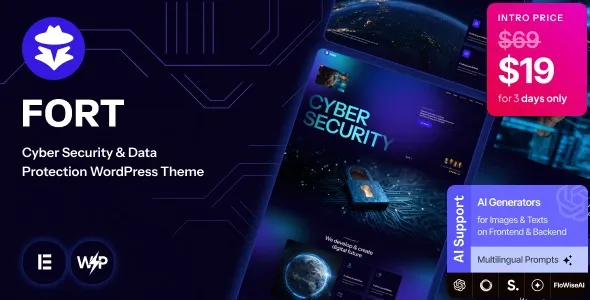
Fort Cyber Security & Data Protection WordPress Theme is structured for companies operating in the digital security, IT defense, and risk management space. Cybersecurity websites must communicate authority, precision, and technical competence from the first screen. Visitors are often business owners, IT managers, or compliance officers looking for immediate reassurance that their infrastructure is in capable hands.
This theme reflects that requirement through clean layouts, strong visual hierarchy, and service-focused sections. Instead of decorative design elements, it emphasizes clarity, structured messaging, and trust-building components that align with security-driven industries.
Cybersecurity websites are different from general corporate sites. Clients want to understand services such as penetration testing, vulnerability assessments, endpoint protection, cloud security, compliance audits, and incident response. Fort is structured to present these services in a way that feels credible and organized.
The homepage typically prioritizes core services, case studies, certifications, and clear calls to action for consultations. Dedicated service pages allow firms to explain technical offerings in detail while maintaining readability for non-technical decision-makers. This balance between expertise and clarity is critical in the security industry.
Fort Cyber Security & Data Protection WordPress Theme supports long-form content sections, enabling companies to publish whitepapers, threat intelligence updates, and educational resources that enhance authority in search engines.
Security companies cannot afford unstable websites. Fort is compatible with current WordPress versions and modern hosting environments using updated PHP configurations. Responsive design ensures the site performs well on desktops, tablets, and mobile devices, which is important when potential clients are researching vendors on the go.
The theme integrates with widely used SEO plugins, caching tools, and security extensions. It also works with contact form builders for consultation requests and quote inquiries. Fast loading times and clean structure contribute to improved search engine visibility and user engagement.
Given the nature of cybersecurity businesses, it is strongly recommended to pair the theme with robust hosting security, SSL encryption, firewall configurations, and regular update practices.
If you are searching for Fort Cyber Security & Data Protection WordPress Theme download, your objective is likely to launch a professional security-focused website without building a custom interface from scratch.
The theme can be installed on WordPress under standard licensing conditions. Always ensure that the theme file you download is complete and has not been altered in ways that compromise integrity. Security companies especially should verify file authenticity before deployment.
A reliable installation ensures compatibility with future WordPress updates and reduces the risk of unexpected technical issues.
Step 1: Download the theme ZIP file from a trusted source.
Step 2: Log in to your WordPress admin dashboard.
Step 3: Navigate to Appearance and select Themes.
Step 4: Click Add New, then choose Upload Theme.
Step 5: Upload the ZIP file and click Install Now.
Step 6: After installation, click Activate.
Step 7: Install any recommended plugins required for full functionality.
Step 8: Import demo content if available to quickly establish the base security layout.
Once activated, configure service pages, add case studies, integrate contact forms, and adjust branding elements to reflect your company’s identity.
Fort allows firms to align the website with their corporate branding, including logo integration, color schemes, and typography adjustments. Cybersecurity businesses often rely on dark or high-contrast visual themes to reinforce technical identity, and these can be customized within the theme settings.
Lead generation is central to cybersecurity websites. Consultation forms, contact sections, and strategic call-to-action placements can be configured to capture inquiries efficiently. Publishing blog posts related to threat analysis or compliance updates further strengthens search engine presence and industry authority.
Regular updates to WordPress core, installed plugins, and the theme are essential. Security companies should maintain strict update schedules and periodic site audits to ensure full compatibility and protection.
This theme is suitable for cybersecurity firms, IT security consultants, data protection agencies, managed security service providers, compliance auditors, and cloud security specialists. It works particularly well for companies that need to present technical services clearly while building trust with enterprise clients.
Yes. The layout structure supports detailed service explanations, case studies, and compliance information suitable for enterprise audiences.
Yes. The theme supports standard WordPress blogging functionality, allowing you to publish industry insights and technical resources.
It integrates with common form plugins, making it easy to collect consultation requests and client inquiries.
No advanced coding is required for standard customization. Most changes can be made through theme settings and page builders.
Yes. The theme structure is compatible with widely used SEO plugins, helping improve search visibility.
Usage depends on licensing terms, but it can generally be installed on WordPress sites in accordance with the applicable license conditions.
For Installation or Technical Related Queries check FAQ Page
Our Website also have older version of the plugins and theme. So you can test your website with compatible plugins or Rollback plugins in case of any bug or compatibility issues.
UNZIP the file downloaded from our website, the zip file might contain other files like Template, Docs etc. So make sure you upload correct file.
To Install Plugins:
To Install Themes:
Sometimes theme/plugin might ask you for license, just ignore. Because we have already activated the product with out legal key, which we have purchased for you.
When a New version appears and is available on our website you’ll find it in My Account “Downloads section”.
For Destination Already Exists error:
Make sure to Delete the version of theme/plugin that you have on your website before you upload our premium version, it might cause a conflict during installation and activation.
Or WordPress will say “destination already exists” when trying to upgrade using a zip file and will fail to upgrade the theme or plugin.
If you faced “destination already exists” error installing this Plugin will solve the issue – Easy Theme and Plugin Upgrades.
Our business hours are Monday to Saturday from 10:00 am to 8:00 pm, any request made outside these hours will be answered until next business day. Support and Updates can take 24 to 48 hours. Support provided is for product installation. Please be aware of possible time zone differences when waiting for our reply.
If you have any Queries, Feel Free to Contact Us:
Abuse Warning:
For more information please read FAQs & Terms of Use.