Get upto 60% Discount

Get upto 60% Discount
Unlimited Access:
$15.00 Original price was: $15.00.$4.99Current price is: $4.99.
Available Download Files

Tired of Restrictions?
Go Unlimited!
Join Our Membership to Download 8400+ Plugins & Themes

Flowers are emotional purchases. Customers order bouquets for birthdays, anniversaries, weddings, and special occasions. If a flower store website feels outdated, cluttered, or slow, trust declines immediately. Visual presentation, smooth browsing, and clear delivery information directly influence buying decisions.
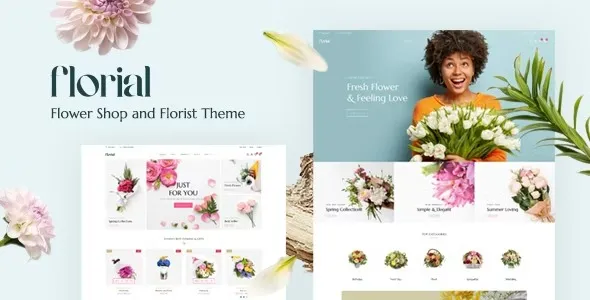
Florial – Flower Store WooCommerce WordPress Theme is designed specifically for florists, bouquet shops, and gift stores that need elegant layouts, strong product imagery, and WooCommerce-ready functionality inside WordPress.
WordPress is distributed under the GNU General Public License. Themes developed for WordPress operate within this ecosystem and typically follow GPL principles for their PHP-based components. Florial aligns with this licensing framework.
GPL allows users to review theme files, customize templates, adjust layouts, and deploy the theme across multiple WordPress installations. The license ensures flexibility, transparency, and long-term control over site development.
Online flower shops often require seasonal promotions, delivery scheduling integrations, and performance optimization. GPL ensures developers can modify theme structure, optimize loading speed, and integrate additional functionality without restrictive barriers.
After activation, Florial provides pre-designed homepage layouts tailored for flower stores. These typically include featured bouquet sections, promotional banners, seasonal highlights, and call-to-action blocks.
The theme enhances WooCommerce product pages with strong image display, clear pricing, and structured product descriptions. Visual emphasis supports emotional purchasing decisions.
Flower stores often categorize products by occasion such as birthdays, anniversaries, sympathy arrangements, or weddings. Structured navigation improves browsing efficiency and helps customers find suitable arrangements quickly.
Ensure WordPress is updated to the latest stable version.
Confirm WooCommerce is installed and activated.
Verify server compatibility including recommended PHP and memory limits.
Log into the WordPress dashboard.
Navigate to Appearance → Themes → Add New → Upload Theme.
Select the Florial theme ZIP file.
Click Install Now and wait for installation to complete.
Click Activate after installation.
Confirm the theme loads properly without layout errors.
Install and activate recommended plugins.
Import demo content if available.
Verify shop and homepage layouts display correctly.
Upload logo and brand visuals.
Adjust color schemes to match floral aesthetics.
Configure delivery information and store policies.
Optimize product images for fast loading.
Flower stores rely heavily on high-quality imagery. Optimize images to balance visual clarity with loading speed.
Many customers order flowers from mobile devices. Confirm that layouts, menus, and checkout pages function smoothly across smartphones and tablets.
Theme updates typically include compatibility improvements with new WordPress releases, WooCommerce integration refinements, performance optimizations, and security fixes.
Before applying updates, verify compatibility with:
Current WordPress version
Installed WooCommerce version
Server PHP version
GPL allows redistribution of the theme, but stable store performance depends on disciplined update testing and compatibility checks.
Improved compatibility with latest WordPress update
Enhanced WooCommerce layout integration
Resolved minor styling inconsistencies
Optimized mobile responsiveness
Security and stability improvements
Florial – Flower Store WooCommerce WordPress Theme provides a structured design foundation for florists seeking professional presentation and seamless online ordering. When properly installed and optimized, it supports emotional engagement, smooth navigation, and scalable store management.
Understanding GPL licensing, following structured installation procedures, and maintaining consistent update discipline ensures reliable performance within the WordPress ecosystem.
For Installation or Technical Related Queries check FAQ Page
Our Website also have older version of the plugins and theme. So you can test your website with compatible plugins or Rollback plugins in case of any bug or compatibility issues.
UNZIP the file downloaded from our website, the zip file might contain other files like Template, Docs etc. So make sure you upload correct file.
To Install Plugins:
To Install Themes:
Sometimes theme/plugin might ask you for license, just ignore. Because we have already activated the product with out legal key, which we have purchased for you.
When a New version appears and is available on our website you’ll find it in My Account “Downloads section”.
For Destination Already Exists error:
Make sure to Delete the version of theme/plugin that you have on your website before you upload our premium version, it might cause a conflict during installation and activation.
Or WordPress will say “destination already exists” when trying to upgrade using a zip file and will fail to upgrade the theme or plugin.
If you faced “destination already exists” error installing this Plugin will solve the issue – Easy Theme and Plugin Upgrades.
Our business hours are Monday to Saturday from 10:00 am to 8:00 pm, any request made outside these hours will be answered until next business day. Support and Updates can take 24 to 48 hours. Support provided is for product installation. Please be aware of possible time zone differences when waiting for our reply.
If you have any Queries, Feel Free to Contact Us:
Abuse Warning:
For more information please read FAQs & Terms of Use.