Get upto 60% Discount

Get upto 60% Discount
Unlimited Access:
$10.00 Original price was: $10.00.$2.99Current price is: $2.99.
Available Download Files

Tired of Restrictions?
Go Unlimited!
Join Our Membership to Download 8400+ Plugins & Themes

Electric vehicle startups, charging station providers, and green mobility companies operate in a future-focused industry. Customers expect modern design, clear service presentation, and fast access to technical information. A generic corporate theme often fails to communicate innovation, sustainability, and technical credibility.
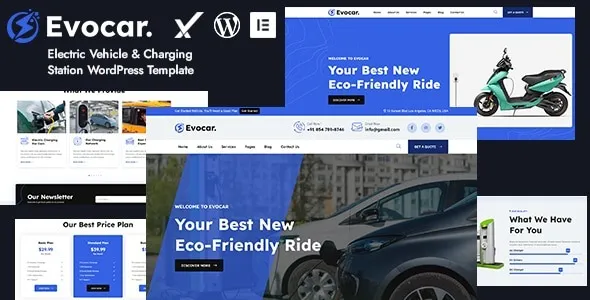
Evocar Electric Vehicle & Charging Station WordPress Theme is built specifically for EV manufacturers, charging infrastructure providers, renewable energy startups, and eco-technology businesses that require structured layouts, service sections, and product showcases inside WordPress.
WordPress is distributed under the GNU General Public License. Themes developed for WordPress function within this ecosystem and typically follow GPL principles for their PHP-based components. Evocar aligns with this licensing framework.
GPL allows users to review theme code, customize templates, modify layouts, and deploy the theme across multiple WordPress installations. The license promotes flexibility, transparency, and long-term control over site development.
EV and charging infrastructure websites often require structured service pages, integration with maps, booking systems, or technical documentation. GPL ensures developers can adapt templates, improve performance, and integrate additional functionality without restrictive barriers.
After activation, Evocar provides homepage variations tailored for electric vehicle businesses and charging station providers. These layouts typically include service highlights, sustainability messaging, feature sections, and call-to-action blocks.
The theme includes structured sections for presenting EV models, charging solutions, installation services, and infrastructure capabilities. Clear content hierarchy supports both user experience and SEO structure.
Businesses can showcase completed installations, infrastructure projects, or technology partnerships through dedicated portfolio or case study templates.
Ensure WordPress is updated to the latest stable version.
Verify hosting meets recommended PHP and memory requirements.
Install WooCommerce if product sales or bookings are required.
Log into the WordPress dashboard.
Navigate to Appearance → Themes → Add New → Upload Theme.
Select the Evocar theme ZIP file.
Click Install Now and wait for installation to complete.
Click Activate after installation.
Confirm the layout loads correctly without structural errors.
Install and activate recommended plugins.
Import demo content if available.
Verify homepage and service sections display properly.
Upload logo and brand visuals.
Adjust color palette to align with brand identity.
Replace demo content with business-specific information.
Configure navigation menus and footer details.
EV customers often search for charging stations or services on mobile devices. Confirm responsive behavior across smartphones and tablets.
Service pages should include clear headings, technical specifications, and structured content to support both user understanding and search engine indexing.
Theme updates typically include compatibility improvements with new WordPress releases, design refinements, performance optimizations, and security enhancements.
Before applying updates, verify compatibility with:
Current WordPress version
Installed plugins
Server PHP version
GPL allows redistribution of the theme, but long-term reliability depends on responsible version management and testing.
Improved compatibility with latest WordPress update
Enhanced layout responsiveness
Resolved minor styling inconsistencies
Optimized homepage performance
Security and stability improvements
Evocar Electric Vehicle & Charging Station WordPress Theme provides a structured design foundation for EV businesses seeking professional presentation and scalable site management. When properly installed and optimized, it supports service clarity, brand credibility, and sustainable business growth.
Understanding GPL licensing, following structured installation procedures, and maintaining disciplined update practices ensures stable performance within the WordPress ecosystem.
For Installation or Technical Related Queries check FAQ Page
Our Website also have older version of the plugins and theme. So you can test your website with compatible plugins or Rollback plugins in case of any bug or compatibility issues.
UNZIP the file downloaded from our website, the zip file might contain other files like Template, Docs etc. So make sure you upload correct file.
To Install Plugins:
To Install Themes:
Sometimes theme/plugin might ask you for license, just ignore. Because we have already activated the product with out legal key, which we have purchased for you.
When a New version appears and is available on our website you’ll find it in My Account “Downloads section”.
For Destination Already Exists error:
Make sure to Delete the version of theme/plugin that you have on your website before you upload our premium version, it might cause a conflict during installation and activation.
Or WordPress will say “destination already exists” when trying to upgrade using a zip file and will fail to upgrade the theme or plugin.
If you faced “destination already exists” error installing this Plugin will solve the issue – Easy Theme and Plugin Upgrades.
Our business hours are Monday to Saturday from 10:00 am to 8:00 pm, any request made outside these hours will be answered until next business day. Support and Updates can take 24 to 48 hours. Support provided is for product installation. Please be aware of possible time zone differences when waiting for our reply.
If you have any Queries, Feel Free to Contact Us:
Abuse Warning:
For more information please read FAQs & Terms of Use.