Get upto 60% Discount

Get upto 60% Discount
Unlimited Access:
$10.00 Original price was: $10.00.$2.99Current price is: $2.99.
Available Download Files

Tired of Restrictions?
Go Unlimited!
Join Our Membership to Download 8400+ Plugins & Themes

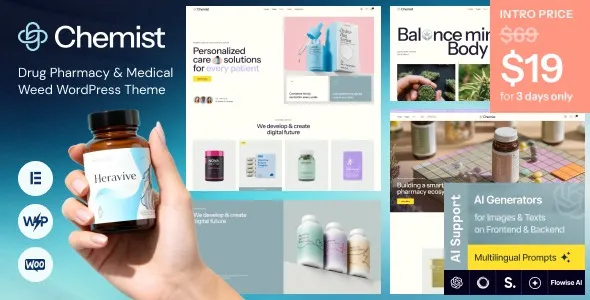
Most pharmacy and dispensary sites fail for a simple reason: the layout and content structure are generic, so customers cannot quickly find products, policies, or trust signals. Chemist Drug Pharmacy & Medical Weed WordPress Theme is typically downloaded when you want a site that already “thinks” like a pharmacy or medical catalogue, instead of forcing you to assemble templates, product pages, and compliance-style messaging from a blank theme.
If your goal is speed to launch, the right starting point matters more than a long feature checklist. A Chemist – Drug Pharmacy & Medical Weed WordPress Theme download typically involves reducing setup decisions. You want a design system that supports product discovery, category browsing, and clear informational pages that patients and customers expect to see.
This page focuses on what you are actually installing, what changes immediately after activation, and where people tend to lose time during setup.
The core value is not “more options” in the WordPress dashboard. It is a faster path to a store-like experience that feels credible for health-related products.
When a theme is built for pharmacy and medical inventory, it usually bakes in assumptions that are painful to recreate manually: navigation patterns that favor categories, product grids that do not feel like a fashion boutique, and page layouts that leave room for dosage guidance, usage notes, shipping details, and policy links without looking cluttered.
In practice, users download Chemist Drug Pharmacy & Medical Weed WordPress Theme because they want to spend their time on product data, imagery, and operations, not on designing every template. The “win” after installation is a site structure that makes shoppers feel oriented. That translates into fewer support questions, fewer abandoned sessions, and less internal debate about what a pharmacy homepage should include.
After installing Chemist Drug Pharmacy & Medical Weed WordPress Theme, the biggest difference between a clean launch and a messy one usually comes down to content discipline. It is easy to import demo content, swap logos, and assume you are done. The friction shows up a week later when real products and real policy pages get added.
Pharmacy-style catalogs often require deeper taxonomy than a normal shop. If you create categories on the fly, menus become bloated and filters stop matching customer intent. Decide early whether you are organizing by condition, product type, brand, or form factor, then keep that consistent across your WooCommerce categories and navigation.
A frequent mistake is trying to “out-design” the theme on day one. Users add multiple page builders, extra header plugins, and animation add-ons, then wonder why the site feels inconsistent. With a niche theme like this, you usually get better results by keeping the default template logic and only customizing what supports clarity: headers, category pages, product layout, and key informational pages.
Even when customers arrive ready to purchase, they still look for reassurance. Shipping, returns, store policies, and contact details are not secondary on pharmacy sites. The practical advantage of Chemist Drug Pharmacy & Medical Weed WordPress Theme is that it tends to accommodate these pages in the navigation and layout without making the shop feel like a corporate brochure.
A safe Chemist – Drug Pharmacy & Medical Weed WordPress Theme download typically means you obtain the theme package, confirm it is the correct install-ready ZIP, and then upload it through your WordPress admin. If you are using a managed host, it is still best practice to keep a local copy of the download so you can reinstall quickly if you roll back a staging site or rebuild a server.
After your Chemist – Drug Pharmacy & Medical Weed WordPress Theme download completes, check that the file is a theme ZIP and not an unpacked folder. In WordPress, go to Appearance, then Themes, then Add New, then Upload Theme. Upload the ZIP, install, and activate.
Immediately after activation, expect your site to change globally. Headers, typography, spacing, and page templates will switch to the theme’s defaults. If your site was previously using a different theme, review your menus, widgets, and homepage settings. It is normal to need to reassign a menu location and confirm which page is set as the homepage.
If the theme provides demo content, import it on a staging site first when possible. Demo imports can create pages, menus, and placeholder products that are useful for layout reference but noisy in production. The clean approach is to import, study the structure, then delete what you do not need before you add real products.
If you want the smoothest path, download and install Chemist – Drug Pharmacy & Medical Weed WordPress Theme, activate it, then confirm three essentials before you touch design: permalinks, WooCommerce pages (Shop, Cart, Checkout, My Account), and your primary menu assignments.
Chemist Drug Pharmacy & Medical Weed WordPress Theme makes sense when your site needs to look and behave like a pharmacy or medical catalog from day one. That includes stores with many categories, customers who browse by need, and businesses that rely on policy clarity and trust-building pages.
It may be unnecessary if you are running a very small catalog with only a handful of products and no plans to expand. In those cases, a lightweight general WooCommerce theme with minimal configuration can be simpler. Another scenario where people regret the download is when they already have a stable theme and only need one or two layout tweaks. Switching themes will change global styling, so the “cost” is rechecking every template and page.
If you are actively evaluating options, a Chemist – Drug Pharmacy & Medical Weed WordPress Theme plugin download is most justified when you want the niche structure and do not want to spend days assembling a pharmacy-like layout from generic blocks.
It is a WordPress theme. Some users call it a plugin because it is installed as a ZIP package, but it is activated under Appearance in WordPress, not under Plugins.
Confirm you are downloading the installable theme ZIP, and plan where you will install it first. If you have an existing live store, use a staging site so you can test activation, menus, and WooCommerce templates without disrupting customers.
Activation changes global templates. If the theme expects a specific homepage layout, you may need to set a static homepage under Settings, then Reading, and assign a page. Also check that your menus are assigned to the correct theme locations.
If you are selling products, WooCommerce is typically required. Without it, you can still use the theme for informational pages, but you will not get the full storefront flow that most users expect when they download this theme.
Importing demo content directly into a live site and then trying to “clean it up” later. It is faster to import on staging, keep only the structural pages you need, and then build your real catalog with consistent categories and attributes.
Yes. Switching themes is reversible, but your site’s styling and some layout settings will change again. Before you test, note your current menu assignments and homepage settings so you can restore them quickly if needed.
For Installation or Technical Related Queries check FAQ Page
Our Website also have older version of the plugins and theme. So you can test your website with compatible plugins or Rollback plugins in case of any bug or compatibility issues.
UNZIP the file downloaded from our website, the zip file might contain other files like Template, Docs etc. So make sure you upload correct file.
To Install Plugins:
To Install Themes:
Sometimes theme/plugin might ask you for license, just ignore. Because we have already activated the product with out legal key, which we have purchased for you.
When a New version appears and is available on our website you’ll find it in My Account “Downloads section”.
For Destination Already Exists error:
Make sure to Delete the version of theme/plugin that you have on your website before you upload our premium version, it might cause a conflict during installation and activation.
Or WordPress will say “destination already exists” when trying to upgrade using a zip file and will fail to upgrade the theme or plugin.
If you faced “destination already exists” error installing this Plugin will solve the issue – Easy Theme and Plugin Upgrades.
Our business hours are Monday to Saturday from 10:00 am to 8:00 pm, any request made outside these hours will be answered until next business day. Support and Updates can take 24 to 48 hours. Support provided is for product installation. Please be aware of possible time zone differences when waiting for our reply.
If you have any Queries, Feel Free to Contact Us:
Abuse Warning:
For more information please read FAQs & Terms of Use.