Get upto 60% Discount

Get upto 60% Discount
Unlimited Access:
$15.00 Original price was: $15.00.$4.99Current price is: $4.99.
Available Download Files

Tired of Restrictions?
Go Unlimited!
Join Our Membership to Download 8400+ Plugins & Themes

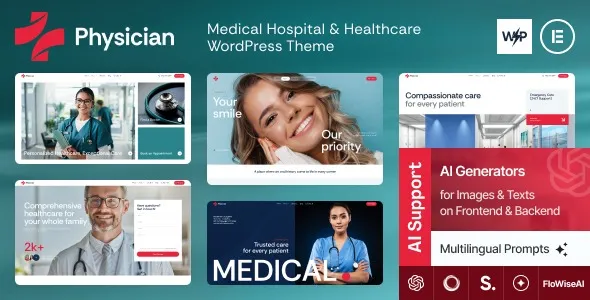
Most people searching for a Physician Medical Hospital & Healthcare WordPress Theme download are not browsing for inspiration. They are trying to unblock a real workflow: a clinic needs a usable website, a doctor wants online appointment requests, or a hospital department needs a clean service page that does not look improvised.
This theme is typically chosen because it reduces the “blank WordPress install” problem. Instead of assembling a medical layout from generic blocks and hoping it feels trustworthy, you start from a structure that already matches healthcare expectations. The practical win is speed with fewer design decisions, while still leaving room to adapt the site to your practice’s services and patient flow.
The core value is not a long list of templates. It is the ability to publish a medical or healthcare presence that reads as legitimate on day one, without having to invent the information architecture from scratch.
In practice, that usually means you can get to a first acceptable version of the site faster. Pages like services, departments, doctor profiles, and contact details tend to be easier to shape when the theme already “expects” those sections. That matters because healthcare sites are judged quickly. If the navigation feels confusing or the typography looks off, users do not wait around to understand your intent.
It is also a theme people reach for when they want a consistent tone across the site. Medical websites often require calm, readable layouts, clear calls to action, and predictable page structure. A theme built for this niche can make the site feel coherent even before you fine-tune copy, images, and forms.
A typical Physician Medical Hospital & Healthcare WordPress Theme download results in a ZIP file. Before uploading anything, confirm you are working with the installable theme package (not just documentation or a folder of assets). If you already have WordPress running, you can upload it from Appearance > Themes > Add New > Upload Theme.
After activation, expect the site to look “incomplete” until you apply the theme’s recommended setup steps. Many healthcare themes rely on demo content import, a companion plugin, or a required page builder configuration to match the preview. This is normal, but it is also where users get stuck and assume the theme is broken.
If you plan to download and install Physician Medical Hospital & Healthcare WordPress Theme on an existing site, take a quick backup first. Theme activation changes how pages render, and it can expose styling conflicts with older plugins. The fastest way to evaluate fit is to install it on a staging site, import the demo, and then rebuild your real pages from that structure.
Right after installation, check three things before you customize anything:
1) Your homepage assignment in Settings > Reading. A theme may expect a static homepage.
2) Permalinks in Settings > Permalinks. Set a clean structure early to avoid later URL churn.
3) Header and menu setup in Appearance > Menus. Many “missing layout” issues are simply an unassigned menu.
Once the theme is active, the best next step is to map your real-world clinic workflow to the site structure. A common mistake is to start tweaking colors and fonts before the pages exist. You will make better decisions when the content is in place.
For most physician and hospital sites, the early build sequence that reduces rework is:
Start with patient intent pages. Services, insurance information, locations, and contact should be drafted first. These pages often drive calls and form submissions, so they deserve the cleanest navigation.
Then build trust pages. Doctor profile pages, credentials, affiliations, and patient resources tend to be the difference between “looks fine” and “I will book here.” If the theme includes staff layouts, use them, but keep the content consistent. Uneven bios and mismatched headshots can make even a well-designed theme feel unreliable.
Finally add conversion paths. Whether you use appointment request forms, click-to-call buttons, or a simple contact form, decide where the action happens. Many users install a medical theme and later realize they still need a scheduling plugin. The theme can frame the experience, but the actual booking workflow usually comes from a form tool or appointment system you choose.
Hands-on friction to anticipate: demo imports can create extra pages you do not need. Delete or unpublish them early. Leaving “Sample” departments and placeholder doctor pages indexed is a common oversight that looks unprofessional and can create duplicate-intent pages that compete with your real services.
A Physician Medical Hospital & Healthcare WordPress Theme download makes the most sense when your website needs to communicate medical services clearly, with predictable layouts and a reserved visual style. It is a practical choice for clinics, private practices, diagnostic centers, dental offices that want a more clinical look, and small hospitals that need departmental navigation without custom design work.
It may be unnecessary if your site is essentially a one-page presence with a phone number, map, and hours. In that case, a lightweight general theme and a solid contact form can be easier to maintain. Similarly, if you are building a large healthcare network site with multiple locations, complex provider search, and deep service taxonomy, you may outgrow what a theme alone can provide. You will likely need custom development or a more specialized directory approach.
Another trade-off is that niche themes sometimes assume a particular page builder workflow. If you prefer the native block editor only, confirm the theme’s editing experience matches your expectations before you commit to rebuilding your content. This is one reason people look for a Physician Medical Hospital & Healthcare WordPress Theme plugin download and then later switch. The theme is fine, but the editing model does not match their team’s day-to-day process.
Demos usually require importing sample content and sometimes installing companion plugins. If you only activate the theme without importing the demo, you will see the theme’s base styling but not the complete page layouts. Check whether there is a demo importer option in the theme’s setup panel, and confirm your homepage and menus are assigned.
You can, but expect layout changes immediately after activation. The safest approach is to test on staging first, then activate on production once you have confirmed menus, widgets, and key pages render correctly. A backup before switching themes is recommended because you may want to roll back quickly.
Often, yes. Many medical themes provide sections and styling for “Book Appointment” calls to action, but the actual scheduling logic typically comes from a form plugin or an appointment system. Decide whether you need simple requests (form-based) or real-time scheduling (calendar-based), then choose a tool that matches that requirement.
It depends on how the theme was built. Some healthcare themes are optimized for a page builder and only partially support block-based editing. If your team wants to edit pages quickly using blocks, test a few page types (service page, doctor profile, contact page) before you commit to rebuilding everything.
Install it on a staging site, import the demo if available, then replace demo text on three pages: Services, About/Providers, and Contact. If those pages can be made accurate and readable in under an hour, the theme is usually a good fit. If you find yourself fighting the layout system, you will likely feel that friction long-term.
It can present multiple locations, but scaling depends on how you plan to organize them. For a few locations, standard pages and a clear menu work well. For many locations with search and filtering, you may need additional plugins or custom development to avoid a messy navigation structure.
For Installation or Technical Related Queries check FAQ Page
Our Website also have older version of the plugins and theme. So you can test your website with compatible plugins or Rollback plugins in case of any bug or compatibility issues.
UNZIP the file downloaded from our website, the zip file might contain other files like Template, Docs etc. So make sure you upload correct file.
To Install Plugins:
To Install Themes:
Sometimes theme/plugin might ask you for license, just ignore. Because we have already activated the product with out legal key, which we have purchased for you.
When a New version appears and is available on our website you’ll find it in My Account “Downloads section”.
For Destination Already Exists error:
Make sure to Delete the version of theme/plugin that you have on your website before you upload our premium version, it might cause a conflict during installation and activation.
Or WordPress will say “destination already exists” when trying to upgrade using a zip file and will fail to upgrade the theme or plugin.
If you faced “destination already exists” error installing this Plugin will solve the issue – Easy Theme and Plugin Upgrades.
Our business hours are Monday to Saturday from 10:00 am to 8:00 pm, any request made outside these hours will be answered until next business day. Support and Updates can take 24 to 48 hours. Support provided is for product installation. Please be aware of possible time zone differences when waiting for our reply.
If you have any Queries, Feel Free to Contact Us:
Abuse Warning:
For more information please read FAQs & Terms of Use.