Get upto 60% Discount

Get upto 60% Discount
Unlimited Access:
$10.00 Original price was: $10.00.$2.99Current price is: $2.99.

Tired of Restrictions?
Go Unlimited!
Join Our Membership to Download 8400+ Plugins & Themes

Pricing tables are often where WordPress sites become visually inconsistent and technically fragile. Many sites rely on page builder rows or heavy shortcodes to display pricing, which leads to broken layouts on updates, poor mobile rendering, and difficult long-term maintenance. What should be a simple comparison section often turns into a dependency problem.
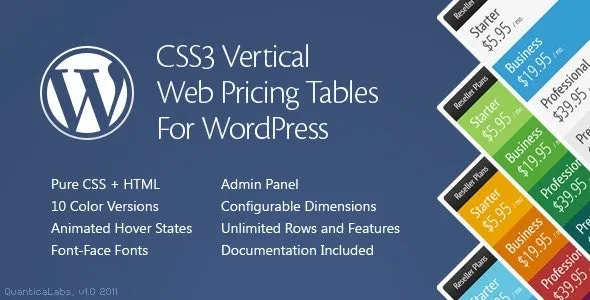
CSS3 Vertical Web Pricing Tables is designed to solve this by providing pricing layouts built primarily with CSS, not complex JavaScript or builder-specific elements. The focus is on vertical pricing structures that remain stable, responsive, and easy to reuse across different pages.
Pricing sections tend to be edited frequently. Plans change, features are added, and call-to-action buttons are updated. When pricing tables are built using deeply nested builder elements, even small changes can affect spacing, alignment, or responsiveness.
Common issues include inconsistent column heights, mobile overflow problems, slow page rendering, and pricing sections that cannot be reused without rebuilding them. CSS3 Vertical Web Pricing Tables addresses these issues by separating pricing structure from page layout complexity.
After activation, WordPress continues to manage pages and content normally. The plugin introduces a set of vertically oriented pricing table layouts that can be inserted where needed without redesigning the page structure.
Pricing tables are rendered using CSS-driven layouts that adapt to screen size naturally. Content inside each plan remains editable, while the visual structure stays consistent across pages and devices. Existing content is not modified unless pricing tables are intentionally added.
Vertical pricing tables present plans in stacked or column-aligned formats that are easier to scan, especially on mobile devices. Instead of relying on equal-height scripts or dynamic resizing, layout consistency is handled through CSS rules.
This approach reduces rendering issues and keeps pricing sections predictable. It also makes pricing tables easier to embed into different themes without custom overrides.
CSS3 Vertical Web Pricing Tables is built specifically for presenting pricing comparisons cleanly. It is not a full page builder, a subscription management system, or a dynamic pricing engine.
The plugin does not calculate prices, manage payments, or connect to checkout logic. Its responsibility is visual structure and presentation, leaving pricing logic and transactions to WooCommerce or other systems.
This plugin is commonly added to marketing pages, SaaS landing pages, service websites, and product comparison pages where pricing clarity matters. It is often introduced when site owners want to reduce dependency on page builders for simple layout components.
Because it does not override theme styles globally, it can be integrated into existing designs without reworking the entire site.
In production environments, these pricing tables are used to compare service tiers, display subscription plans, outline feature differences, and present one-time pricing options. The vertical format is especially useful for mobile-first sites where horizontal tables become unreadable.
By keeping the layout lightweight, pricing sections remain fast-loading and visually stable.
To install the plugin, download the CSS3 Vertical Web Pricing Tables package, upload it through the WordPress plugin installer, and activate it from the admin dashboard. Once active, pricing table layouts become available for insertion into pages or posts.
Initial setup typically involves selecting a layout style and entering plan details rather than designing tables from scratch.
Before publishing pricing tables, site owners should test responsiveness across devices, confirm that pricing text remains readable, and ensure call-to-action buttons link correctly. It is also important to verify that pricing sections align visually with the site’s overall design.
These checks help maintain clarity and avoid confusion at conversion-critical points.
Do these pricing tables work without page builders?
Yes. They are designed to work independently of builders.
Are the layouts mobile-friendly?
Yes. Vertical layouts are naturally responsive when configured correctly.
Can pricing tables be reused on multiple pages?
Yes. Tables can be reused without rebuilding layouts.
Is it compatible with recent WordPress versions?
Yes. Updates focus on compatibility and layout stability.
Version 2.0
Recent updates focus on improving CSS responsiveness, refining vertical layout alignment, reducing conflicts with modern themes, and maintaining compatibility with current WordPress releases. The plugin is verified for WordPress 6.0+ and supports PHP 7.4 and above.
For Installation or Technical Related Queries check FAQ Page
Our Website also have older version of the plugins and theme. So you can test your website with compatible plugins or Rollback plugins in case of any bug or compatibility issues.
UNZIP the file downloaded from our website, the zip file might contain other files like Template, Docs etc. So make sure you upload correct file.
To Install Plugins:
To Install Themes:
Sometimes theme/plugin might ask you for license, just ignore. Because we have already activated the product with out legal key, which we have purchased for you.
When a New version appears and is available on our website you’ll find it in My Account “Downloads section”.
For Destination Already Exists error:
Make sure to Delete the version of theme/plugin that you have on your website before you upload our premium version, it might cause a conflict during installation and activation.
Or WordPress will say “destination already exists” when trying to upgrade using a zip file and will fail to upgrade the theme or plugin.
If you faced “destination already exists” error installing this Plugin will solve the issue – Easy Theme and Plugin Upgrades.
Our business hours are Monday to Saturday from 10:00 am to 8:00 pm, any request made outside these hours will be answered until next business day. Support and Updates can take 24 to 48 hours. Support provided is for product installation. Please be aware of possible time zone differences when waiting for our reply.
If you have any Queries, Feel Free to Contact Us:
Abuse Warning:
For more information please read FAQs & Terms of Use.