Get upto 60% Discount

Get upto 60% Discount
Unlimited Access:
$10.00 Original price was: $10.00.$2.99Current price is: $2.99.

Tired of Restrictions?
Go Unlimited!
Join Our Membership to Download 8400+ Plugins & Themes

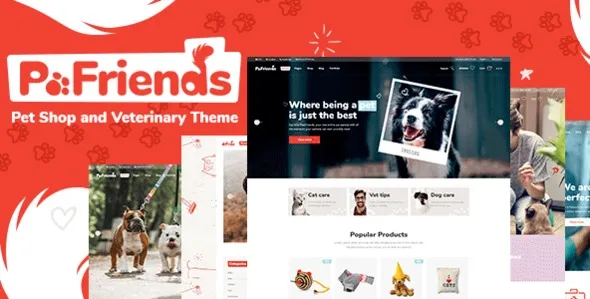
If you are searching for a PawFriends Pet Shop and Veterinary WordPress Theme download, you are probably trying to move past the “temporary” site stage. Pet shops, groomers, shelters, and clinics all run into the same problem: the website has to feel calm, credible, and easy to navigate, even when the content is still being assembled.
PawFriends Pet Shop Theme is typically chosen when the default WordPress theme feels too generic and when building pages from scratch slows down launch. The real value is not “more options.” It is getting a pet-focused layout language that already matches what visitors expect, so you can publish core pages without redesigning every section.
This matters most when your first priority is conversion clarity: services, opening hours, appointment prompts, location, and a clean path to contact. A theme like this is often downloaded because it reduces the number of decisions you need to make before the site looks coherent.
The main reason to download PawFriends Pet Shop Theme is to avoid reinventing a structure that pet customers already understand. Visitors want quick reassurance: “Do you treat my pet, can I book, where are you, and can I trust you?”
In practice, the theme’s core value is speed-to-credible. You can stand up a homepage, service pages, team or veterinarian profiles, and contact flows with fewer layout compromises. That reduces the temptation to patch together multiple page builder templates that do not match each other.
It also helps when your content is uneven at launch. Many pet businesses start with limited photos, incomplete service descriptions, or a small product catalog. A focused theme can keep the site from feeling empty by using spacing, typography, and section structure that supports short copy and a few strong images.
A safe workflow starts with getting the correct package and confirming what you are installing. After your PawFriends Pet Shop Theme download, you should have a theme ZIP file (and sometimes bundled companion plugins in a separate folder). Keep the original ZIP intact until you confirm it installs cleanly.
In your WordPress dashboard, go to Appearance → Themes → Add New → Upload Theme, upload the ZIP, then click Install and Activate. If the theme includes required or recommended plugins, WordPress will usually prompt you right after activation.
Immediately after activation, expect your site to look “unstyled” until you import demo content or configure the homepage sections. This is normal. The theme provides the structure, but your menus, homepage assignments, and widgets still need to be connected.
First, confirm your permalinks are set (Settings → Permalinks) and that your primary menu is assigned to the correct location. Then check whether the theme expects a page builder or a companion plugin for certain templates. Missing one dependency is the most common reason users think the theme is broken.
If you plan to run ecommerce, install WooCommerce before importing any shop-related demo pages. That prevents product grids, cart links, and shop widgets from rendering as empty placeholders.
Most users do not struggle with installation. They struggle with the first hour after activation, when WordPress asks for decisions you may not have made yet. PawFriends – Pet Shop and Veterinary WordPress Theme tends to work best when you set a few basics before you start tweaking colors and fonts.
Create the pages you know you need: Home, Services, About, Contact, and if relevant, Shop. Then assign your homepage (Settings → Reading). Once those anchors exist, the theme’s layout options become easier to evaluate because you are editing real pages, not empty templates.
Demo content can speed up assembly, but it can also create clutter. Users often import everything, then spend hours deleting pages, posts, and media they never wanted. A cleaner approach is to import only what matches your use case, then replace images first. Pet themes depend heavily on photography, and placeholder images can make the site feel unfinished even if the layout is correct.
If you are building a simple one-page site with a phone number and a map, you may not need a specialized theme. A lightweight default theme plus a block-based layout can be enough.
On the other hand, if you need multiple service categories, staff profiles, appointment prompts, and a shop or product catalog, a pet-focused theme reduces the amount of custom layout work. That is usually why people specifically seek out a PawFriends download instead of starting from a general-purpose template.
It is a WordPress theme. Some theme packages include companion plugins for page building, sliders, or custom widgets, but the core install happens under Appearance → Themes.
Expect to upload and activate the theme, then install any recommended plugins. Your site may not resemble the demo until you assign your homepage, set menus, and optionally import demo content. That gap is normal and usually resolved within basic setup steps.
No. You only need WooCommerce if you plan to sell products, gift cards, or bookings through a shop-style flow. For clinics focused on calls and forms, the theme can be used without ecommerce.
Demos are built with specific pages, menus, widgets, and sometimes page builder templates. If one of those pieces is missing, sections can appear out of order or empty. Check that required plugins are active, your homepage is assigned, and your menu is set to the correct location.
You can, but be realistic about the content model. If you need advanced adoption listings with filters and structured pet profiles, you may need an additional listing plugin or a custom post type setup. The theme can present the content nicely, but it may not replace specialized directory functionality.
Use a staging site or a maintenance window, then download and install PawFriends Theme and test menu assignments, homepage settings, and plugin prompts before pushing changes live. Themes can change layout and widget areas instantly, so staging prevents surprises.
If your goal is a site that looks “ready” quickly and matches pet-industry expectations, a PawFriends Pet Shop and Veterinary WordPress Theme download is usually a practical step. If you only need a minimal brochure page, you may be better served by a lighter theme and the block editor.
For Installation or Technical Related Queries check FAQ Page
Our Website also have older version of the plugins and theme. So you can test your website with compatible plugins or Rollback plugins in case of any bug or compatibility issues.
UNZIP the file downloaded from our website, the zip file might contain other files like Template, Docs etc. So make sure you upload correct file.
To Install Plugins:
To Install Themes:
Sometimes theme/plugin might ask you for license, just ignore. Because we have already activated the product with out legal key, which we have purchased for you.
When a New version appears and is available on our website you’ll find it in My Account “Downloads section”.
For Destination Already Exists error:
Make sure to Delete the version of theme/plugin that you have on your website before you upload our premium version, it might cause a conflict during installation and activation.
Or WordPress will say “destination already exists” when trying to upgrade using a zip file and will fail to upgrade the theme or plugin.
If you faced “destination already exists” error installing this Plugin will solve the issue – Easy Theme and Plugin Upgrades.
Our business hours are Monday to Saturday from 10:00 am to 8:00 pm, any request made outside these hours will be answered until next business day. Support and Updates can take 24 to 48 hours. Support provided is for product installation. Please be aware of possible time zone differences when waiting for our reply.
If you have any Queries, Feel Free to Contact Us:
Abuse Warning:
For more information please read FAQs & Terms of Use.