Get upto 60% Discount

Get upto 60% Discount
Unlimited Access:
$10.00 Original price was: $10.00.$2.99Current price is: $2.99.
Available Download Files

Tired of Restrictions?
Go Unlimited!
Join Our Membership to Download 8400+ Plugins & Themes

Renewable energy sites often fail for one simple reason. They look like brochure pages, not operational businesses. Visitors want proof, clarity, and a path to action, whether that action is booking a site survey, requesting a quote, or understanding how solar actually fits their property.
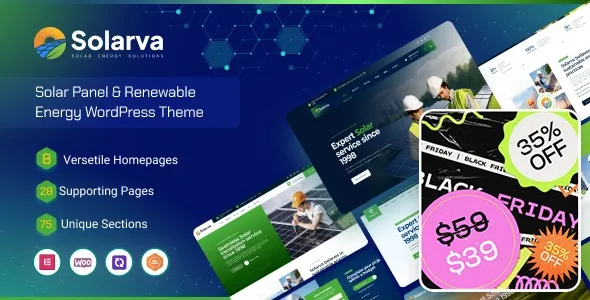
Solarva Ecology and Solar Energy Theme is designed for that exact gap. It gives you a purpose-built WordPress theme structure for solar installers, ecology organizations, sustainability consultancies, and green tech services. If your priority is launching a credible site quickly without fighting layout decisions on every page, this theme is a practical starting point.
If you are evaluating a Solarva Ecology and Solar Energy Theme download, it helps to know what it enables, where it saves time, and where you still need to make smart decisions during setup.
The core value is speed to a coherent, industry-appropriate site. Not just “a homepage,” but a consistent set of templates that support how solar and ecology businesses sell: service explanations, project credibility, and lead capture.
Most generic multipurpose themes can be bent into shape, but you end up designing from scratch anyway. Solarva focuses on patterns that are hard to fake with a blank theme: service grids that read clearly, project sections that feel like case studies, and calls-to-action that do not interrupt the content flow.
In practice, this means you can spend your time on the parts that build E-E-A-T signals. Add real project photos, certifications, team bios, and location coverage pages. The theme’s job is to keep the structure steady so those trust elements feel intentional instead of bolted on.
Solar sites usually need more than “pretty sections.” They need a repeatable way to publish service pages, explain incentives, show installation steps, and answer pre-sales questions. Solarva is most useful when you are building a small set of strong pages and then expanding into supporting content.
A sensible workflow looks like this:
This is also where download intent matters. People searching for a Solarva Ecology and Solar Energy Theme download are usually trying to ship a site quickly. The theme supports that, but you still need to supply the proof and specificity that Google and customers look for.
The biggest mistake is treating the demo as your final site. Demo content is useful for layout, but it often creates thin, duplicated intent pages once you start indexing. Search engines do not reward “service page templates” that read like placeholders.
Another frequent issue is overloading the homepage. Solar businesses have a lot to say, but you do not need every section visible above the fold. Use the theme’s structure to create clean routing and let service pages carry the detail.
Also watch your media. Solar sites rely on visuals, but oversized images are a common reason for slow mobile performance. Compress project photos and keep sliders minimal. A fast, stable page improves crawl efficiency and reduces bounce, which matters when you are trying to get new pages indexed quickly.
With a general-purpose theme, you usually spend time solving the same problems repeatedly: how to present services, how to show credibility, how to structure a project story, how to keep calls-to-action consistent. Solarva reduces that decision fatigue.
It can also help avoid a subtle duplicate-intent trap. Many sites built with generic templates end up with near-identical pages that only swap a few words. With a solar-focused theme, it is easier to design pages around distinct user intents such as “residential installation,” “commercial solar,” “maintenance,” and “battery storage,” rather than cloning one layout four times.
If your goal is a clean, indexable site architecture, start with unique page purposes. Then use the theme to keep design consistent while content stays meaningfully different.
The theme itself is only one part of performance, but it influences how much you rely on heavy page effects. In real deployments, the speed killers are usually avoidable: multiple sliders, uncompressed hero images, and too many external fonts.
For better crawl prioritization, keep your key pages shallow. Important pages should be reachable in one or two clicks from the homepage. Solarva’s structured navigation and section patterns can support this, but you still need to plan your menus and internal links.
If you publish educational content, link it back to services and projects. This creates relevance clusters that help indexing. A Solarva Ecology and Solar Energy Theme download gets you the framework, but internal linking is what turns a framework into a discoverable site.
If you are preparing a Solarva Ecology and Solar Energy Theme download, treat it like any production theme deployment. A careful install prevents the most common breakages.
After installation, create a short list of “index-first” pages. Homepage, core services, contact, and one credibility page like projects or about. Then expand into supporting content.
A niche theme accelerates layout, but it can also steer your site toward a particular visual language. If your brand is intentionally minimal or highly technical, you may need more customization than expected to avoid looking like other solar sites.
Also, do not overestimate what a theme does. Solarva can present services and projects well, but it does not replace operational content. You still need accurate specs, financing details, warranty explanations, and location-specific pages if you serve multiple regions.
Finally, be careful with page duplication. If you create separate pages for “solar panels,” “PV panels,” and “solar system,” but the content is nearly identical, you risk competing with yourself. Use one strong canonical page per intent and support it with related, clearly different content.
It is strongest for service-led sites that need leads, quotes, or consultations. You can publish educational content too, but the theme’s main advantage is structured service and project presentation.
Yes, if your services map to similar patterns: projects, impact reporting, consulting, or environmental programs. You may want to adjust imagery and color choices to avoid overly “solar installer” cues.
Replace hero headlines, service descriptions, and any project or testimonial blocks immediately. Those areas are most visible to users and most likely to create thin, duplicated pages if left unchanged.
Make each service page answer a distinct question. Use different proof, different FAQs, and different internal links. Avoid cloning the same layout with minor wording changes. This is one of the most important steps after a Solarva Ecology and Solar Energy Theme download.
It depends more on your choices than the theme name. Large images, sliders, and too many add-ons are the usual causes. Keep assets lean and limit heavy visual effects on mobile.
Publish your core pages, connect forms, add real project photos, write a strong about page with credentials, and set up internal links between services and projects. Then submit your key URLs for indexing through your preferred search console workflow.
If you want a site that looks credible in the clean energy space without designing every template from zero, Solarva is a reasonable choice. It is most effective when you treat it as a structure for unique content, not a shortcut that replaces expertise.
For teams moving quickly, a Solarva Ecology and Solar Energy Theme download makes sense when you already have real photos, service details, and a plan for page intent. If you do not, build that content plan first. The theme will amplify what you publish, but it cannot invent trust.
When you are ready to proceed, complete your Solarva Ecology and Solar Energy Theme download, install it on a clean staging setup, and publish a small set of high-quality pages before expanding. That approach tends to index faster and avoids the duplicate-intent issues that slow growth later.
For Installation or Technical Related Queries check FAQ Page
Our Website also have older version of the plugins and theme. So you can test your website with compatible plugins or Rollback plugins in case of any bug or compatibility issues.
UNZIP the file downloaded from our website, the zip file might contain other files like Template, Docs etc. So make sure you upload correct file.
To Install Plugins:
To Install Themes:
Sometimes theme/plugin might ask you for license, just ignore. Because we have already activated the product with out legal key, which we have purchased for you.
When a New version appears and is available on our website you’ll find it in My Account “Downloads section”.
For Destination Already Exists error:
Make sure to Delete the version of theme/plugin that you have on your website before you upload our premium version, it might cause a conflict during installation and activation.
Or WordPress will say “destination already exists” when trying to upgrade using a zip file and will fail to upgrade the theme or plugin.
If you faced “destination already exists” error installing this Plugin will solve the issue – Easy Theme and Plugin Upgrades.
Our business hours are Monday to Saturday from 10:00 am to 8:00 pm, any request made outside these hours will be answered until next business day. Support and Updates can take 24 to 48 hours. Support provided is for product installation. Please be aware of possible time zone differences when waiting for our reply.
If you have any Queries, Feel Free to Contact Us:
Abuse Warning:
For more information please read FAQs & Terms of Use.