Get upto 60% Discount

Get upto 60% Discount
Unlimited Access:
$10.00 Original price was: $10.00.$2.99Current price is: $2.99.
Available Download Files

Tired of Restrictions?
Go Unlimited!
Join Our Membership to Download 8400+ Plugins & Themes

In many industries, customers do not want to fill out long quotation forms or wait for email replies. They prefer instant messaging. A quick WhatsApp conversation often feels faster, more personal, and more trustworthy than traditional checkout flows. For stores selling custom products, bulk quantities, or negotiable services, direct messaging can significantly increase response rates and close deals faster.
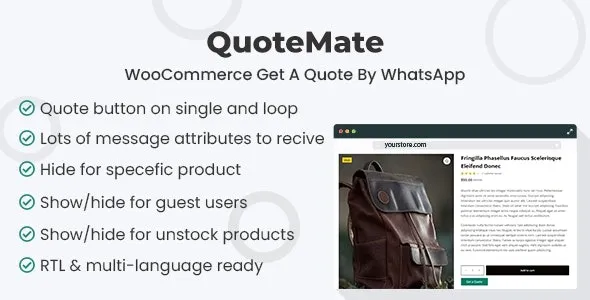
QuoteMate – WooCommerce Get A Quote By WhatsApp is designed to bridge WooCommerce product pages with WhatsApp-based quotation requests. Instead of relying solely on cart checkout or email forms, the plugin enables customers to initiate structured quote discussions directly through WhatsApp.
WordPress operates under the GNU General Public License. WooCommerce extensions that integrate via PHP hooks and filters typically align with GPL principles. QuoteMate follows this framework, meaning its core functionality respects GPL standards.
GPL allows users to inspect the source code, modify message templates, customize quote triggers, and deploy the plugin across multiple WordPress installations. The license ensures flexibility, transparency, and long-term control.
When a plugin connects ecommerce systems with messaging platforms, transparency is important. GPL ensures developers can review how product data is passed, how messages are generated, and how user interactions are handled within the WooCommerce structure.
After activation, the plugin typically adds a Get a Quote via WhatsApp button on product pages. Instead of adding items to the cart, customers can initiate a WhatsApp message that includes predefined product information.
Message templates may automatically include product name, quantity, SKU, or custom attributes. This reduces manual typing for customers and ensures store owners receive structured enquiry details.
Once the message is sent, communication continues directly within WhatsApp. This enables real-time negotiation, clarification of requirements, and faster closing of sales without traditional checkout steps.
Ensure WordPress is updated to the latest stable release.
Confirm WooCommerce is installed and activated.
Verify server compatibility including supported PHP versions.
Log into the WordPress dashboard.
Navigate to Plugins → Add New → Upload Plugin.
Select the QuoteMate ZIP file.
Click Install Now and wait for installation to complete.
Click Activate Plugin.
Confirm there are no dashboard error messages or conflicts.
Access the plugin settings panel.
Enter the WhatsApp number receiving quote requests.
Customize the message template format.
Define whether the button replaces or supplements Add to Cart.
Open a product page.
Click the WhatsApp quote button.
Verify the message contains correct product details.
Confirm the WhatsApp redirection works on both desktop and mobile devices.
The WhatsApp quote button should integrate smoothly with the active theme. Test button placement, mobile responsiveness, and styling consistency.
If the store uses both direct checkout and quote messaging, verify that pricing visibility and cart functionality operate as intended. Hybrid sales models should be tested carefully before production deployment.
Updates typically address compatibility with new WooCommerce releases, improvements to message handling logic, minor bug fixes, and security refinements.
Before updating, verify compatibility with:
Current WordPress version
Installed WooCommerce version
Server PHP version
GPL allows redistribution of the plugin, but responsible usage requires monitoring version consistency and testing after updates.
Improved compatibility with latest WooCommerce updates
Enhanced WhatsApp message formatting logic
Resolved minor product data transmission inconsistencies
Mobile responsiveness improvements
Security and stability refinements
QuoteMate – WooCommerce Get A Quote By WhatsApp enables WooCommerce stores to convert product interest into direct messaging conver
For Installation or Technical Related Queries check FAQ Page
Our Website also have older version of the plugins and theme. So you can test your website with compatible plugins or Rollback plugins in case of any bug or compatibility issues.
UNZIP the file downloaded from our website, the zip file might contain other files like Template, Docs etc. So make sure you upload correct file.
To Install Plugins:
To Install Themes:
Sometimes theme/plugin might ask you for license, just ignore. Because we have already activated the product with out legal key, which we have purchased for you.
When a New version appears and is available on our website you’ll find it in My Account “Downloads section”.
For Destination Already Exists error:
Make sure to Delete the version of theme/plugin that you have on your website before you upload our premium version, it might cause a conflict during installation and activation.
Or WordPress will say “destination already exists” when trying to upgrade using a zip file and will fail to upgrade the theme or plugin.
If you faced “destination already exists” error installing this Plugin will solve the issue – Easy Theme and Plugin Upgrades.
Our business hours are Monday to Saturday from 10:00 am to 8:00 pm, any request made outside these hours will be answered until next business day. Support and Updates can take 24 to 48 hours. Support provided is for product installation. Please be aware of possible time zone differences when waiting for our reply.
If you have any Queries, Feel Free to Contact Us:
Abuse Warning:
For more information please read FAQs & Terms of Use.