Get upto 60% Discount

Get upto 60% Discount
Unlimited Access:
$10.00 Original price was: $10.00.$2.99Current price is: $2.99.

Tired of Restrictions?
Go Unlimited!
Join Our Membership to Download 8400+ Plugins & Themes

TL;DR:
In this full guide to Microthemer WordPress Visual CSS Editor, we’ll break down how it works, its best features, pricing, performance, pros/cons, alternatives, and a hands-on tutorial including an example CSS snippet.
If you’ve ever wished you could visually style any part of your WordPress site like header, buttons, forms, WooCommerce layouts without digging into theme files, Microthemer is built exactly for that.
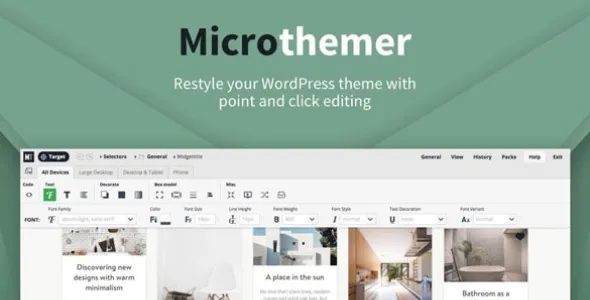
Microthemer WordPress Visual CSS Editor combines a drag-and-style interface with full developer-grade CSS controls, so you can tweak spacing, fonts, colors, animations, Flexbox layouts, and even CSS Grid in real time. In this in-depth guide, we’ll review its features, pricing, performance, and how it compares to CSS Hero and YellowPencil.
Microthemer is a live, visual CSS editor plugin for WordPress that lets you target any element, adjust its styling visually, and instantly preview the results.
According to WordPress.org, it is one of the most advanced visual CSS tools available, offering full CSS property support, responsive breakpoints, and real-time editing inside your WordPress dashboard.
A visual CSS editor powerful enough for developers, but intuitive enough for beginners.
It’s actively maintained, and well-reviewed across WordPress marketplaces, Product Hunt, and independent blogs.
If you’re looking to download Microthemer for quick design control, or you want the full Microthemer Pro download for advanced CSS work, its capabilities go far beyond typical visual design plugins.
Below is a breakdown of Microthemer’s most important features and why they matter.
Themeover also offers an Amender tool for quick content edits.
Most CSS or design plugins offer limited features. Microthemer stands out because:
Below is a simple 7-step guide to get started.
css:
.elementor-button {
padding: 14px 28px;
border-radius: 6px;
background-color: #0073e6;
}
.elementor-button:hover {
background-color: #004ea8;
}
Microthemer loads its interface only in the backend and applies optimized CSS on the frontend.
Many users looking for “Microthemer Pro download” compare it with CSS Hero or YellowPencil.
| Feature | Microthemer | CSS Hero | YellowPencil |
|---|---|---|---|
| Price | Varies; annual/lifetime | Annual | One-time |
| Best For | Designers & developers | Beginners | Visual designers |
| Learning Curve | Medium | Easy | Easy |
| Full CSS Support | ✔ (incl. Grid/Flexbox) | ✖ partial | ✖ limited |
| Integrations | Elementor, Beaver, Oxygen | Elementor, Divi | Most themes/builders |
| Code Editor | ✔ | ✖ | ✖ |
| Export CSS | ✔ | Partial | ✔ |
| Deactivate Safe? | ✔ | ✔ | ✔ |
| Advanced Layout Editing | ✔ | Limited | Limited |
Using a visual CSS editor can affect site performance if overused. Here’s what to keep in mind:
Microthemer’s breakpoint system helps ensure the site looks good across screen sizes.
It styles elements visually but does not modify layout or content like Elementor or Beaver Builder.
Yes, but knowing CSS basics greatly improves results.
Yes — it creates clean, readable CSS that you can move to child themes.
Fully compatible.
Minimal impact — only a small CSS file loads on the frontend.
Yes — styles remain intact.
Annual and lifetime licenses are available, including agency/unlimited options.
CSS Hero and YellowPencil are simpler visual editors.
Yes — the built-in code editor supports full custom CSS coding.
Yes — and this is one of its biggest advantages.
For Installation or Technical Related Queries check FAQ Page
Our Website also have older version of the plugins and theme. So you can test your website with compatible plugins or Rollback plugins in case of any bug or compatibility issues.
UNZIP the file downloaded from our website, the zip file might contain other files like Template, Docs etc. So make sure you upload correct file.
To Install Plugins:
To Install Themes:
Sometimes theme/plugin might ask you for license, just ignore. Because we have already activated the product with out legal key, which we have purchased for you.
When a New version appears and is available on our website you’ll find it in My Account “Downloads section”.
For Destination Already Exists error:
Make sure to Delete the version of theme/plugin that you have on your website before you upload our premium version, it might cause a conflict during installation and activation.
Or WordPress will say “destination already exists” when trying to upgrade using a zip file and will fail to upgrade the theme or plugin.
If you faced “destination already exists” error installing this Plugin will solve the issue – Easy Theme and Plugin Upgrades.
Our business hours are Monday to Saturday from 10:00 am to 8:00 pm, any request made outside these hours will be answered until next business day. Support and Updates can take 24 to 48 hours. Support provided is for product installation. Please be aware of possible time zone differences when waiting for our reply.
If you have any Queries, Feel Free to Contact Us:
Abuse Warning:
For more information please read FAQs & Terms of Use.