Get upto 60% Discount

Get upto 60% Discount
Unlimited Access:
$10.00 Original price was: $10.00.$2.99Current price is: $2.99.
Available Download Files

Tired of Restrictions?
Go Unlimited!
Join Our Membership to Download 8400+ Plugins & Themes

Most IT services sites fail in the same places. The homepage looks fine, but the service pages are thin, the contact path is noisy, and the “trust” elements feel bolted on. When I first deployed the Itco IT Solutions & Services WordPress Theme for a small MSP-style business, the win was not a flashy layout. It was that the theme already expects you to publish services, case studies, and credibility signals in a predictable structure.
That structure matters for indexing and for conversions. Google can understand a site faster when each service has its own page, consistent internal links, and supporting content that is not duplicated across templates. Users also move faster when the theme’s sections are aligned with how IT buyers evaluate a provider: capabilities, proof, process, and a clear next step.
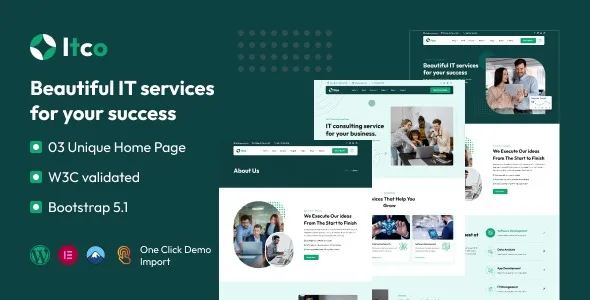
Itco is best used as a foundation for an IT solutions brand that sells services, not as a general-purpose blog skin. The theme supports a services-first information architecture, usually including service listings, detail pages, and sections for testimonials, team, and portfolio or case studies.
Where teams get value is speed to a coherent site. You can publish a service page that looks “complete” without inventing the layout each time. But the theme does not write your service differentiation for you. You still need unique copy, real project examples, and specific service deliverables to avoid duplicate intent across pages like “IT Support”, “Managed Services”, and “Help Desk”.
In practice, we used Itco to standardize page sections so each service page could be produced with a repeatable editorial checklist. That made the site easier to crawl and easier to expand without turning into a template farm.
On many IT themes, the demo imports encourage a long homepage with every section under the sun. It looks impressive, but it can hide the pages you actually want indexed. I have seen service pages end up as short stubs because the homepage carries all the content.
With Itco, you will get better results if you treat the homepage as navigation and proof, then push depth into individual service pages and a small set of supporting pages (industries, case studies, pricing approach, onboarding). That is how you avoid duplicate-intent pages that compete with each other in search.
Install on staging if you can. Theme imports change menus, widgets, and sometimes front page settings. I have broken a live navigation before by importing demo content into production without checking what it overwrote.
In WordPress, go to Appearance > Themes > Add New > Upload Theme. Upload the theme zip, install, and activate. If you are doing an Itco IT Solutions & Services WordPress Theme download from a vendor package, keep the full package handy because it often includes child theme and required plugins.
After activation, you will likely be prompted to install companion plugins (page builder, demo importer, sliders, forms, and so on). Install only what you will use. Every plugin adds update surface area and potential front-end weight.
Demo import is useful for speed, but it is also the fastest way to ship duplicate content. If you import, immediately replace placeholder service text, images, and headings. Also check that the imported pages are not indexed until you clean them up.
Set Settings > Permalinks to a clean structure (usually post name). Confirm your Home and Blog pages in Settings > Reading. Then build menus. If you build layouts first and permalinks later, you can end up with messy redirects and internal links that need cleanup.
Before publishing, check mobile header behavior, contact form delivery, and that service pages have unique titles and meta descriptions. I also recommend verifying that your theme fonts are loaded efficiently and that images are not oversized from demo assets.
The theme is most effective when you use it to enforce clarity. Here is the pattern that worked well for us when scaling beyond a brochure site.
Create one page per core service, then make each page answer a distinct intent. For example, “Managed IT Services” should focus on ongoing outcomes and SLAs, while “IT Support” can focus on response, ticketing, and remote help. Avoid writing the same “we provide reliable support” paragraph across both.
Even two or three real case studies can carry a lot of E-E-A-T weight if they include constraints, approach, and measurable results. Itco’s layouts make it easy to present these, but the credibility comes from specifics.
Use the theme’s testimonial and certification blocks, but do not paste identical trust blurbs on every page. Instead, tailor trust elements to the service. Security pages should feature security process and tooling. Cloud migration pages should show migration methodology and rollback planning.
If you have built IT sites with a generic multipurpose theme, you know the pain. You can make anything, but nothing is guided. Itco is narrower in scope, which reduces editorial decisions. That is a benefit when multiple people publish pages and you want consistent layouts.
Compared to building from a blank page builder template, Itco tends to reduce “layout drift” over time. We saw fewer cases where one editor created a service page with three sections and another created one with twelve. Consistency helps users and it helps Google understand your site’s hierarchy.
The trade-off is that you will spend time learning the theme’s preferred components. If you fight it and rebuild everything from scratch, you lose the advantage of using a purpose-built IT theme in the first place.
Many IT themes ship with heavy home sections, sliders, counters, and animation libraries. The theme can still be fast, but you need restraint.
What helped on a real deployment was removing the slider entirely, using static hero sections, and limiting icon fonts to what we actually used. We also replaced demo images with properly sized WebP assets. That reduced layout shift and improved mobile interaction metrics.
From an indexing perspective, faster pages get crawled more reliably, especially on sites that publish new service locations, blog posts, and case studies over time. If you plan to scale content, start with a lean build so you are not refactoring later.
This is the classic mistake. Demo imports create pages with generic headings that can be indexed quickly. If those pages remain, they dilute your topical focus. After import, delete unused demo pages or set them to draft, and make sure your sitemap only includes real content.
It is tempting to link every CTA to the same section on the homepage. That can work for users, but it weakens internal linking signals. Give each service page a real contact path, ideally to a dedicated contact page or a service-specific consultation form.
Itco provides structure, not strategy. You still need a clear URL structure, unique page titles, schema where appropriate (organization, services, reviews if legitimate), and a plan for internal links. The theme will not prevent cannibalization if you publish overlapping services with near-identical copy.
It fits MSPs and IT consultancies best because the layouts assume service packages, support, and credibility blocks. A general agency can still use it, but you may spend more time adapting sections that are clearly IT-oriented.
No. Demo import is helpful if you want the exact section layouts quickly. If you already have a sitemap and copy, building pages manually can be cleaner and avoids cleaning up placeholder content later.
Check menus, homepage assignment, and whether any demo pages were published. Then verify mobile header behavior and that your forms send email correctly. Those are the first things that tend to break quietly.
Yes, if you vary page intent and supporting sections. Use different proof points, different FAQs per service, and different internal links. Keep the layout consistent, but make the content unique and specific.
Set a tight typography system, swap iconography, and standardize image style. Then rewrite headings and section intros so they sound like your team. Visual tweaks help, but unique copy and real case studies are what make the site feel original.
For Installation or Technical Related Queries check FAQ Page
Our Website also have older version of the plugins and theme. So you can test your website with compatible plugins or Rollback plugins in case of any bug or compatibility issues.
UNZIP the file downloaded from our website, the zip file might contain other files like Template, Docs etc. So make sure you upload correct file.
To Install Plugins:
To Install Themes:
Sometimes theme/plugin might ask you for license, just ignore. Because we have already activated the product with out legal key, which we have purchased for you.
When a New version appears and is available on our website you’ll find it in My Account “Downloads section”.
For Destination Already Exists error:
Make sure to Delete the version of theme/plugin that you have on your website before you upload our premium version, it might cause a conflict during installation and activation.
Or WordPress will say “destination already exists” when trying to upgrade using a zip file and will fail to upgrade the theme or plugin.
If you faced “destination already exists” error installing this Plugin will solve the issue – Easy Theme and Plugin Upgrades.
Our business hours are Monday to Saturday from 10:00 am to 8:00 pm, any request made outside these hours will be answered until next business day. Support and Updates can take 24 to 48 hours. Support provided is for product installation. Please be aware of possible time zone differences when waiting for our reply.
If you have any Queries, Feel Free to Contact Us:
Abuse Warning:
For more information please read FAQs & Terms of Use.