Get upto 60% Discount

Get upto 60% Discount
Unlimited Access:
$15.00 Original price was: $15.00.$4.99Current price is: $4.99.
Available Download Files

Tired of Restrictions?
Go Unlimited!
Join Our Membership to Download 8400+ Plugins & Themes

Most travel websites fail in the same place. They look fine, but the visitor cannot move from “I like this trip” to “I can reserve it” without emailing, waiting, and losing momentum.
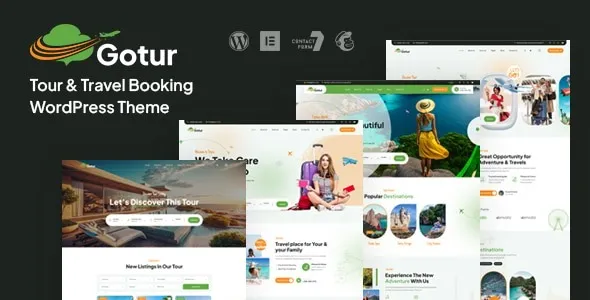
Gotur Tour & Travel Booking WordPress Theme is typically downloaded for one reason: to turn tour listings into a structured booking experience that feels consistent across pages, devices, and trip types. If you are searching for a Gotur Tour & Travel Booking WordPress Theme download, you are probably trying to get an install-ready foundation that already understands itineraries, tour detail pages, and conversion steps.
It is also a practical choice when you do not want to stitch together a general-purpose theme plus several booking-related add-ons and then spend days aligning templates and styles.
The core value of Gotur Tour & Travel Booking WordPress Theme is not a long feature checklist. It is the way it narrows your setup decisions so you can publish trips quickly without reinventing page layouts and user flow.
After activation, most site owners aim for a repeatable pattern: add a tour, present the essentials (overview, itinerary, inclusions, pricing, availability), and guide the visitor toward a booking or inquiry action without sending them through unrelated blog navigation.
This matters because tour content is not just “posts.” You often need consistent sections, predictable formatting, and a layout that does not break when you add the tenth or hundredth trip. A booking-focused theme reduces the amount of custom templating you would otherwise do in the block editor or a page builder.
In practice, the biggest time-saver shows up later. When you update pricing, season dates, or trip descriptions, you are not editing a one-off landing page each time. You are working within a structure that keeps the site coherent as it grows.
A safe workflow starts with getting the correct package and knowing what WordPress will do with it. Most users complete a Gotur Tour & Travel Booking WordPress Theme download as a ZIP file, then install it from the WordPress dashboard.
In your admin area, go to Appearance → Themes → Add New → Upload Theme, then upload the ZIP and click Activate. If you are using a child theme (recommended when you plan to edit templates or add custom CSS), install the parent theme first, then the child theme.
Immediately after you activate Gotur Tour & Travel Booking WordPress Theme, expect your site’s header, typography, and page templates to change. Many travel themes also prompt you to install companion plugins or import demo content. If you choose to import a demo, do it on a fresh site or staging environment first so you do not overwrite menus, widgets, or existing pages.
First, confirm your homepage and menu assignments. Many “it looks broken” reports are simply the wrong homepage set under Settings → Reading or an unassigned primary menu.
Second, verify permalinks. If tour detail pages or category pages return 404 errors after setup, go to Settings → Permalinks and click Save to flush rewrite rules. This small step fixes a surprising number of “pages not found” issues after you download and install Gotur Tour & Travel Booking WordPress Theme.
Most people do not struggle with installation. They struggle with alignment between demo expectations and their real content.
Demo tours are written to look complete. Your real tours might not have a detailed itinerary yet, or you may not know what to list as inclusions. If your pages feel “empty” after activation, it is usually a content completeness issue, not a theme issue. Decide early on a minimum viable tour template (duration, highlights, meeting point, cancellation policy, and at least a basic itinerary) and apply it consistently.
A common mistake is maintaining pricing in multiple places: once in the tour description, again in a pricing table image, and again in a booking form. This creates mismatches that users notice immediately. If Gotur Tour & Travel Booking WordPress Theme integrates with a booking workflow, keep pricing and availability in the booking fields and treat the page copy as explanatory, not authoritative.
Some users download Gotur Tour & Travel Booking WordPress Theme expecting it to be a lightweight brochure theme. If your site only needs a handful of static pages (About, Contact, a simple “Tours” page with inquiry forms), a booking-first theme can feel like extra structure. In that case, you may be better served by a general theme plus a form plugin and a clean listing layout.
On the other hand, if you plan to publish many tours, update seasons, or run multiple destinations, a dedicated travel theme usually pays off quickly.
It is a WordPress theme. Some setups may recommend companion plugins for demo import, page building, or booking-related elements, but the main download installs under Appearance → Themes.
Install and activate the theme, then set your homepage and menu locations. If you import demo content, do it on a fresh install or staging site first. Finally, save permalinks once to avoid 404 errors on newly created pages.
Posts and pages remain in WordPress, but they may display with different templates and styling. If your current site relies on a different page builder or heavily customized templates, plan time to adjust layouts and rebuild key pages to match the new structure.
Demos often use complete, carefully formatted content and specific plugin configurations. Differences usually come from missing companion plugins, unimported demo settings, or tours that do not yet have structured sections like itinerary and inclusions.
Yes, but consider your workflow. If you expect frequent updates to dates, pricing, and trip details, the structure helps. If you only need a simple catalog and inquiries, a lighter setup may be easier to maintain.
Usually, yes. You can skip demo import and build pages manually, but be prepared to spend more time creating consistent tour layouts. Many users choose a Gotur Tour & Travel Booking WordPress Theme download specifically to reduce that manual templating work, so importing a minimal demo can be a practical starting point.
If you are comparing options while planning a Gotur Tour & Travel Booking WordPress Theme download, focus less on screenshots and more on whether you want your tours managed as repeatable, structured content. That single decision determines whether this theme feels like a shortcut or an extra layer.
For teams that publish trips regularly, want consistent tour pages, and prefer a booking-oriented site flow, a Gotur Tour & Travel Booking WordPress Theme plugin download is often the most direct path to an install-ready travel website.
For Installation or Technical Related Queries check FAQ Page
Our Website also have older version of the plugins and theme. So you can test your website with compatible plugins or Rollback plugins in case of any bug or compatibility issues.
UNZIP the file downloaded from our website, the zip file might contain other files like Template, Docs etc. So make sure you upload correct file.
To Install Plugins:
To Install Themes:
Sometimes theme/plugin might ask you for license, just ignore. Because we have already activated the product with out legal key, which we have purchased for you.
When a New version appears and is available on our website you’ll find it in My Account “Downloads section”.
For Destination Already Exists error:
Make sure to Delete the version of theme/plugin that you have on your website before you upload our premium version, it might cause a conflict during installation and activation.
Or WordPress will say “destination already exists” when trying to upgrade using a zip file and will fail to upgrade the theme or plugin.
If you faced “destination already exists” error installing this Plugin will solve the issue – Easy Theme and Plugin Upgrades.
Our business hours are Monday to Saturday from 10:00 am to 8:00 pm, any request made outside these hours will be answered until next business day. Support and Updates can take 24 to 48 hours. Support provided is for product installation. Please be aware of possible time zone differences when waiting for our reply.
If you have any Queries, Feel Free to Contact Us:
Abuse Warning:
For more information please read FAQs & Terms of Use.