Exclusive Sale! Grab Flat 10% OFF* | On All Products

Faren Architecture and Interior Design WordPress Theme

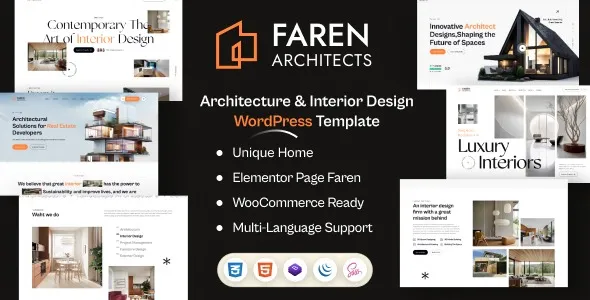
Faren - Architecture and Interior Design WordPress Theme

  Unlimited Access:

Original price was: $10.00.Current price is: $2.99.

Or

  Available Download Files

Tired of Restrictions?
Go Unlimited!

Join Our Membership to Download 8400+ Plugins & Themes

Membership Banner image for ultraplugins store

The Architecture of Faren: Why Minimalist Code Matters for High-Resolution Sites

When a client asks for an “Architecture” site, they aren’t asking for a blog; they are asking for a digital showroom. The friction usually starts when you try to balance massive 4K interior renders with Google’s Core Web Vitals. The Faren Architecture and Interior Design WordPress Theme is one of the few Bootstrap 5 frameworks I’ve used that doesn’t feel like it’s fighting the images.

Most people searching for a Faren Architecture and Interior Design WordPress Theme download focus on the “270+ pages,” but the real value is in the SASS-based styling. Unlike themes that bloat your header with 5,000 lines of inline CSS, Faren uses a modular approach. This means your “Oswald” typography and “Slick Slider” animations load in a logical sequence, preventing that “broken page” look during the first two seconds of a visit.

Beyond the Demo: Building for “Spatial Depth”

Architecture is about layers, and Faren’s integration of Isotope Filtering and WOW Animations mimics this. In my experience, the biggest mistake designers make is over-animating. Faren allows for “Quiet Design” where elements slide in only when the user’s intent (scrolling) is clear.

I’ve moved several firms from “custom-built” sites to Faren because of the Faren Builder. It separates the “Global Header” (the business logic) from the “Page Header” (the artistic logic). This allows you to have a transparent, disappearing header for your “Minimalist House” project and a solid, traditional header for your “Company News” page without writing a single conditional PHP tag.

2 A.M. Developer “Battle Notes” for Faren Deployments

If you are currently unzipping your Faren download, keep these three “insider” warnings on your desk:

  • The “Double Padding” Trap: Faren’s Bootstrap 5 containers have native gutter padding. If you add Elementor’s default column padding on top of that, your architectural “Grid” will look off-center by exactly 15 pixels. Pro Tip: Set your Elementor column widgets to “No Gap” and let Faren’s CSS handle the white space. It keeps the “blueprint” alignment perfect.
  • The Slick Slider “Z-Index” Ghost: If you use the “Elegant Home” demo, you might find that your mobile menu occasionally slides under the hero slider. This is a common z-index conflict between the Slick Slider and the Redux header. Don’t waste time in the settings—just add z-index: 9999 !important; to the .faren-header-area in your child theme.
  • Image Metadata Bloat: Faren’s “Pixel Perfect” layouts are sensitive. If you upload images with “Original” metadata (Exif data), the Isotope Filter can sometimes miscalculate the masonry height, leaving a giant gap in your gallery. Always run your renders through a “Strip Metadata” tool before uploading.

Strategic Workflow: Optimizing for “Design Intent”

If you are looking for a Faren Architecture and Interior Design WordPress Theme download, treat it as a framework, not a finished product.

  1. Typography Hierarchy: Faren defaults to Oswald for titles. It is a “loud” font. If your firm’s brand is “Quiet Luxury,” drop the font-weight to 300 in the Faren Options > Typography panel immediately.
  2. The Child Theme Requirement: Faren updates frequently. If you make CSS tweaks to the main theme, you will lose them. The download includes a faren-child.zip, install it first.
  3. Performance Check: Disable the “Magnific Popup” for mobile users. A lightboxes on a 6-inch screen is a UX nightmare. Let the mobile users scroll the clean “Blog Layout” instead.

Technical Specifications for High-Traffic Portfolios

To maintain the “GTMetrix Speed” that Faren is known for, your server stack needs to be modernized.

    • PHP Environment: PHP 8.1+ is mandatory for the Bootstrap 5 logic.
    • Memory Limit: 512MB. High-end interior design sites use “heavy” Elementor widgets; 256MB will cause the editor to crash during a long “Save” process.
  • Max Input Vars: 3000. This ensures the 270+ inner page templates don’t “clip” during the demo import process.

Frequently Asked Questions

  • Can I use Faren for a Real Estate site?
    • Yes, it’s marketed as “Real Estate Friendly,” but it’s an Architect’s theme at heart. It doesn’t have a native MLS integration, so you’ll be manually adding properties as “Projects.”
  • How do I fix the “Primary Color” not changing?
    • Go to Dashboard > Faren Options > General. If it doesn’t change, clear your “Static CSS” in the Elementor > Tools menu. The theme’s SASS needs to re-generate.
  • Is Faren ready for a multi-language agency?
    • It’s fully PO/MO compatible. I’ve deployed it with Polylang for European firms and the “Slick Slider” handles RTL (Right-to-Left) transitions without any extra code.
  • Does it include the “All illustration” files?
    • Yes, the download usually includes the vector assets used in the demos. This is great for maintaining the “Iconography” consistency across your site.
  • Why is my “One Click Demo” failing?
    • Check your upload_max_filesize. The demo content for Faren is massive because of the 270+ pages. Set it to 64M or higher.
  • Is the “Header Builder” compatible with Elementor Pro?
    • It uses its own Faren Builder, which is a “light” version of a header builder. If you have Elementor Pro, I suggest disabling the Faren Header in the Theme Options and using the Pro Theme Builder for more granular control.

For Installation or Technical Related Queries check FAQ Page

Our Website also have older version of the plugins and theme. So you can test your website with compatible plugins or Rollback plugins in case of any bug or compatibility issues.

UNZIP the file downloaded from our website, the zip file might contain other files like Template, Docs etc. So make sure you upload correct file.

To Install Plugins:

  • Download the latest .ZIP file from UltraPlugins Store.
  • Log into your WordPress site.
  • Go to Plugins > Add New.
  • Click the “Upload Plugin” button at the top of the page.
  • Select the zip file with the new plugin version to install.
  • Click the “Install Now” button.


To Install Themes:

  • Download the latest .ZIP file from UltraPlugins Store.
  • Some Theme needs to be extracted before installing & some don’t. So extract the theme, main theme and child should be inside.
  • Log into your WordPress site.
  • Go to Appearance > Themes.
  • Click the “Add New” button at the top of the page.
  • Click the “Upload Theme” button at the top of the page.
  • Select the zip file with the new theme version to install.
  • Click the “Install Now” button.


Sometimes theme/plugin might ask you for license, just ignore. Because we have already activated the product with out legal key, which we have purchased for you.

When a New version appears and is available on our website you’ll find it in My Account “Downloads section”.

For Destination Already Exists error:

Make sure to Delete the version of theme/plugin that you have on your website before you upload our premium version, it might cause a conflict during installation and activation.

Or WordPress will say “destination already exists” when trying to upgrade using a zip file and will fail to upgrade the theme or plugin.

If you faced “destination already exists” error installing this Plugin will solve the issue – Easy Theme and Plugin Upgrades.

Our business hours are Monday to Saturday from 10:00 am to 8:00 pm, any request made outside these hours will be answered until next business day. Support and Updates can take 24 to 48 hours. Support provided is for product installation. Please be aware of possible time zone differences when waiting for our reply.

If you have any Queries, Feel Free to Contact Us: 


Abuse Warning:

  • Please note that accounts are monitored and redistribution of our content is not allowed and will not be tolerated.
  • Our system may detect patterns of downloading items from non-end users outside of our fair use policy.
  • Any violation of our terms of use will result in permanent account suspension and no refunds will be issued.
  • Subscriptions can be cancelled at any time from your account control panel.
  • Downloads are strictly subject to our fair use policy.


For more information please read FAQs & Terms of Use.
Related Products
Select your currency