Get upto 60% Discount

Get upto 60% Discount
Unlimited Access:
$10.00 Original price was: $10.00.$2.99Current price is: $2.99.
Available Download Files

Tired of Restrictions?
Go Unlimited!
Join Our Membership to Download 8400+ Plugins & Themes

Most HVAC sites fail for predictable reasons. The design looks fine, but the structure does not support how people actually book service. Visitors want to confirm you serve their area, understand what you repair, and request a visit without hunting through menus.
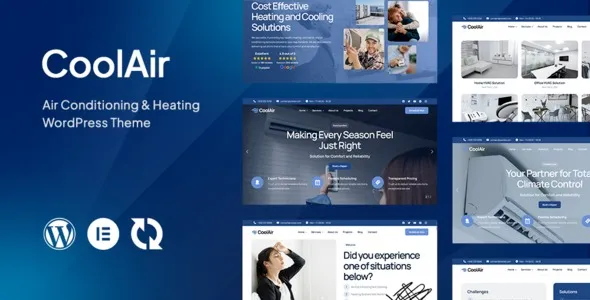
Coolair Air Conditioning & Heating HVAC WordPress Theme is built around that service-first journey. It gives you page layouts and components that match real HVAC intent: emergency calls, seasonal tune ups, installation estimates, and maintenance plans.
If you are evaluating a Coolair Air Conditioning & Heating HVAC WordPress Theme download, the key question is not “does it look modern?” It is “does it reduce the steps between landing on a page and requesting service?” This theme is designed to do exactly that.
The main value is speed to a credible, conversion-ready HVAC website without custom development. You get a layout system that supports service pages, technician trust signals, quote requests, and contact routing in a way that feels natural for home services.
In practice, it helps you publish pages that Google can understand and users can act on. Clean service taxonomy, location-aware content blocks, and consistent calls to action reduce “thin page” risk and improve crawl value because each page can be meaningfully distinct.
It is also a workflow win. Instead of building every page from scratch, you start from HVAC-appropriate sections and refine the copy, photos, and offers to match your business.
With multipurpose themes, you often end up fighting the defaults. The homepage hero is built for portfolios, not dispatch. The navigation favors categories, not urgent tasks like “Request Service” or “Get an Estimate.”
Another common issue is duplicate-intent pages. Users create separate pages for “AC Repair,” “Air Conditioner Repair,” and “Cooling Repair,” then reuse the same blocks with minor wording changes. That can dilute indexing and confuse internal linking. A theme that encourages clearer service architecture makes it easier to avoid near-duplicates.
Coolair is most helpful when you want a site that is organized like an HVAC company operates. Services are distinct. Calls to action are obvious. Trust elements are not an afterthought.
The fastest way to create SEO problems is to publish too many similar pages. Instead, build a small set of strong, unique service pages and support them with targeted FAQs and location content where it makes sense.
Create one primary page per service intent, such as AC Repair, Furnace Repair, HVAC Installation, and Maintenance Plans. On each page, add sections that are truly specific: symptoms you handle, what your diagnostic visit includes, typical turnaround, and what affects pricing.
Then use supporting content for variations. For example, a single AC Repair page can include “not cooling,” “short cycling,” and “frozen coils” as subsections instead of separate pages. This keeps intent consolidated and helps Google understand that one page owns that topic.
If you are planning a Coolair Air Conditioning & Heating HVAC WordPress Theme download to rebuild an existing site, map your current URLs first. Decide which pages should be merged, redirected, or rewritten before you import demos and publish new templates.
A clean install matters. Theme conflicts and missing demo assets are usually caused by rushed setup or mixing too many builders and add-ons.
After setup, keep a staging copy before major edits. Theme changes can affect headers, template parts, and structured layout blocks.
Coolair makes sense if your site’s job is lead generation for HVAC services and you want a layout that already speaks that language. It is especially useful for small to mid-size contractors who need a credible site quickly, or for agencies building multiple home-service sites with consistent structure.
You may not need it if your business runs on a single landing page and paid ads only, or if you already have a custom theme with proven conversion data. In those cases, switching themes can introduce risk without clear upside.
Publishing too many similar pages. It feels productive, but it creates duplicate intent. Start with fewer, stronger pages and expand only when you can add real specificity.
Leaving demo copy in place. Review every block that mentions generic “our team” language. Add technician experience, service area boundaries, warranty terms, and real contact details.
Overloading the site with sliders and animations. HVAC visitors are often on mobile and in a hurry. Keep motion minimal and reserve above-the-fold space for the primary action.
Ignoring internal linking. Link service pages to related services and to your maintenance plan page. This improves crawl paths and helps Google understand your site’s hierarchy.
Theme choice is only one part of performance, but it sets the baseline. Keep images compressed, avoid stacking multiple page builder plugins, and limit third-party scripts like chat widgets unless they measurably increase conversions.
After your Coolair Air Conditioning & Heating HVAC WordPress Theme download and demo import, run a quick audit. Look for oversized hero images, autoplay video backgrounds, and unused widgets. Removing one heavy element often improves real user load time more than micro-optimizing settings.
A page builder can create almost any layout, but you pay in decisions and consistency. You have to invent the HVAC structure yourself, then enforce it across pages.
Coolair is a better choice when you want a cohesive service-business layout out of the box. That cohesion matters for SEO because it encourages consistent headings, predictable internal links, and clearer page intent. It also matters for conversions because visitors learn where to find what they need quickly.
If you are comparing options while searching for a Coolair Air Conditioning & Heating HVAC WordPress Theme download, focus on maintainability. The best theme is the one your team can update without breaking templates or creating a patchwork of mismatched sections.
Yes. Build distinct pages around intent, not synonyms. For example, keep “Furnace Repair” and “AC Repair” separate, but handle minor variations as sections within each page rather than near-identical standalone pages.
Start with your header CTA, phone number, service area messaging, and contact form routing. Then replace homepage service blocks with your real offerings and add proof elements like certifications, years in business, and review excerpts.
It can if URLs change or if you publish thinner content during the rebuild. Keep your existing URL structure where possible, redirect retired pages, and ensure the new templates do not remove important on-page content like service descriptions and FAQs.
Only create location pages where you can add meaningful detail: neighborhoods served, typical response times, local regulations, or common equipment types in that area. Otherwise, use one strong service area page and mention key cities naturally within service pages.
It can be, as long as you plan your navigation and contact routing. Create separate contact options for service, installation estimates, and maintenance plans, and make sure forms send to the right inbox or CRM pipeline.
If you are ready to move forward with a Coolair Air Conditioning & Heating HVAC WordPress Theme download, check three things first: you have a clear page map, you know which plugins you will keep long-term, and you have real business details ready to replace demo content immediately.
Done well, Coolair helps you launch a site that feels like a real HVAC operation, not a repurposed template. It supports clean indexing by encouraging fewer, better pages and it supports lead capture by keeping the next step obvious.
For many service businesses, that combination is the difference between a site that simply exists and a site that consistently turns local search traffic into booked jobs after a Coolair Air Conditioning & Heating HVAC WordPress Theme download.
For Installation or Technical Related Queries check FAQ Page
Our Website also have older version of the plugins and theme. So you can test your website with compatible plugins or Rollback plugins in case of any bug or compatibility issues.
UNZIP the file downloaded from our website, the zip file might contain other files like Template, Docs etc. So make sure you upload correct file.
To Install Plugins:
To Install Themes:
Sometimes theme/plugin might ask you for license, just ignore. Because we have already activated the product with out legal key, which we have purchased for you.
When a New version appears and is available on our website you’ll find it in My Account “Downloads section”.
For Destination Already Exists error:
Make sure to Delete the version of theme/plugin that you have on your website before you upload our premium version, it might cause a conflict during installation and activation.
Or WordPress will say “destination already exists” when trying to upgrade using a zip file and will fail to upgrade the theme or plugin.
If you faced “destination already exists” error installing this Plugin will solve the issue – Easy Theme and Plugin Upgrades.
Our business hours are Monday to Saturday from 10:00 am to 8:00 pm, any request made outside these hours will be answered until next business day. Support and Updates can take 24 to 48 hours. Support provided is for product installation. Please be aware of possible time zone differences when waiting for our reply.
If you have any Queries, Feel Free to Contact Us:
Abuse Warning:
For more information please read FAQs & Terms of Use.