Exclusive Sale! Grab Flat 10% OFF* | On All Products

Paroti – Nonprofit Charity WordPress Theme

Paroti – Nonprofit Charity WordPress Theme

  Unlimited Access:

Original price was: $10.00.Current price is: $2.99.

Or

  Available Download Files

Tired of Restrictions?
Go Unlimited!

Join Our Membership to Download 8400+ Plugins & Themes

Membership Banner image for ultraplugins store

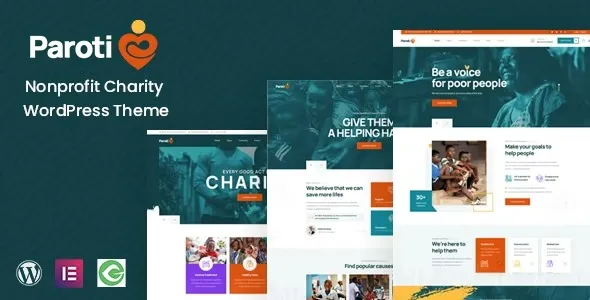
Paroti – Nonprofit Charity WordPress Theme is built for organizations that want a professional, trustworthy, and conversion-focused website for their charity or nonprofit work. It is designed to help you present your mission clearly while guiding visitors toward taking action such as donating or supporting your cause.

If you are creating a nonprofit website where clarity, trust, and engagement matter, Paroti provides a solid foundation.

Why Paroti Is Effective for Charity Websites

A successful charity website needs to do more than just display information — it needs to build trust and encourage action.

Paroti focuses on this by organizing your content into clear sections such as your mission, campaigns, and impact areas. Visitors can quickly understand what your organization does and how they can contribute.

This is especially important for nonprofits that rely on donations and public support.

Optimized for Donations and Fundraising

Paroti is structured to support donation-based platforms. You can highlight active campaigns, showcase progress, and direct users toward contributing.

The layout is designed to naturally guide users from awareness to action, which improves conversion rates.

It works well with donation and fundraising plugins, making it easier to manage contributions.

Strong Performance for Better Reach

Performance plays an important role in user experience and SEO.

Paroti uses optimized code and avoids unnecessary elements, helping your website load faster. This is particularly useful for users accessing your site from mobile devices or slower networks.

A fast-loading site also improves search engine visibility.

Flexible Design Without Complexity

The theme allows customization through standard WordPress options. You can adjust layout, colors, and typography without editing code.

It also supports page builders like Elementor, giving you the flexibility to create pages visually.

This makes it suitable for both beginners and experienced users.

Who Should Use Paroti

Paroti is ideal for:
Charity organizations
Nonprofit foundations
Donation-based platforms
Community support initiatives

It works for both small campaigns and large organizations.

How to Download and Install Paroti

To get started:

Download the theme file from this page
Go to Appearance → Themes → Add New → Upload Theme
Upload the .zip file and install
Activate the theme

After installation, import demo content if available and customize it with your own information.

Frequently Asked Questions

Is Paroti suitable for donation websites?
Yes, it is built for charity and fundraising.

Can I run multiple campaigns?
Yes, you can manage multiple campaigns easily.

Is it beginner-friendly?
Yes, it works without coding.

Does it support plugins?
Yes, it is compatible with common WordPress plugins.

Changelog

Version 1.1.5

Improved donation sections
Updated WordPress compatibility
Performance optimizations
Compatible with PHP 7.4+


For Installation or Technical Related Queries check FAQ Page

Our Website also have older version of the plugins and theme. So you can test your website with compatible plugins or Rollback plugins in case of any bug or compatibility issues.

UNZIP the file downloaded from our website, the zip file might contain other files like Template, Docs etc. So make sure you upload correct file.

To Install Plugins:

  • Download the latest .ZIP file from UltraPlugins Store.
  • Log into your WordPress site.
  • Go to Plugins > Add New.
  • Click the “Upload Plugin” button at the top of the page.
  • Select the zip file with the new plugin version to install.
  • Click the “Install Now” button.


To Install Themes:

  • Download the latest .ZIP file from UltraPlugins Store.
  • Some Theme needs to be extracted before installing & some don’t. So extract the theme, main theme and child should be inside.
  • Log into your WordPress site.
  • Go to Appearance > Themes.
  • Click the “Add New” button at the top of the page.
  • Click the “Upload Theme” button at the top of the page.
  • Select the zip file with the new theme version to install.
  • Click the “Install Now” button.


Sometimes theme/plugin might ask you for license, just ignore. Because we have already activated the product with out legal key, which we have purchased for you.

When a New version appears and is available on our website you’ll find it in My Account “Downloads section”.

For Destination Already Exists error:

Make sure to Delete the version of theme/plugin that you have on your website before you upload our premium version, it might cause a conflict during installation and activation.

Or WordPress will say “destination already exists” when trying to upgrade using a zip file and will fail to upgrade the theme or plugin.

If you faced “destination already exists” error installing this Plugin will solve the issue – Easy Theme and Plugin Upgrades.

Our business hours are Monday to Saturday from 10:00 am to 8:00 pm, any request made outside these hours will be answered until next business day. Support and Updates can take 24 to 48 hours. Support provided is for product installation. Please be aware of possible time zone differences when waiting for our reply.

If you have any Queries, Feel Free to Contact Us: 


Abuse Warning:

  • Please note that accounts are monitored and redistribution of our content is not allowed and will not be tolerated.
  • Our system may detect patterns of downloading items from non-end users outside of our fair use policy.
  • Any violation of our terms of use will result in permanent account suspension and no refunds will be issued.
  • Subscriptions can be cancelled at any time from your account control panel.
  • Downloads are strictly subject to our fair use policy.


For more information please read FAQs & Terms of Use.

Related Products
Select your currency