Get upto 60% Discount

Get upto 60% Discount
Unlimited Access:
$10.00 Original price was: $10.00.$2.99Current price is: $2.99.
Available Download Files

Tired of Restrictions?
Go Unlimited!
Join Our Membership to Download 8400+ Plugins & Themes

Most photography sites fail in small, avoidable ways. Galleries load in an awkward order, projects lack a clear story, and the contact path gets buried under pretty layouts.
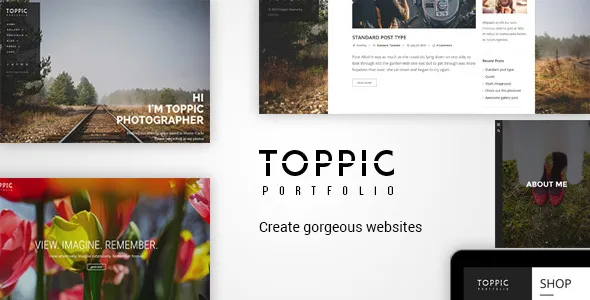
TopPic – Portfolio Photography Theme is built for a specific job: presenting images as work, not as blog posts. If you are looking for a theme that helps you publish projects quickly, keep navigation quiet, and make your portfolio feel intentional, this is the right category of tool to evaluate.
If your goal is to get the theme installed today, start with a safe source and a clean setup. Many users searching for a TopPic – Portfolio Photography Theme download are really trying to solve a workflow problem: “How do I publish a new shoot without fighting layout choices every time?”
TopPic is most valuable when you treat it like a portfolio system rather than a design experiment. It gives you a structured way to publish galleries, organize work into projects, and keep typography and spacing consistent across the site.
Instead of spending time building custom templates for each shoot, you focus on sequencing images, writing short project notes, and keeping categories clean. For photographers, that is the difference between a site that gets updated monthly and a site that stays frozen for a year.
It also helps unify “entry points” to your work. Visitors can land on a project, a category, or a homepage grid and still understand what you do within seconds.
A theme like this earns its place when you publish repeatedly. After the initial setup, the best workflow is simple: create a project, upload and order images, assign a category, and publish.
In practice, you will likely use TopPic for one of these patterns:
The key is resisting the temptation to over-tag everything. A portfolio theme works best when you keep taxonomy tight and let the grid and project pages do the heavy lifting.
If you are ready to proceed with a TopPic – Portfolio Photography Theme download, treat the installation like any production WordPress change. Themes affect layout, menus, widgets, and sometimes image sizes, so you want a controlled rollout.
A common attempt is to use the block editor with the Gallery block and call it a portfolio. It works for a handful of images, but it tends to break down when you need consistent project pages, category browsing, and a clean overview grid.
Default themes also bias toward blogging. You end up forcing “posts” to behave like projects, which creates friction later when you want to reorder work, hide dates, or present multiple galleries under one project narrative.
TopPic is not magic. It simply starts from the assumption that your site is a body of work, not a stream of updates. That assumption saves time every time you publish.
Most issues are not bugs. They come from mismatched expectations or rushed configuration.
Photographers often upload 6000px images and assume WordPress will handle it. You will get slow grids and inconsistent sharpness. Export web versions intentionally and let WordPress generate responsive sizes.
If every shoot becomes its own category, navigation becomes noise. Use categories for broad services or styles, then curate projects within them.
After a theme change, thumbnails can look wrong because the new theme uses different aspect ratios. Regenerate thumbnails and re-check key projects. This is one of the biggest “why does my portfolio look off?” moments after a TopPic – Portfolio Photography Theme download and activation.
Portfolio sites are naturally heavy. The theme choice matters, but so do your image and caching decisions.
To keep pages indexable and fast, prioritize these basics:
If you publish a lot of similar shoots, consider a “best of” category page that links to your strongest projects. It improves crawl prioritization and prevents thin pages from taking attention away from your best work.
TopPic is designed to make a portfolio feel cohesive. That can be a downside if you want every project page to look radically different.
Also, portfolio themes sometimes rely on specific shortcodes or builder elements. If you later switch themes, you may need cleanup work to remove layout artifacts. Plan for that if you are building a long-term site that might be redesigned every year.
Finally, if you only need a single landing page with a contact form and a few images, a full portfolio theme may be more structure than you need.
Yes, but treat the blog as secondary. Keep portfolio projects as the main navigation path, and use the blog for behind-the-scenes posts, announcements, or SEO support articles that link back to your best work.
The theme may define different thumbnail sizes or aspect ratios. Regenerate thumbnails and review key pages. If you want consistent composition, export images with the intended crop in mind rather than relying on automatic cropping.
The theme itself is only part of performance. The biggest factors are image weight, the number of gallery scripts you add, and caching. Keep uploads optimized, avoid stacking multiple sliders, and use a reliable caching setup.
That is one of the strongest use cases. Create a small set of top-level categories that match how clients search for you, then curate projects within each category so the grid stays high quality.
Use a staging site or a cloned environment. Do the TopPic – Portfolio Photography Theme download, installation, and thumbnail regeneration there first. Confirm menus, project templates, and mobile layouts before activating on production.
Do not publish multiple thin pages for the same shoot. Prefer one strong project page, one relevant category hub, and an About page that clarifies your services. If you create tag archives, keep them curated or disable indexing for low-value archives.
A TopPic – Portfolio Photography Theme download makes the most sense when you are ready to curate and publish consistently, not when you are still collecting random galleries. If you have at least 6–12 projects you are proud of, you can build a clean grid, create meaningful categories, and make the site feel complete.
If you are still experimenting with style, install it on staging, set up two or three sample projects, and see whether the publishing flow feels faster. That is the real test of whether this theme is the right foundation.
If you are about to do a TopPic – Portfolio Photography Theme download, make sure you have these ready:
With those basics in place, the TopPic – Portfolio Photography Theme download becomes a straightforward step toward a portfolio that is easier to maintain and easier for visitors to understand.
For Installation or Technical Related Queries check FAQ Page
Our Website also have older version of the plugins and theme. So you can test your website with compatible plugins or Rollback plugins in case of any bug or compatibility issues.
UNZIP the file downloaded from our website, the zip file might contain other files like Template, Docs etc. So make sure you upload correct file.
To Install Plugins:
To Install Themes:
Sometimes theme/plugin might ask you for license, just ignore. Because we have already activated the product with out legal key, which we have purchased for you.
When a New version appears and is available on our website you’ll find it in My Account “Downloads section”.
For Destination Already Exists error:
Make sure to Delete the version of theme/plugin that you have on your website before you upload our premium version, it might cause a conflict during installation and activation.
Or WordPress will say “destination already exists” when trying to upgrade using a zip file and will fail to upgrade the theme or plugin.
If you faced “destination already exists” error installing this Plugin will solve the issue – Easy Theme and Plugin Upgrades.
Our business hours are Monday to Saturday from 10:00 am to 8:00 pm, any request made outside these hours will be answered until next business day. Support and Updates can take 24 to 48 hours. Support provided is for product installation. Please be aware of possible time zone differences when waiting for our reply.
If you have any Queries, Feel Free to Contact Us:
Abuse Warning:
For more information please read FAQs & Terms of Use.
All directory items are created by third-party developers and distributed by ULTRA PLUGINS under the General Public License (GPL). ULTRA PLUGINS is not affiliated with, nor does it endorse, any product featured on this site.