Get upto 60% Discount

Get upto 60% Discount
Unlimited Access:
$15.00 Original price was: $15.00.$4.99Current price is: $4.99.
Available Download Files

Tired of Restrictions?
Go Unlimited!
Join Our Membership to Download 8400+ Plugins & Themes

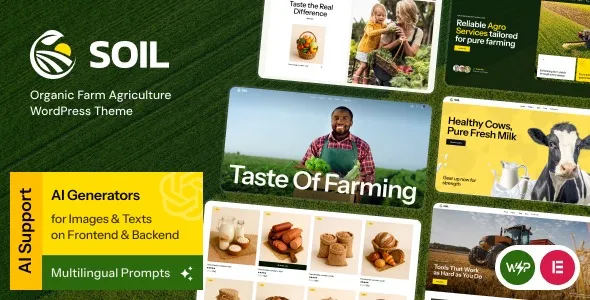
Farm and agriculture sites often fail for a simple reason: the content is real, but the presentation looks generic. Visitors cannot quickly find what you grow, where you sell, or how to contact you. Soil Organic Farm Agriculture WordPress Theme focuses on that “first minute” experience with layouts that prioritize produce, farm story, seasonal updates, and trust signals like certifications and sourcing.
If you are here for a Soil Organic Farm Agriculture WordPress Theme download, it usually means you want a ready-to-publish foundation that still leaves room for your own branding. That is the right mindset for this theme. It is most useful when you want a farm site that reads like a farm, not like a template.
Soil Organic Farm Agriculture WordPress Theme enables a structured way to publish farm content without inventing the structure yourself. Instead of starting with a blank page builder canvas, you get a set of page patterns that naturally fit agriculture businesses: product or produce highlights, farm-to-table storytelling, seasonal announcements, and clear contact and visit information.
The practical advantage is speed with fewer layout decisions. You can spend time on what matters: photos, crop descriptions, pickup schedules, and updates. When a theme is aligned with your niche, you also reduce the risk of “pretty but confusing” pages that look fine yet do not convert visitors into calls, visits, or orders.
A common workflow problem for farms is that the site changes with the season. You might promote strawberries for six weeks, then switch to tomatoes, then focus on CSA signups. With a niche theme, swapping featured sections and updating key pages is usually faster than reworking a multipurpose layout that was never designed for rotating availability.
Farm sites win when they feel local and credible. You will likely publish your growing practices, your team story, and your location details. A theme designed for agriculture tends to make those pages feel like first-class content rather than “extra” pages buried in the menu.
High-quality images do the heavy lifting for agriculture brands, but many sites bury galleries in awkward blocks. A farm-focused theme typically gives you cleaner ways to highlight produce, fields, markets, and events so the site stays readable even when you add lots of imagery.
A theme is not an ordering system by itself. If you need payments, delivery zones, inventory, or subscriptions, you will still rely on WooCommerce and the right extensions. Soil Organic Farm Agriculture WordPress Theme can make your shop pages and calls to action feel more on-brand, but it will not replace ecommerce configuration.
Another common misconception is that installing a theme automatically fills your site with content. You will still need to add your own pages, images, and text. The win is that you are not guessing at what pages to create or how to lay them out.
Multipurpose themes can work, but they often come with two costs: decision fatigue and inconsistent design as you add pages. You start with one demo, then mix blocks from other demos, and six months later the site looks stitched together.
Soil Organic Farm Agriculture WordPress Theme is a better fit when your site is primarily about farm identity and local conversion actions: “visit us,” “call us,” “see what’s in season,” “join our CSA,” or “find us at the market.” A niche theme can keep those actions visible without you constantly adjusting layouts.
On the other hand, if you are building a broad lifestyle brand with many unrelated content types, a niche theme can feel limiting. In that case, a flexible base theme plus a carefully chosen block library may be the better long-term choice.
For a smooth setup, treat theme installation like a small deployment. A few careful steps prevent broken layouts and lost settings.
Update WordPress core, then update your active plugins. If you are replacing an existing theme, take a full backup so you can roll back quickly if needed.
When you obtain your Soil Organic Farm Agriculture WordPress Theme download, confirm you have the installable theme ZIP. If the file you received contains documentation and multiple folders, you may need to locate the specific theme ZIP inside it.
In your WordPress dashboard, go to Appearance > Themes > Add New > Upload Theme. Upload the ZIP, then click Install Now and Activate.
Many themes rely on a page builder, a forms plugin, or a slider component. Install only what you need. Extra plugins add maintenance overhead, so keep the stack lean.
Demo imports can be helpful for structure, but they also add filler pages you will need to delete. If you import, do it on a staging site first. Then replace demo images and text page by page so you do not leave placeholder content indexed.
Check your homepage, menu links, contact page, and any shop pages. Then test on mobile. Agriculture sites are often discovered on phones while people are traveling to a market or farm stand.
Demo content can get crawled and indexed if you forget to remove it. If you use demo import, immediately set noindex on staging, then clean up before you launch.
Farm photography is beautiful, but raw images from modern phones and cameras can be several megabytes each. Resize and compress before upload. Your pages will load faster, and you will avoid bloated media libraries.
Some users build half the site with the block editor and half with a page builder. That can create inconsistent spacing and typography. Pick one primary editing approach and stick to it for your main pages.
A farm site tends to grow quietly: new seasonal posts, event pages, gallery updates, and sometimes a shop catalog. The theme choice matters because it sets the baseline for CSS and script loading.
After installing Soil Organic Farm Agriculture WordPress Theme, run a quick performance check once your real images are in place. If you see slowdowns, the first fixes are usually image compression, caching, and limiting heavy sliders. You do not need to chase perfect scores. You need consistent, fast-enough pages on mobile data.
It is a WordPress theme. You install it under Appearance > Themes. It can work alongside plugins, but it is not installed under Plugins.
Yes, if your setup uses WooCommerce, the theme can provide a more agriculture-appropriate look and feel. You will still need to configure products, shipping or pickup, taxes, and payments inside WooCommerce.
Many modern themes support the block editor well, but some demos rely on a specific builder. If you prefer Gutenberg, check whether the theme’s main layouts can be recreated using blocks without importing builder templates.
Set your logo, typography, and primary colors first. Then build the core navigation: Home, About, What’s in Season, Visit/Contact, and Shop (if applicable). This prevents you from designing pages that later do not fit your menu structure.
Build on a staging site or enable a maintenance mode plugin. If the site is public, avoid publishing empty pages and remove demo placeholders quickly. Once your real pages are ready, submit your sitemap in Search Console.
Add three things early: a clear location and hours section, a seasonal availability page, and a short “how we grow” story with original photos. Those pieces improve trust and help visitors decide quickly.
When you search for Soil Organic Farm Agriculture WordPress Theme download, the main risk is ending up with an incomplete package or a bundle that is not the installable ZIP. Always confirm you can upload the file directly in WordPress, and keep a copy of the original download somewhere safe for future reinstalls.
If you plan to customize heavily, use a child theme so updates do not overwrite your changes. This is especially important for farms that rely on the site during peak season. You want updates to be routine, not a redesign emergency.
For users who need a clean farm-focused layout quickly, a Soil Organic Farm Agriculture WordPress Theme download is a practical starting point. For users who need complex ecommerce logic, membership tiers, or advanced delivery scheduling, plan your plugin stack first, then choose the theme that best supports the customer journey.
If your priority is a credible agriculture presence with fast setup and a layout that matches how farms actually communicate, Soil Organic Farm Agriculture WordPress Theme download is the kind of foundation that helps you publish confidently and iterate as seasons change.
For Installation or Technical Related Queries check FAQ Page
Our Website also have older version of the plugins and theme. So you can test your website with compatible plugins or Rollback plugins in case of any bug or compatibility issues.
UNZIP the file downloaded from our website, the zip file might contain other files like Template, Docs etc. So make sure you upload correct file.
To Install Plugins:
To Install Themes:
Sometimes theme/plugin might ask you for license, just ignore. Because we have already activated the product with out legal key, which we have purchased for you.
When a New version appears and is available on our website you’ll find it in My Account “Downloads section”.
For Destination Already Exists error:
Make sure to Delete the version of theme/plugin that you have on your website before you upload our premium version, it might cause a conflict during installation and activation.
Or WordPress will say “destination already exists” when trying to upgrade using a zip file and will fail to upgrade the theme or plugin.
If you faced “destination already exists” error installing this Plugin will solve the issue – Easy Theme and Plugin Upgrades.
Our business hours are Monday to Saturday from 10:00 am to 8:00 pm, any request made outside these hours will be answered until next business day. Support and Updates can take 24 to 48 hours. Support provided is for product installation. Please be aware of possible time zone differences when waiting for our reply.
If you have any Queries, Feel Free to Contact Us:
Abuse Warning:
For more information please read FAQs & Terms of Use.
All directory items are created by third-party developers and distributed by ULTRA PLUGINS under the General Public License (GPL). ULTRA PLUGINS is not affiliated with, nor does it endorse, any product featured on this site.