Get upto 60% Discount

Get upto 60% Discount
Unlimited Access:
$10.00 Original price was: $10.00.$2.99Current price is: $2.99.
Available Download Files

Tired of Restrictions?
Go Unlimited!
Join Our Membership to Download 8400+ Plugins & Themes

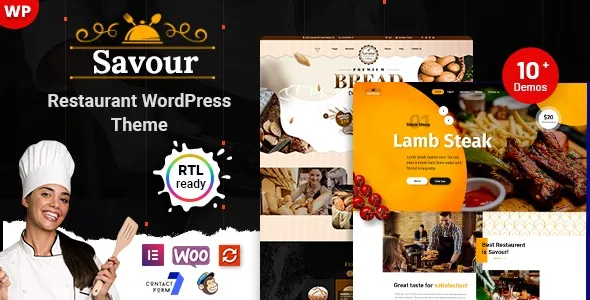
Savor Restaurant WordPress Theme is built for restaurants, cafés, bistros, fine dining establishments, and food businesses that rely on atmosphere, menu presentation, and reservation flow. A restaurant website has one clear job: convert visitors into booked tables or online orders.
When someone searches for a restaurant WordPress theme, they are not looking for a corporate layout. They need menu sections, opening hours, gallery presentation, chef highlights, reservation integration, and location visibility. Savor is structured around those operational needs rather than generic design blocks.
If you are searching for Savor Restaurant WordPress Theme download, your intention is likely to launch a professional food business website quickly while maintaining a strong visual identity.
Food businesses depend heavily on presentation. Customers often decide where to dine based on menu clarity, ambiance visuals, and ease of booking. Savor prioritizes menu layouts that are readable and structured, allowing you to categorize starters, main courses, desserts, beverages, and specialty dishes without confusion.
High-quality image sections allow you to showcase signature dishes, interior atmosphere, and chef highlights. Instead of cluttered design elements, the layout guides visitors toward important actions such as booking a table or placing an order.
Dedicated sections for testimonials and customer reviews add social proof, which plays a significant role in dining decisions.
Savor supports integration with reservation plugins, enabling customers to book tables directly through the website. For restaurants offering delivery or takeaway, compatibility with WooCommerce allows online ordering functionality.
The structure supports displaying business hours, contact details, and map integration clearly. For local SEO, this is essential. Search engines rely on consistent location signals, and a properly structured restaurant theme helps reinforce that information.
Restaurants targeting local customers benefit from clear navigation and fast-loading pages, especially when users are browsing from mobile devices while deciding where to eat.
Most restaurant searches happen on smartphones. Savor is responsive and optimized for mobile browsing, ensuring that menus, reservation forms, and contact details remain accessible across devices.
The theme is compatible with current WordPress versions and modern hosting environments. It works alongside popular SEO plugins, caching tools, and security extensions. Fast load times are critical, particularly when showcasing high-resolution food photography.
Maintaining secure hosting and regular updates protects customer data and ensures booking systems function reliably.
If your goal is to deploy Savor Restaurant WordPress Theme efficiently, confirm that the theme package is complete and compatible with your WordPress installation. Using properly packaged theme files helps prevent layout errors and plugin conflicts.
Before activation, ensure your hosting environment supports updated PHP versions and secure HTTPS connections. Restaurants collecting reservation details must maintain secure infrastructure.
Step 1: Download the theme ZIP file from a reliable source.
Step 2: Log in to your WordPress dashboard.
Step 3: Navigate to Appearance and select Themes.
Step 4: Click Add New and choose Upload Theme.
Step 5: Upload the ZIP file and start installation.
Step 6: Activate the theme after installation completes.
Step 7: Install any recommended plugins for reservations or ordering.
Step 8: Import demo content if available to replicate the base restaurant layout.
After activation, customize your menu categories, upload dish images, configure reservation settings, and update business hours and location details.
Local restaurant SEO depends on structured content, clear location information, optimized menu pages, and consistent branding. Savor provides a clean framework that allows you to create individual pages for events, seasonal menus, or special promotions.
Publishing blog posts about chef specials, food sourcing, or upcoming events can strengthen search visibility and increase repeat visits. Internal linking between menu pages, reservation sections, and contact details helps search engines understand site hierarchy.
Because user engagement affects rankings over time, a clear booking flow and fast performance contribute indirectly to stronger search positioning.
This theme is ideal for restaurants, cafés, bakeries, catering services, food trucks, and hospitality businesses that need an elegant yet functional website focused on reservations and menu visibility.
Yes. It integrates with reservation plugins that allow customers to book tables directly from the website.
Yes. With WooCommerce integration, you can enable delivery or takeaway ordering functionality.
Yes. The responsive design ensures menus and booking forms function smoothly on smartphones and tablets.
Yes. You can create dedicated pages for seasonal dishes, promotions, or restaurant events.
No advanced coding knowledge is required. Most configuration can be handled through WordPress settings and theme options.
Yes. The theme is compatible with major SEO plugins, allowing you to optimize content for local and organic search visibility.
For Installation or Technical Related Queries check FAQ Page
Our Website also have older version of the plugins and theme. So you can test your website with compatible plugins or Rollback plugins in case of any bug or compatibility issues.
UNZIP the file downloaded from our website, the zip file might contain other files like Template, Docs etc. So make sure you upload correct file.
To Install Plugins:
To Install Themes:
Sometimes theme/plugin might ask you for license, just ignore. Because we have already activated the product with out legal key, which we have purchased for you.
When a New version appears and is available on our website you’ll find it in My Account “Downloads section”.
For Destination Already Exists error:
Make sure to Delete the version of theme/plugin that you have on your website before you upload our premium version, it might cause a conflict during installation and activation.
Or WordPress will say “destination already exists” when trying to upgrade using a zip file and will fail to upgrade the theme or plugin.
If you faced “destination already exists” error installing this Plugin will solve the issue – Easy Theme and Plugin Upgrades.
Our business hours are Monday to Saturday from 10:00 am to 8:00 pm, any request made outside these hours will be answered until next business day. Support and Updates can take 24 to 48 hours. Support provided is for product installation. Please be aware of possible time zone differences when waiting for our reply.
If you have any Queries, Feel Free to Contact Us:
Abuse Warning:
For more information please read FAQs & Terms of Use.