Get upto 60% Discount

Get upto 60% Discount
Unlimited Access:
$15.00 Original price was: $15.00.$4.99Current price is: $4.99.
Available Download Files

Tired of Restrictions?
Go Unlimited!
Join Our Membership to Download 8400+ Plugins & Themes

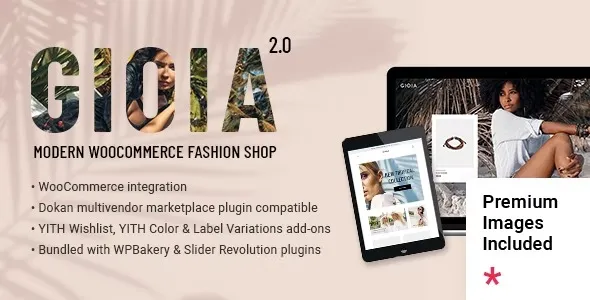
Gioia – Modern Fashion Shop is designed for clothing brands, fashion boutiques, and lifestyle stores that depend on strong visual identity and smooth online shopping experiences. Fashion customers do not browse randomly. They evaluate presentation, product photography, brand tone, and checkout simplicity within seconds.
This theme focuses on clean typography, refined spacing, and image-forward layouts that allow apparel and accessories to take center stage. Instead of overwhelming visitors with cluttered elements, Gioia supports a modern retail experience that aligns with how fashion brands position themselves in competitive markets.
If you are searching for Gioia Modern Fashion Shop download, the primary goal is typically to launch a stylish WooCommerce-powered store without building a custom design from the ground up.
Fashion stores require more than product grids. They need collection highlights, seasonal campaigns, editorial-style lookbooks, and clear navigation between categories such as men, women, accessories, or limited editions.
Gioia supports structured category pages and product layouts that emphasize imagery while keeping purchasing actions prominent. Integration with WooCommerce enables inventory management, size variations, pricing control, and secure checkout flows. The product page structure allows detailed descriptions, fabric information, sizing guidance, and customer reviews without breaking visual consistency.
For brands focused on storytelling, the theme also accommodates blog sections where you can publish style guides, trend reports, or behind-the-scenes content. This strengthens organic search visibility while reinforcing brand authority.
Fashion eCommerce depends heavily on mobile performance. A significant portion of customers browse and purchase through smartphones. Gioia is built with responsive design standards so that product grids, filters, and checkout pages function smoothly across screen sizes.
Performance optimization is equally important. High-resolution product images must load efficiently to prevent bounce rates. The theme is compatible with caching plugins, image optimization tools, and SEO extensions, allowing you to balance visual richness with loading speed.
A structured codebase also supports proper indexing by search engines. Clean markup combined with optimized product metadata improves crawl efficiency and search result appearance.
If your intention is to deploy Gioia Modern Fashion Shop quickly, ensure that the theme package is complete and compatible with your current WordPress version. A properly structured theme file minimizes installation conflicts and ensures smooth WooCommerce integration.
Before installation, confirm that your hosting environment supports updated PHP versions and secure HTTPS connections. This is essential for eCommerce stores handling transactions.
Step 1: Download the theme ZIP file from a reliable source.
Step 2: Log in to your WordPress admin dashboard.
Step 3: Navigate to Appearance and select Themes.
Step 4: Click Add New and choose Upload Theme.
Step 5: Upload the ZIP file and click Install Now.
Step 6: Activate the theme after installation completes.
Step 7: Install required plugins, including WooCommerce if prompted.
Step 8: Import demo content if available to replicate the fashion shop layout.
After activation, configure product categories, upload your collection images, set payment gateways, and adjust shipping rules.
Ranking a fashion store requires more than aesthetic design. It requires optimized category pages, descriptive product content, structured internal linking, and consistent publishing. Gioia provides a layout that supports content expansion without compromising design.
Creating individual landing pages for seasonal collections, optimizing product titles with buyer-focused keywords, and maintaining fast performance all contribute to improved search visibility. The theme does not restrict content depth, which is essential for building topical authority in fashion niches.
Internal links between blog posts and product categories strengthen crawl paths and help search engines understand site hierarchy. Clean design combined with structured content improves both user engagement and ranking potential.
This theme is ideal for modern fashion boutiques, independent clothing brands, streetwear startups, lifestyle accessory shops, and curated online apparel stores. It works particularly well for businesses that rely on high-impact visuals and smooth checkout experiences to convert visitors into customers.
Yes. It integrates with WooCommerce for product management, payment processing, and order handling.
Yes. The theme structure supports custom pages and blog content for showcasing collections and style guides.
Yes. The responsive design ensures product grids and checkout flows adapt smoothly to smartphones and tablets.
No advanced coding is required for standard customization. Most adjustments can be made through WordPress settings and theme options.
Yes. It works with popular SEO plugins, allowing you to optimize product pages, categories, and blog posts for search visibility.
Yes. The layout supports expanding product catalogs and content sections as your brand scales.
For Installation or Technical Related Queries check FAQ Page
Our Website also have older version of the plugins and theme. So you can test your website with compatible plugins or Rollback plugins in case of any bug or compatibility issues.
UNZIP the file downloaded from our website, the zip file might contain other files like Template, Docs etc. So make sure you upload correct file.
To Install Plugins:
To Install Themes:
Sometimes theme/plugin might ask you for license, just ignore. Because we have already activated the product with out legal key, which we have purchased for you.
When a New version appears and is available on our website you’ll find it in My Account “Downloads section”.
For Destination Already Exists error:
Make sure to Delete the version of theme/plugin that you have on your website before you upload our premium version, it might cause a conflict during installation and activation.
Or WordPress will say “destination already exists” when trying to upgrade using a zip file and will fail to upgrade the theme or plugin.
If you faced “destination already exists” error installing this Plugin will solve the issue – Easy Theme and Plugin Upgrades.
Our business hours are Monday to Saturday from 10:00 am to 8:00 pm, any request made outside these hours will be answered until next business day. Support and Updates can take 24 to 48 hours. Support provided is for product installation. Please be aware of possible time zone differences when waiting for our reply.
If you have any Queries, Feel Free to Contact Us:
Abuse Warning:
For more information please read FAQs & Terms of Use.
All directory items are created by third-party developers and distributed by ULTRA PLUGINS under the General Public License (GPL). ULTRA PLUGINS is not affiliated with, nor does it endorse, any product featured on this site.