Get upto 60% Discount

Get upto 60% Discount
Unlimited Access:
$10.00 Original price was: $10.00.$2.99Current price is: $2.99.

Tired of Restrictions?
Go Unlimited!
Join Our Membership to Download 8400+ Plugins & Themes

Landscaping sites fail for predictable reasons. The gallery looks fine, but quotes do not come in. Service pages exist, but they do not answer the questions people search before they call. Mobile users cannot find the phone number quickly, and the navigation buries the areas you serve.
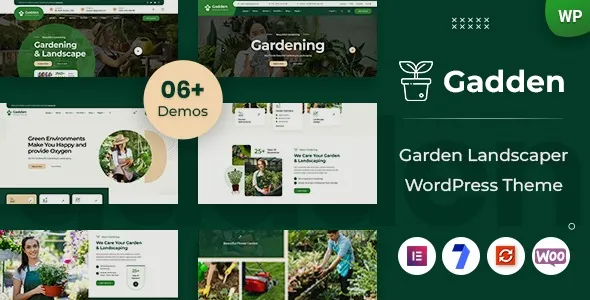
Gadden Garden Landscaper WordPress Theme is built around that service-business reality. It gives you a layout system and page patterns that fit landscaping, lawn care, gardening, irrigation, and outdoor maintenance companies, so you can publish clear service pages, project showcases, and conversion-focused contact paths without assembling everything from scratch.
If your goal is to get a site live quickly and keep it editable by non-developers, a clean Gadden Garden Landscaper WordPress Theme download is often the fastest way to move from “placeholder website” to a site that supports quoting, scheduling, and local search visibility.
A common friction point is that service businesses try to use a generic multipurpose theme and then spend weeks fighting layout decisions. You end up with inconsistent headings, mismatched spacing, and pages that look different on each device.
Gadden focuses on a service-first structure. You can highlight core services, show before-and-after work, and route visitors toward a quote request without forcing them through a maze of pages. That matters because most landscaping leads come from high-intent queries and quick comparisons, not deep browsing.
Another issue is credibility. People want proof: recent projects, service area coverage, and simple trust signals like reviews, accreditations, and clear business details. A theme designed for landscapers makes it easier to place those elements where users expect them.
Theme installs are simple, but the mistakes are predictable. The safest path is to treat the theme like a deployable asset and confirm compatibility before you touch a live site.
Update WordPress core, then update existing plugins. If you are replacing an older theme, take a full backup (files and database). If possible, test on a staging site first.
Make sure your Gadden Garden Landscaper WordPress Theme download is the installable ZIP for WordPress. If you received a package that contains documentation and multiple folders, look for the theme ZIP inside it.
In WordPress, go to Appearance > Themes > Add New > Upload Theme. Upload the ZIP, install, then activate. If WordPress reports “missing stylesheet,” you likely uploaded the wrong ZIP.
If the theme includes demo import, run it on a fresh site or staging environment. Demo imports can create pages, menus, and media that you will later need to prune. After import, immediately set your homepage and menu under Settings and Appearance.
Create or refine: Services, Projects or Portfolio, About, Service Areas, and Contact. Add a quote request form and a trackable phone number if you run ads. Then check mobile layouts for the header, call button, and contact section.
Test with a performance tool and confirm caching is working. Ensure your site is set to public (Settings > Reading), submit your sitemap, and verify that key pages are not blocked by noindex.
A theme cannot do SEO for you, but it can remove structural friction. The biggest win is publishing consistent, intent-matched pages without redesigning each one.
Landscaping search intent is usually specific: “mulch installation,” “paver patio,” “lawn aeration,” “spring cleanup,” plus a city or neighborhood. Build separate service pages and keep them focused. Use the theme’s sections to place a short overview, process steps, pricing factors, FAQs, and a contact block in a predictable order.
Project galleries often miss the details that create trust. Add what was done, materials used, timeframe, and the area served. Include internal links back to the relevant service page. This creates topical reinforcement and helps Google understand the relationship between your services and proof of work.
Many sites create dozens of near-duplicate city pages. That can dilute quality and confuse indexing. Instead, use a primary “Service Areas” page and only create location pages when you can add unique proof, photos, or constraints (soil type, HOA rules, seasonal conditions, or common job sizes in that area).
Multipurpose themes are flexible, but flexibility often becomes decision fatigue. You spend time choosing from dozens of header styles, blog layouts, and animation options that do not move the business forward.
With Gadden Garden Landscaper WordPress Theme, the advantage is focus. The layout patterns are closer to what a landscaping company needs, so you can spend your time on content and offer clarity instead of design experimentation.
If you are comparing options, ask one practical question: can you create a clear service page, a project showcase, and a quote path in under an hour without custom code? If not, you will likely burn time later. For many site owners, that is why they look for a Gadden Garden Landscaper WordPress Theme download rather than another general theme.
Homepages are not where most organic traffic lands. Build dedicated service pages and link to them prominently. Use the homepage as a directory and credibility overview, not as your only sales page.
Demo content is a starting point, not a strategy. Replace it early so you do not forget later. Google can index placeholder pages if your site is public, and that can create cleanup work.
Landscaping sites are image-heavy by nature. Compress images, use modern formats when possible, and keep hero sections simple. A fast site gets crawled more reliably and converts better on mobile.
If multiple services share the same paragraphs with only the heading changed, the pages compete with each other. Write unique “how it works” and “pricing factors” sections per service. This is one of the easiest ways to avoid duplicate-intent problems.
A niche theme helps you move faster, but it also nudges you into a particular design language. If your brand needs something highly unconventional, you may still need custom design work.
Also, do not assume the theme replaces operational tools. If you need booking logic, route optimization, or a full CRM, you will still add plugins or external services. Think of the theme as the presentation layer that makes those tools easier to access and trust.
It is a WordPress theme. You install it under Appearance > Themes, not under Plugins. If you see an upload screen asking for a theme ZIP, you are in the right place.
Content stored in WordPress (pages, posts) remains, but layout styling can change. If your current site uses a page builder or theme-specific shortcodes, some sections may need rebuilding. Test the switch on staging if the site is already generating leads.
Create one page per core service and keep each page specific. Add a short intro, a process section, pricing factors, and a few service-specific FAQs. Then link related projects and blog posts back to that service page.
Not always. Only create location pages when you can add unique content such as local project photos, unique constraints, or distinct service offerings. Otherwise, a strong service area page plus well-built service pages is usually cleaner for indexing.
Confirm your menu, logo, and homepage settings. Then check mobile: header height, tap targets, and that the primary call to action is visible without scrolling. Finally, verify that your contact form sends email reliably.
Publish a clear getting-started page that explains what you can build, what you still need (content, photos, forms), and then provide a direct path to the Gadden Garden Landscaper WordPress Theme download with installation steps. People searching for a theme download want speed and certainty.
Gadden Garden Landscaper WordPress Theme is a practical fit when you want a landscaper-focused structure, fast page creation, and a site that guides visitors toward a quote without overengineering. If you are ready to build service pages, publish real project proof, and keep the site easy to maintain, a reliable Gadden Garden Landscaper WordPress Theme download is a sensible next step.
For teams scaling content, the theme’s biggest advantage is consistency. When every service page follows a similar pattern, you can publish faster, avoid duplicate intent, and make it easier for both users and search engines to understand what you offer.
If you are evaluating options today, start with a clean install, map your services, and then move forward with the Gadden Garden Landscaper WordPress Theme download once you have a simple page plan. That workflow prevents the most common redo work later.
For Installation or Technical Related Queries check FAQ Page
Our Website also have older version of the plugins and theme. So you can test your website with compatible plugins or Rollback plugins in case of any bug or compatibility issues.
UNZIP the file downloaded from our website, the zip file might contain other files like Template, Docs etc. So make sure you upload correct file.
To Install Plugins:
To Install Themes:
Sometimes theme/plugin might ask you for license, just ignore. Because we have already activated the product with out legal key, which we have purchased for you.
When a New version appears and is available on our website you’ll find it in My Account “Downloads section”.
For Destination Already Exists error:
Make sure to Delete the version of theme/plugin that you have on your website before you upload our premium version, it might cause a conflict during installation and activation.
Or WordPress will say “destination already exists” when trying to upgrade using a zip file and will fail to upgrade the theme or plugin.
If you faced “destination already exists” error installing this Plugin will solve the issue – Easy Theme and Plugin Upgrades.
Our business hours are Monday to Saturday from 10:00 am to 8:00 pm, any request made outside these hours will be answered until next business day. Support and Updates can take 24 to 48 hours. Support provided is for product installation. Please be aware of possible time zone differences when waiting for our reply.
If you have any Queries, Feel Free to Contact Us:
Abuse Warning:
For more information please read FAQs & Terms of Use.