Get upto 60% Discount

Get upto 60% Discount
Unlimited Access:
$10.00 Original price was: $10.00.$2.99Current price is: $2.99.
Available Download Files

Tired of Restrictions?
Go Unlimited!
Join Our Membership to Download 8400+ Plugins & Themes

As soon as a business has more than a handful of branches, a static list of addresses becomes a liability. Users cannot filter, they cannot see what is nearby, and they often bounce before they find the right store. A good locator flips that experience into a fast search and a confident decision.
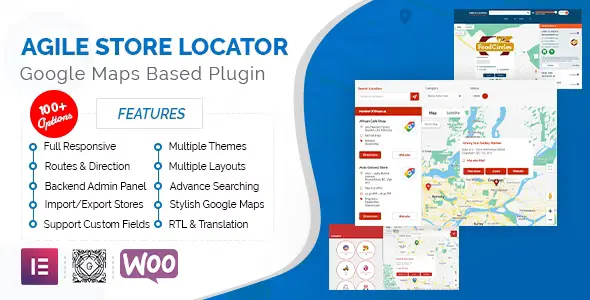
Agile Store Locator (Google Maps) For WordPress is built for that moment. It turns locations into a searchable map and directory that can handle real-world needs like categories, distance search, and location details that actually answer customer questions.
If you are evaluating an Agile Store Locator (Google Maps) For WordPress download because your current setup is slow, hard to maintain, or inconsistent across pages, this guide focuses on what you can realistically expect once it is installed and configured.
The core value is simple: it lets visitors find the right place without contacting you. That sounds obvious, but it has measurable impact when you run multi-location retail, service areas, pickup points, dealers, or franchises.
Instead of forcing users to scan a long page, the plugin supports location discovery through map interaction and structured filters. When implemented well, it reduces “where are you located?” support requests and increases store visits because users can confirm distance, hours, and directions in one flow.
It also helps site owners maintain a consistent location dataset. You update a store once and it stays accurate wherever the locator is embedded.
Most teams do not fail at store locator projects because of features. They fail because of upkeep. Locations change, managers want edits, and marketing wants new categories every quarter.
Agile Store Locator (Google Maps) For WordPress works best when you treat it like a small database. Create a clean set of categories first (for example: “Service Center”, “Retail”, “Pickup”). Then add locations with consistent naming, phone formatting, and opening hours. This consistency matters because it affects search results, filtering, and user trust.
For WooCommerce sites, the most common pattern is linking the locator from header navigation, product pages (“Find in store”), and checkout support content (“Pickup locations”). The plugin is not a full inventory-by-store system, but it pairs well with a “find a nearby store” callout that reduces purchase hesitation.
If your goal is a clean setup that Google can crawl and users can trust, install it like you would any production plugin and avoid rushing configuration.
Update WordPress and your theme. Take a full backup. Confirm you can access wp-admin and that your hosting meets typical modern PHP and memory requirements for map-heavy pages.
Use the official plugin package you obtained and keep the zip file intact. If you are comparing versions, label the file clearly so you do not upload the wrong build later. A second Agile Store Locator (Google Maps) For WordPress download is worth doing if your file looks altered or your upload fails.
Go to Plugins, Add New, Upload Plugin. Upload the zip, install, then activate. If you get a “folder already exists” message, delete the old plugin folder first to prevent partial overwrites.
Most locator issues come from Maps API setup, not from the plugin itself. Create or reuse a Google Cloud project, enable the required Maps services, and restrict your API key properly (domain restrictions, relevant APIs only). Test the map on a staging page before going live.
Start with 3 to 5 locations. Verify distance search, category filtering, and marker clicks. Check mobile behavior. Make sure the store detail view contains the information a user needs to act: address, phone, hours, and a directions link.
Create a single canonical page for the locator and link to it from navigation. This keeps indexing clean and prevents multiple near-duplicate “store finder” pages from competing in search.
Many sites begin with a page builder section that lists addresses, or a custom post type with store pages. That can work for 5 locations. It breaks at 50.
A manual list has no distance logic and no map-based discovery. A custom post type without a locator interface often turns into a development project, especially when marketing asks for category filters and search radius controls.
Agile Store Locator (Google Maps) For WordPress is most useful when you want the locator experience without building geosearch from scratch. It gives you a consistent UI and a manageable admin layer, which is usually the difference between “we launched it” and “we can maintain it.” If you are deciding whether to proceed with an Agile Store Locator (Google Maps) For WordPress download, consider how often your locations change and how much time you want to spend maintaining a custom solution.
Store locators can accidentally create a crawl problem. If you publish dozens of thin location pages, or generate multiple filter URLs that look unique to crawlers, you can dilute indexing priority across your site.
A practical approach is to keep one primary locator page as the main indexed target, then decide whether individual store pages are worth indexing. If each store page has unique content (parking instructions, services, photos, local phone numbers, holiday hours), indexing can make sense. If pages are near-identical except for address, they often underperform and can create duplicate-intent issues.
Also remember that maps and marker data can be heavy. Use caching, keep the locator page lean, and avoid stacking multiple map widgets on the same page. If you are doing an Agile Store Locator (Google Maps) For WordPress download specifically to improve UX, do not sabotage it with a slow page template.
Most problems show up after launch, not during initial testing.
Teams often lock the key to one domain and forget about “www” vs non-www, staging domains, or subdirectory installs. Result: maps fail for some users. Add the correct referrers and test in an incognito window.
Distance search depends on good geocoding. If addresses are entered inconsistently, or if the wrong country/state is implied, users can get “no stores found” even when stores exist. Standardize address formatting and confirm coordinates where needed.
Creating separate pages for every category (“Pickup locator”, “Service locator”) can fragment ranking signals and confuse users. A single locator with clear filters is usually better, and it keeps Google’s crawl prioritization focused.
Not directly. Local pack visibility is driven by Google Business Profile and local SEO signals. The plugin helps on-site discovery and can support local landing pages, but it does not replace Google Business Profile optimization.
Index store pages only if you can make each one meaningfully unique. If every page is the same template with only an address swapped, keep them noindex or avoid publishing them and focus on one strong locator page.
It depends on hosting, caching, and how many markers you load at once. A common best practice is to load results based on search and filters rather than rendering hundreds of markers immediately on page load.
Usually it is inconsistent address data or incorrect geocoding. Verify each store’s coordinates, confirm the correct country/region context, and test distance searches from multiple zip codes or cities.
Export your existing locations first, then map fields carefully before import. Pay attention to categories, hours, and coordinates. Run both locators on staging until you confirm search parity and do a final redirect plan if you are changing URLs.
This plugin makes sense for multi-location businesses that need fast discovery: retailers, clinics, agencies with branch offices, dealers, and service networks. It is also a strong choice when non-technical staff will maintain locations over time.
If you only have one location, or you rarely change addresses and hours, a well-structured contact page with embedded directions can be enough. In that case, an Agile Store Locator (Google Maps) For WordPress download may add complexity without adding meaningful value.
For teams that do need a locator, the main decision is not “does it have features?” It is “can we keep it accurate and fast six months from now?” If your answer is yes, completing the Agile Store Locator (Google Maps) For WordPress download and investing an hour in clean data setup is typically what separates a usable locator from a frustrating one.
For Installation or Technical Related Queries check FAQ Page
Our Website also have older version of the plugins and theme. So you can test your website with compatible plugins or Rollback plugins in case of any bug or compatibility issues.
UNZIP the file downloaded from our website, the zip file might contain other files like Template, Docs etc. So make sure you upload correct file.
To Install Plugins:
To Install Themes:
Sometimes theme/plugin might ask you for license, just ignore. Because we have already activated the product with out legal key, which we have purchased for you.
When a New version appears and is available on our website you’ll find it in My Account “Downloads section”.
For Destination Already Exists error:
Make sure to Delete the version of theme/plugin that you have on your website before you upload our premium version, it might cause a conflict during installation and activation.
Or WordPress will say “destination already exists” when trying to upgrade using a zip file and will fail to upgrade the theme or plugin.
If you faced “destination already exists” error installing this Plugin will solve the issue – Easy Theme and Plugin Upgrades.
Our business hours are Monday to Saturday from 10:00 am to 8:00 pm, any request made outside these hours will be answered until next business day. Support and Updates can take 24 to 48 hours. Support provided is for product installation. Please be aware of possible time zone differences when waiting for our reply.
If you have any Queries, Feel Free to Contact Us:
Abuse Warning:
For more information please read FAQs & Terms of Use.