Get upto 60% Discount

Get upto 60% Discount
Unlimited Access:
$10.00 Original price was: $10.00.$2.99Current price is: $2.99.
Available Download Files

Tired of Restrictions?
Go Unlimited!
Join Our Membership to Download 8400+ Plugins & Themes

Most WordPress themes look impressive in demos. Very few hold up under real store conditions. After working with multiple WooCommerce builds across different industries, one thing is clear: theme performance is determined less by features and more by how the structure behaves under real usage.
This editorial review breaks down how Pedona – Fashion & Sport Theme for WooCommerce WordPress performs beyond the demo layer, where it fits strategically, where it can fail, and how to deploy it properly if you decide to use it.
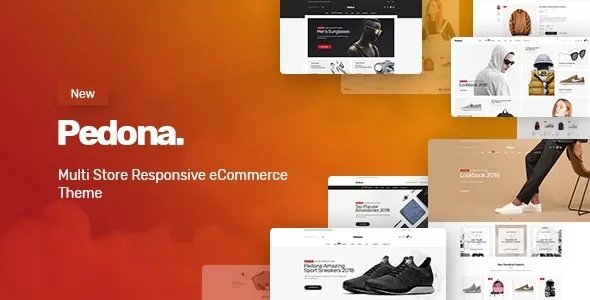
In practical deployments, Pedona – Fashion & Sport Theme for WooCommerce WordPress works best for businesses that depend on strong visual presentation combined with structured product navigation. It is not just a design layer; it acts as a front-end commerce framework.
The layout hierarchy typically favors collection-based browsing, clear product grids, variation clarity, and promotional campaign sections. That makes it suitable for brands that rely on visual merchandising and seasonal marketing.
It is less suitable for enterprise-level operations requiring deep backend customization or heavy ERP integrations without additional optimization planning.
In mid-sized catalogs with structured categories and optimized images, Pedona – Fashion & Sport Theme for WooCommerce WordPress performs reliably. Filtering, pagination, and variation handling remain stable when hosted on properly configured environments.
Where most store owners go wrong is importing demo content and leaving every module active. Excessive sliders, uncompressed images, and plugin overload are what slow stores down — not the theme itself.
If deployed correctly with image compression, caching, and minimal above-the-fold clutter, the theme maintains solid user experience metrics.
Themes do not guarantee performance. Configuration does.
For best results:
Convert large images to modern formats
Enable lazy loading
Use server-level caching
Avoid stacking multiple hero sliders
Remove unused demo widgets
When optimized properly, Pedona – Fashion & Sport Theme for WooCommerce WordPress supports fast mobile rendering and smooth navigation flow.
What I appreciate about Pedona – Fashion & Sport Theme for WooCommerce WordPress is its ability to balance aesthetics with usability. Product grids are generally spaced well, navigation feels intentional, and promotional sections are positioned to guide user behavior.
Used strategically, the homepage should focus on one campaign priority rather than multiple competing messages. Reducing noise improves conversion clarity.
The theme supports upsells, cross-sells, and structured browsing — but execution determines success.
Immediately after activation, you will notice that demo layouts often include oversized banners and multiple promotional blocks.
The first 48 hours should focus on:
Removing unnecessary demo sections
Rebuilding homepage hierarchy
Configuring mobile navigation cleanly
Testing checkout flow end-to-end
Optimizing image sizes
Skipping these steps results in a generic-looking store.
In my professional opinion, Pedona – Fashion & Sport Theme for WooCommerce WordPress performs best for small to mid-scale commerce operations where brand presentation and structured browsing matter more than extreme backend customization.
It is not a magic solution. It is a framework that rewards disciplined deployment.
If configured properly, it can support scalable growth. If treated as a demo clone, it will underperform.
If your goal is to deploy Pedona – Fashion & Sport Theme for WooCommerce WordPress quickly under GPL licensing, ensure that the package you download is clean, unmodified, and compatible with your current WordPress and WooCommerce versions.
GPL licensing allows installation on multiple websites under open-source terms. Always verify file integrity before uploading to your live environment.
This page provides access for evaluation and testing purposes so you can determine whether it aligns with your operational goals before full production deployment.
Step 1: Download the Pedona – Fashion & Sport Theme for WooCommerce WordPress ZIP file from a trusted source
Step 2: Log into your WordPress dashboard
Step 3: Navigate to Appearance → Themes
Step 4: Click Add New → Upload Theme
Step 5: Upload the ZIP file and click Install
Step 6: Activate the theme
Step 7: Install required plugins if prompted
Step 8: Import demo content only if necessary
Step 9: Remove unused sections and optimize structure
Always test checkout, cart flow, mobile navigation, and page speed before launch.
Ensure your hosting environment includes:
SSL certification
Regular backups
Updated PHP version
Firewall or security plugin
Caching configuration
Themes depend heavily on infrastructure stability.
Version: 1.0.9
– Improved compatibility with latest WordPress core version
– Enhanced WooCommerce integration stability
– Minor performance optimizations and bug fixes
Yes, but performance depends on hosting, caching, and image optimization. For very large inventories, infrastructure planning becomes critical.
Most visual and layout adjustments can be handled through theme settings or page builders. Advanced branding tweaks may require CSS familiarity.
The theme structure supports clean markup and works well with SEO plugins. Proper product schema configuration further improves search visibility.
Under GPL terms, installation on multiple WordPress sites is permitted while respecting license conditions.
No. Demo imports should be treated as structural starting points. Refinement and optimization are required for professional deployment.
For Installation or Technical Related Queries check FAQ Page
Our Website also have older version of the plugins and theme. So you can test your website with compatible plugins or Rollback plugins in case of any bug or compatibility issues.
UNZIP the file downloaded from our website, the zip file might contain other files like Template, Docs etc. So make sure you upload correct file.
To Install Plugins:
To Install Themes:
Sometimes theme/plugin might ask you for license, just ignore. Because we have already activated the product with out legal key, which we have purchased for you.
When a New version appears and is available on our website you’ll find it in My Account “Downloads section”.
For Destination Already Exists error:
Make sure to Delete the version of theme/plugin that you have on your website before you upload our premium version, it might cause a conflict during installation and activation.
Or WordPress will say “destination already exists” when trying to upgrade using a zip file and will fail to upgrade the theme or plugin.
If you faced “destination already exists” error installing this Plugin will solve the issue – Easy Theme and Plugin Upgrades.
Our business hours are Monday to Saturday from 10:00 am to 8:00 pm, any request made outside these hours will be answered until next business day. Support and Updates can take 24 to 48 hours. Support provided is for product installation. Please be aware of possible time zone differences when waiting for our reply.
If you have any Queries, Feel Free to Contact Us:
Abuse Warning:
For more information please read FAQs & Terms of Use.