Get upto 60% Discount

Get upto 60% Discount
Unlimited Access:
$10.00 Original price was: $10.00.$2.99Current price is: $2.99.
Available Download Files

Tired of Restrictions?
Go Unlimited!
Join Our Membership to Download 8400+ Plugins & Themes

Most WooCommerce fashion themes look impressive in demos but underperform in production environments. The real evaluation is not whether Mooboo looks modern, but whether it can sustain a real fashion catalog without slowing down browsing, damaging Core Web Vitals, or disrupting conversion flow.
Mooboo is built around WooCommerce, which means it inherits the flexibility and database structure of WordPress ecommerce while depending heavily on how well the store is configured after activation.
In controlled catalog setups with mid-sized inventories and multiple product variations, Mooboo’s filtering and product grid structure remain stable when properly configured. The AJAX-based filtering for size, color, and pricing supports browsing behavior common in fashion ecommerce.
The product grid spacing is conversion-friendly. It maintains enough visual breathing space to avoid clutter while keeping product density high enough to reduce excessive scrolling.
Quick view functionality reduces navigation friction, and variation swatches help minimize abandonment during product comparison.
Most store owners import demo content and leave every section active. They upload oversized product images, install multiple heavy plugins, and never optimize scripts or caching. The result is a slow store that feels bloated.
Mooboo becomes heavy only when sliders stack above the fold, mega menus load unoptimized category thumbnails, and variation scripts are overloaded with unnecessary animation.
The theme itself is not the problem. Deployment discipline determines performance.
Fashion stores depend on high-resolution visuals. Without WebP conversion, lazy loading, server-level caching, and proper image compression, Largest Contentful Paint can easily exceed recommended thresholds.
Mooboo’s layout supports optimization, but it does not automatically guarantee performance. Proper configuration is required to maintain fast mobile rendering.
If paid traffic campaigns are part of your growth strategy, speed optimization becomes directly tied to return on ad spend.
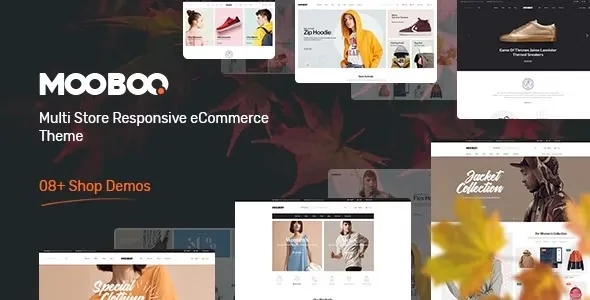
Mooboo is especially strong for mid-scale fashion brands that rely on seasonal campaigns and visual storytelling.
Collection-based homepage sections support trend-driven merchandising. Lookbook-style layouts enhance brand positioning. Product variation swatches improve selection clarity. Recently viewed products and cross-sell sections assist in increasing average order value.
These strengths matter for boutiques, streetwear labels, and independent apparel brands where branding and aesthetic control influence purchasing decisions.
Mooboo is not designed for enterprise-level catalogs with thousands of SKUs and complex ERP integrations without additional optimization.
If your business requires advanced wholesale pricing logic, deep B2B segmentation, or multi-vendor marketplace functionality, infrastructure planning will matter more than theme choice.
It performs best within small to mid-sized catalogs where brand identity and product presentation are central to conversion.
After activation, the homepage layout relies heavily on widget blocks and demo sections. The default configuration often includes oversized banners and multiple promotional modules.
The first optimization step should be removing unnecessary demo blocks. Focus on one seasonal campaign above the fold. Reduce excessive sliders. Simplify category presentation.
Mobile menu configuration should be reviewed immediately, as cluttered mobile navigation significantly increases bounce rates in fashion ecommerce.
These adjustments determine whether the store feels premium or generic.
Theme performance is strongly influenced by hosting environment. Shared hosting without object caching can limit performance even with an optimized theme.
For fashion stores with image-heavy catalogs, enabling server-level caching, object caching such as Redis, and CDN delivery improves stability and load times.
Infrastructure decisions often impact revenue more than design selection.
Mooboo works with WooCommerce structured data output. After deployment, validate product schema, pricing availability, breadcrumb structure, and review markup using structured data testing tools.
Accurate schema improves search presentation and enhances visibility for fashion-related product queries.
Most generic theme listings ignore this step, but structured data validation contributes to long-term SEO strength.
Mooboo is a strong fit for boutique clothing brands, footwear stores, accessory retailers, seasonal apparel campaigns, and visually driven ecommerce businesses that prioritize presentation and brand cohesion.
It is less suitable for highly customized enterprise commerce environments requiring advanced backend integrations.
Mooboo functions best as a mid-scale fashion commerce framework rather than a generic multipurpose layout. When paired with optimized images, streamlined homepage structure, and proper hosting configuration, it supports visually focused ecommerce growth.
Its effectiveness depends less on activation and more on strategic implementation. Proper deployment transforms it from a demo-based design into a performance-ready fashion storefront.
For Installation or Technical Related Queries check FAQ Page
Our Website also have older version of the plugins and theme. So you can test your website with compatible plugins or Rollback plugins in case of any bug or compatibility issues.
UNZIP the file downloaded from our website, the zip file might contain other files like Template, Docs etc. So make sure you upload correct file.
To Install Plugins:
To Install Themes:
Sometimes theme/plugin might ask you for license, just ignore. Because we have already activated the product with out legal key, which we have purchased for you.
When a New version appears and is available on our website you’ll find it in My Account “Downloads section”.
For Destination Already Exists error:
Make sure to Delete the version of theme/plugin that you have on your website before you upload our premium version, it might cause a conflict during installation and activation.
Or WordPress will say “destination already exists” when trying to upgrade using a zip file and will fail to upgrade the theme or plugin.
If you faced “destination already exists” error installing this Plugin will solve the issue – Easy Theme and Plugin Upgrades.
Our business hours are Monday to Saturday from 10:00 am to 8:00 pm, any request made outside these hours will be answered until next business day. Support and Updates can take 24 to 48 hours. Support provided is for product installation. Please be aware of possible time zone differences when waiting for our reply.
If you have any Queries, Feel Free to Contact Us:
Abuse Warning:
For more information please read FAQs & Terms of Use.