Get upto 60% Discount

Get upto 60% Discount
Unlimited Access:
$10.00 Original price was: $10.00.$2.99Current price is: $2.99.
Available Download Files

Tired of Restrictions?
Go Unlimited!
Join Our Membership to Download 8400+ Plugins & Themes

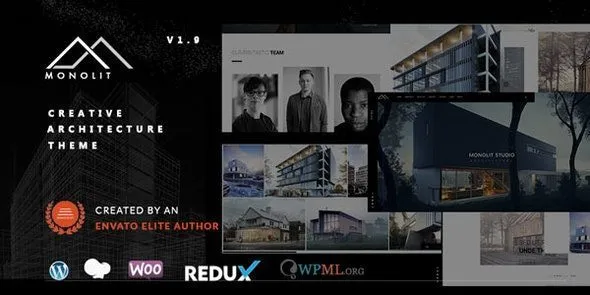
Architecture and interior studios usually download a theme for one reason: they want the work to look intentional without spending weeks polishing layout details. Monolit – Responsive Architecture WordPress Theme is built around that expectation. It is typically chosen when you need a portfolio-first site that feels curated, with clear navigation, strong typography, and image-led pages that do not collapse into a generic blog template.
If you are here for a Monolit Responsive Architecture WordPress Theme download, it helps to know what you are installing. This is not a “do everything” theme. It is a focused presentation layer meant to get a studio online quickly, then stay out of the way while you publish projects, case studies, and contact details.
Most users who search for this theme are blocked by the same workflow problem: they have quality visuals, but WordPress defaults do not provide a portfolio structure that feels like a real practice website. Monolit aims to solve that gap with a design system that already assumes you will lead with imagery and project context.
The core value of Monolit – Responsive Architecture WordPress Theme is speed to a “finished” look. Not speed in page load terms, but speed in decision-making. You install it, pick a layout direction, and you stop debating grids, spacing, and gallery presentation.
For architecture and design sites, the hardest part is consistency. A portfolio can look great on one page and fall apart across ten projects if templates are not cohesive. Monolit is typically downloaded because it reduces those inconsistencies by giving you a tightly defined visual language across project pages, lists, and navigation.
Another reason it gets downloaded is client expectation. Many studios need a site that feels like an architectural portfolio immediately, not after custom development. Monolit is often used as the baseline, then customized lightly with brand fonts, colors, and content structure instead of rebuilding everything from scratch.
One practical note from real use: users sometimes expect a theme like this to replace content strategy. It will not. You still need decent project write-ups, image sizing discipline, and a clear hierarchy (project type, location, year, scope). The theme helps those choices look coherent once you make them.
A safe Monolit – Responsive Architecture WordPress Theme download usually results in a ZIP file that you upload through WordPress. In your dashboard, go to Appearance → Themes → Add New → Upload Theme, select the ZIP, and install. After activation, the site will switch to Monolit’s templates immediately, so do this on a staging site if you are replacing an existing theme.
Right after activation, most users see two things: the theme’s default styling and a mostly empty layout waiting for content. If your download includes a companion plugin or bundled components, install those next so the theme’s intended sections and templates render correctly. Skipping this step is a common reason people think the theme is “broken” when it is simply missing required components.
Once installed, set your basics before importing or building pages. Configure your permalink structure, set the correct homepage (static or posts), and confirm your menu locations. Then create your project categories and a small set of sample portfolio entries. This reveals quickly whether your image ratios and captions are working with the design.
If you plan to download and install Monolit – Responsive Architecture WordPress Theme on a live site, check your existing widgets and menus first. Theme changes can move widget areas and menu assignments. It is not dangerous, but it can look messy until you reassign them.
The most common friction point is media handling. Architecture portfolios rely on large images, but large images uploaded without sizing rules can bloat pages and make galleries feel inconsistent. Before you publish your first ten projects, decide on a standard width and aspect ratio for hero images and gallery images. Then stick to it.
Another frequent mistake is importing demo content and leaving the structure untouched. Demo imports are useful for seeing the theme’s intent, but they can also lock you into page names, menu patterns, and filler sections that do not match a real studio’s needs. A better approach is to import, study the template logic, then rebuild with your own information architecture.
Also watch your typography choices. Themes like Monolit are designed with specific spacing assumptions. If you swap fonts or increase base sizes aggressively, you may create awkward line breaks in headings, especially on mobile. Make changes incrementally and test the same page across phone, tablet, and desktop before committing.
Finally, some users download Monolit expecting it to function like a flexible multipurpose builder theme. If your site requires heavy landing-page experimentation, complex marketing funnels, or dozens of varied page types, you may spend more time fighting the theme’s opinionated structure than benefiting from it. In that case, a more modular setup can be a better fit.
Install and activate the theme, then immediately check whether any required or recommended plugins are listed in your dashboard. After that, set permalinks, assign your menus, and confirm your homepage setting. Doing these basics first prevents confusing layout issues later.
Yes. Your posts, pages, and media stay in WordPress. What changes is how that content is displayed. You may need to reassign menus and widgets, and you may need to adjust page templates to match Monolit’s layout options.
Demos usually rely on specific images, carefully written project entries, and sometimes additional plugins or settings. If you did not import demo content, you will see a clean but empty structure. If you did import, you still need to replace images and adjust typography so your content matches the intended spacing.
It can be, but you should plan your taxonomy early. Use clear categories (architecture, interiors, competitions) and consistent metadata (location, year, scope). The theme’s portfolio presentation works best when filtering and project lists are structured, not improvised.
In many installations, gallery behavior depends on included or recommended components. After you install, confirm that the theme’s gallery and portfolio elements render correctly and that any companion plugins are active. If galleries appear unstyled or missing controls, it is usually a setup dependency rather than a content problem.
If your priority is a portfolio that feels like an architecture studio site with minimal layout decisions, Monolit is a practical choice. If you need highly varied landing pages, frequent layout experiments, or complex marketing sections, you may prefer a more flexible theme framework.
If you are comparing options while planning a Monolit Responsive Architecture WordPress Theme download, focus less on the feature checklist and more on whether the theme’s default content rhythm matches your work. When the structure fits, you publish faster and spend less time correcting layout inconsistencies.
Many users start with a Monolit Responsive Architecture WordPress Theme download because they want a site that looks composed on day one. The best results come when you treat it like a portfolio system: standardize images, write short project narratives, and keep navigation simple.
For Installation or Technical Related Queries check FAQ Page
Our Website also have older version of the plugins and theme. So you can test your website with compatible plugins or Rollback plugins in case of any bug or compatibility issues.
UNZIP the file downloaded from our website, the zip file might contain other files like Template, Docs etc. So make sure you upload correct file.
To Install Plugins:
To Install Themes:
Sometimes theme/plugin might ask you for license, just ignore. Because we have already activated the product with out legal key, which we have purchased for you.
When a New version appears and is available on our website you’ll find it in My Account “Downloads section”.
For Destination Already Exists error:
Make sure to Delete the version of theme/plugin that you have on your website before you upload our premium version, it might cause a conflict during installation and activation.
Or WordPress will say “destination already exists” when trying to upgrade using a zip file and will fail to upgrade the theme or plugin.
If you faced “destination already exists” error installing this Plugin will solve the issue – Easy Theme and Plugin Upgrades.
Our business hours are Monday to Saturday from 10:00 am to 8:00 pm, any request made outside these hours will be answered until next business day. Support and Updates can take 24 to 48 hours. Support provided is for product installation. Please be aware of possible time zone differences when waiting for our reply.
If you have any Queries, Feel Free to Contact Us:
Abuse Warning:
For more information please read FAQs & Terms of Use.