Get upto 60% Discount

Get upto 60% Discount
Unlimited Access:
$10.00 Original price was: $10.00.$2.99Current price is: $2.99.
Available Download Files

Tired of Restrictions?
Go Unlimited!
Join Our Membership to Download 8400+ Plugins & Themes

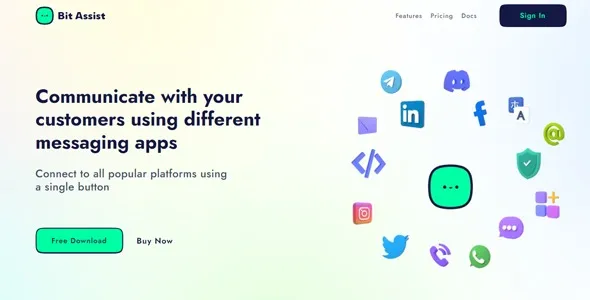
Bit Assist Pro is a WordPress communication plugin developed to integrate multi-channel messaging platforms such as WhatsApp, Telegram, Facebook Messenger, and custom chat widgets directly into WordPress websites. The plugin operates within WordPress core standards using hooks, filters, and REST-based processes rather than altering core files.
The system enables site owners to centralize customer communication, automate responses, and provide structured real-time interaction without depending on externally rendered front-end frameworks.
WordPress is distributed under the GNU General Public License, and plugins extending its PHP-based framework are typically considered derivative works. This means the core functionality of Bit Assist Pro aligns with GPL principles.
Users are permitted to study the source code, modify it to meet project requirements, and deploy it across multiple WordPress installations without restrictive per-site activation controls.
GPL licensing does not eliminate commercial value. Many professional WordPress plugins are distributed under GPL while monetizing updates, technical support, documentation, and managed distribution systems.
The license protects user freedom and transparency while allowing developers to operate sustainable business models around maintenance and service delivery.
After activation, Bit Assist Pro introduces a floating chat interface or embedded communication widget on the website frontend. This interface connects visitors to selected messaging channels and can be customized for appearance, trigger behavior, and device responsiveness.
The plugin typically integrates with theme layouts without requiring structural modifications.
Within the WordPress dashboard, administrators gain access to configuration panels for channel setup, API credentials, display rules, scheduling, and conditional triggers.
Automation features may include predefined greetings, timed prompts, department routing, and channel-specific logic designed to enhance response efficiency.
Because Bit Assist Pro relies on standard WordPress development practices, compatibility generally depends on theme quality and adherence to WordPress coding standards.
Testing is recommended when using advanced page builders, caching systems, or JavaScript-heavy themes.
Messaging widgets may load external APIs depending on selected channels. Reliable hosting, optimized caching, and updated PHP versions contribute to stable performance.
Staging environment testing is advisable before deploying major updates on production websites.
GPL flexibility allows developers and agencies to test Bit Assist Pro across multiple client projects, customize interaction flows, and implement channel variations without restrictive licensing constraints.
Responsible deployment includes version tracking, update verification, and avoiding direct modification of core plugin files.
When evaluating any release, users should confirm compatibility with the current WordPress version, supported PHP versions, and overall changelog transparency.
Regular updates typically address bug fixes, compatibility improvements, and security hardening.
A structured release may include improved API authentication handling, enhanced compatibility with updated WordPress versions, performance optimizations for frontend scripts, and resolved conflicts with third-party plugins.
Version transparency and consistent maintenance contribute to long-term operational stability and improved trust signals for site owners.
Bit Assist Pro demonstrates how GPL-licensed WordPress plugins can provide professional-grade communication features while maintaining flexibility and transparency.
Understanding licensing implications, deployment best practices, and update discipline ensures long-term sustainability rather than short-term implementation focus.
Within the WordPress ecosystem, GPL should be viewed as a framework supporting customization, control, and scalability.
For Installation or Technical Related Queries check FAQ Page
Our Website also have older version of the plugins and theme. So you can test your website with compatible plugins or Rollback plugins in case of any bug or compatibility issues.
UNZIP the file downloaded from our website, the zip file might contain other files like Template, Docs etc. So make sure you upload correct file.
To Install Plugins:
To Install Themes:
Sometimes theme/plugin might ask you for license, just ignore. Because we have already activated the product with out legal key, which we have purchased for you.
When a New version appears and is available on our website you’ll find it in My Account “Downloads section”.
For Destination Already Exists error:
Make sure to Delete the version of theme/plugin that you have on your website before you upload our premium version, it might cause a conflict during installation and activation.
Or WordPress will say “destination already exists” when trying to upgrade using a zip file and will fail to upgrade the theme or plugin.
If you faced “destination already exists” error installing this Plugin will solve the issue – Easy Theme and Plugin Upgrades.
Our business hours are Monday to Saturday from 10:00 am to 8:00 pm, any request made outside these hours will be answered until next business day. Support and Updates can take 24 to 48 hours. Support provided is for product installation. Please be aware of possible time zone differences when waiting for our reply.
If you have any Queries, Feel Free to Contact Us:
Abuse Warning:
For more information please read FAQs & Terms of Use.