Get upto 60% Discount

Get upto 60% Discount
Unlimited Access:
$10.00 Original price was: $10.00.$2.99Current price is: $2.99.

Tired of Restrictions?
Go Unlimited!
Join Our Membership to Download 8400+ Plugins & Themes

Most WordPress sites start with a simple need: upload a file, share it, move on. Then the library grows. PDFs multiply, policies get revised, and suddenly the “Downloads” page becomes a scrolling wall of links nobody can search.
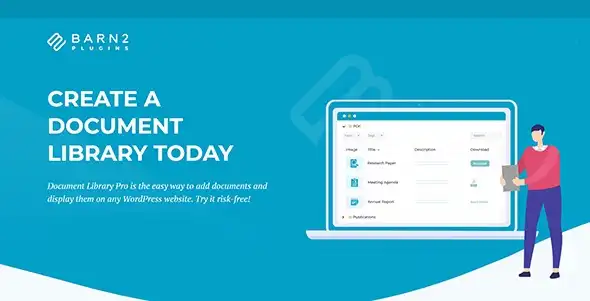
Document Library Pro is built for that exact moment. It turns documents into a filterable, searchable library that behaves more like a catalog than a blog post archive.
The core value of Document Library Pro is discoverability. It lets visitors find the right file quickly using search, categories, tags, and sortable columns, instead of relying on page structure or manual lists.
That shift is bigger than it sounds. When documents are treated as structured content, you can keep URLs stable, add metadata over time, and avoid duplicating the same file across multiple pages just to make it “findable.”
It also helps content teams. Updating a single document entry updates the library automatically, which reduces the quiet drift where old versions keep circulating because someone forgot to edit a separate list page.
File sharing problems rarely look like “we need a plugin.” They look like internal friction.
Support teams keep sending direct file links because the public site is hard to navigate. HR uploads onboarding PDFs into random pages. Product teams create separate “Resources” pages for each category, then forget to maintain them.
Document Library Pro is most useful when you want one source of truth for documents, with multiple ways to browse it.
A document library is only as good as the workflow behind it. In practice, you will usually create a document entry, attach a file (or link), assign categories and tags, and publish.
Over time, the advantage is in maintenance. You can revise titles to match how users search, add missing metadata, and reorganize taxonomy without rebuilding pages. Libraries stay usable even as they grow from 30 files to 300.
One practical tip: decide early whether you want categories to represent departments (HR, Legal, Finance) or document types (Policy, Form, Guide). Mixing both can work, but it often leads to overlapping filters that confuse visitors.
Libraries can accidentally create thin or repetitive pages if every filter combination becomes a URL that search engines can crawl. The safest approach is to keep one primary library page as the index-worthy hub, then ensure filter states do not generate a large number of crawlable, near-duplicate pages.
From a performance perspective, the main wins come from reducing manual duplication. Instead of maintaining multiple pages with repeated link lists, you maintain one dataset and display it consistently. That typically means fewer edits, fewer broken links, and fewer “orphaned” files that exist in the Media Library but are not meaningfully published.
If you are looking for Document Library Pro download options, the safest route is to obtain the plugin package from the official source you purchased it from, then keep a copy of the original ZIP for future restores.
Installation is straightforward in WordPress:
Go to your WordPress dashboard, open Plugins, choose Add New, then Upload Plugin. Select the ZIP file, install, and activate.
After activation, set up your document structure before importing a large library. Create the categories and tags you plan to use, then add a few test documents first. This helps you confirm how the library displays and how search behaves before you commit to a full upload.
For ongoing stability, keep WordPress, your theme, and the plugin updated. Test updates on a staging site if your library is business-critical or heavily customized.
The most frequent issue is treating documents like blog posts with attachments. That approach usually produces inconsistent titles, missing categories, and no clear rules for versioning.
Another mistake is uploading files with vague filenames and expecting the library search to compensate. Search is only as helpful as the text you provide. Use human-readable titles and add short descriptions when the document’s purpose is not obvious.
Finally, teams often overuse tags. A small, controlled tag set is easier to browse than dozens of one-off labels that only apply to a single file.
If you only publish a handful of static PDFs and they rarely change, a simple page with a short list of links can be enough. The overhead of building a taxonomy and maintaining metadata may not pay off.
It also may not be necessary if your documents are already managed in a dedicated portal and WordPress only needs a single outbound link. Document Library Pro shines when WordPress is the publishing layer and users expect to search and browse within the site.
Yes, as long as your WordPress site has a way to restrict access. The library display can list documents, but access control typically depends on your membership, role, or page restriction setup. Plan your permissions first so you do not accidentally expose files that should be internal.
Use a consistent document entry and replace the file when a new version is published. That way, the page or library reference stays the same. If you must keep multiple versions available, make versioning explicit in the title and consider a “Superseded” tag or category to prevent outdated files from ranking or being downloaded by mistake.
A well-structured library is usually manageable, but performance depends on your hosting, caching, and how many documents you display at once. Keep libraries paginated and avoid trying to show hundreds of rows on a single view. If you expect thousands of documents, test on staging with realistic data.
Download tracking is often handled through analytics or dedicated tracking tools. You can usually track clicks on file links, but the exact method depends on whether downloads are direct file URLs or routed through a tracked endpoint. Decide what “download” means for your reporting before you roll it out.
Use categories for the primary browsing paths, like departments or document types. Use tags for secondary attributes, like product lines, regions, or audiences. If users commonly search for “forms,” “templates,” or “checklists,” reflect those words in titles and taxonomy so search results align with real language.
No. WordPress still stores files in the Media Library, but Document Library Pro gives you a structured publishing layer on top. Think of it as the difference between having files stored somewhere and having a navigable catalog that people can actually use.
For Installation or Technical Related Queries check FAQ Page
Our Website also have older version of the plugins and theme. So you can test your website with compatible plugins or Rollback plugins in case of any bug or compatibility issues.
UNZIP the file downloaded from our website, the zip file might contain other files like Template, Docs etc. So make sure you upload correct file.
To Install Plugins:
To Install Themes:
Sometimes theme/plugin might ask you for license, just ignore. Because we have already activated the product with out legal key, which we have purchased for you.
When a New version appears and is available on our website you’ll find it in My Account “Downloads section”.
For Destination Already Exists error:
Make sure to Delete the version of theme/plugin that you have on your website before you upload our premium version, it might cause a conflict during installation and activation.
Or WordPress will say “destination already exists” when trying to upgrade using a zip file and will fail to upgrade the theme or plugin.
If you faced “destination already exists” error installing this Plugin will solve the issue – Easy Theme and Plugin Upgrades.
Our business hours are Monday to Saturday from 10:00 am to 8:00 pm, any request made outside these hours will be answered until next business day. Support and Updates can take 24 to 48 hours. Support provided is for product installation. Please be aware of possible time zone differences when waiting for our reply.
If you have any Queries, Feel Free to Contact Us:
Abuse Warning:
For more information please read FAQs & Terms of Use.