Get upto 60% Discount

Get upto 60% Discount
Unlimited Access:
$15.00 Original price was: $15.00.$4.99Current price is: $4.99.
Available Download Files

Tired of Restrictions?
Go Unlimited!
Join Our Membership to Download 8400+ Plugins & Themes

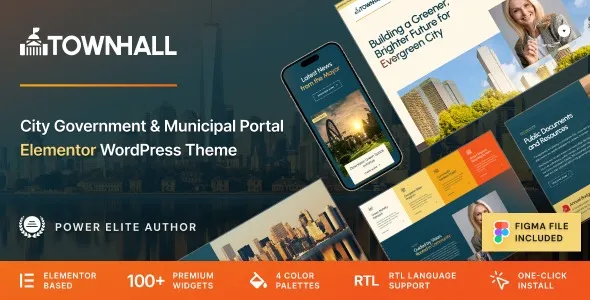
Town Hall is designed specifically for municipal administrations, public offices, and local government authorities that require structured communication. A city website is not a promotional brochure. It functions as a digital public office where citizens expect clarity, transparency, and immediate access to essential information.
This theme focuses on organizing announcements, public notices, council updates, department directories, and downloadable resources in a logical hierarchy. Instead of decorative layouts, it emphasizes usability. Visitors should be able to locate service information, meeting schedules, and official contacts without navigating through unnecessary design elements.
Town Hall Municipal Portal and Local City Government WordPress Theme supports that requirement by presenting content in clearly defined sections that mirror how public institutions operate.
When someone visits a city website, their objective is usually practical. They may need to check tax deadlines, review a council resolution, download a permit form, or find department contact details. The layout framework of Town Hall is built around these real user behaviors.
The homepage typically acts as an information hub. Important announcements receive visual priority. Department pages can be structured with staff listings, responsibilities, and direct communication channels. Document sections allow municipalities to publish budgets, meeting minutes, and public policies in an organized format.
Rather than forcing government entities into corporate-style templates, the theme respects the informational nature of public service websites.
Town Hall is compatible with current WordPress versions and modern hosting environments using updated PHP configurations. For municipalities, technical stability is not optional. A government portal must remain accessible during high-traffic situations such as emergency announcements or major public updates.
The theme works with widely adopted plugins for SEO optimization, caching, security hardening, and multilingual functionality. It also integrates with WooCommerce when municipalities need to enable online payments for permits, registrations, or service fees.
Responsive design ensures citizens can access services from mobile devices, which is especially important in regions where mobile usage exceeds desktop browsing.
If you are searching for Town Hall Municipal Portal and Local City Government WordPress Theme download, the primary goal is usually rapid deployment of a structured municipal website without building a custom system from scratch.
Under the GNU General Public License, the theme can be installed and used on WordPress websites while respecting licensing terms. GPL distribution allows flexibility, but it remains essential to download complete and unmodified files to maintain security and compatibility.
Always verify file integrity before installation and maintain routine updates to protect the site from vulnerabilities.
Step 1: Download the theme ZIP package from a reliable GPL source.
Step 2: Log in to your WordPress administration panel.
Step 3: Navigate to Appearance and select Themes.
Step 4: Click Add New and then choose Upload Theme.
Step 5: Upload the ZIP file and initiate installation.
Step 6: Once installed, click Activate to enable the theme.
Step 7: Install any recommended plugins prompted by the theme setup process.
Step 8: Import demo content if available to establish the base municipal structure.
After activation, configure navigation menus, create department pages, publish announcements, and upload official documents according to your city’s requirements.
Every municipality has unique branding guidelines, including official colors, emblems, and typography standards. Town Hall allows administrators to adjust visual settings through WordPress customization panels or supported page builders.
Accessibility is a major consideration for government websites. Clear typography, structured headings, and logical navigation contribute to a more inclusive experience. Proper content structuring combined with accessibility plugins can help municipalities move closer to compliance standards.
Long-term management should include regular updates to WordPress core, installed plugins, and the theme itself. A civic website represents public authority, so maintenance is directly linked to public trust.
Town Hall works effectively for city councils, town administrations, municipal departments, regional offices, and community information portals. It is especially useful where structured document publication and official announcements form the core of daily website activity.
Because the theme architecture focuses on information clarity, it scales from small-town administrations to larger metropolitan portals.
Yes. The layout can accommodate multiple departments and hierarchical structures, making it adaptable for both small municipalities and larger administrative regions.
Yes. When integrated with WooCommerce or similar payment systems, municipalities can collect service fees, registrations, or permit payments online.
It works with popular multilingual plugins, allowing government bodies to publish content in multiple languages where required.
Basic WordPress knowledge is sufficient for standard operation. More advanced structural customization may require technical assistance.
Updates should be applied whenever new versions are released to maintain compatibility with WordPress core and security patches.
Under GPL terms, it can be used across multiple WordPress installations, provided distribution respects licensing requirements.
For Installation or Technical Related Queries check FAQ Page
Our Website also have older version of the plugins and theme. So you can test your website with compatible plugins or Rollback plugins in case of any bug or compatibility issues.
UNZIP the file downloaded from our website, the zip file might contain other files like Template, Docs etc. So make sure you upload correct file.
To Install Plugins:
To Install Themes:
Sometimes theme/plugin might ask you for license, just ignore. Because we have already activated the product with out legal key, which we have purchased for you.
When a New version appears and is available on our website you’ll find it in My Account “Downloads section”.
For Destination Already Exists error:
Make sure to Delete the version of theme/plugin that you have on your website before you upload our premium version, it might cause a conflict during installation and activation.
Or WordPress will say “destination already exists” when trying to upgrade using a zip file and will fail to upgrade the theme or plugin.
If you faced “destination already exists” error installing this Plugin will solve the issue – Easy Theme and Plugin Upgrades.
Our business hours are Monday to Saturday from 10:00 am to 8:00 pm, any request made outside these hours will be answered until next business day. Support and Updates can take 24 to 48 hours. Support provided is for product installation. Please be aware of possible time zone differences when waiting for our reply.
If you have any Queries, Feel Free to Contact Us:
Abuse Warning:
For more information please read FAQs & Terms of Use.