Get upto 60% Discount

Get upto 60% Discount
Unlimited Access:
$10.00 Original price was: $10.00.$2.99Current price is: $2.99.

Tired of Restrictions?
Go Unlimited!
Join Our Membership to Download 8400+ Plugins & Themes

As websites grow more commercial or partnership-driven, logos start to play a structural role rather than a decorative one. Client logos, partner brands, certifications, and media mentions all need to be displayed clearly, consistently, and without breaking page layouts. Many sites resort to manually uploading images into columns or sliders, which quickly becomes difficult to manage and inconsistent across devices.
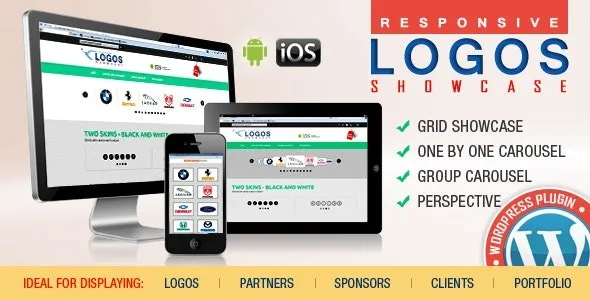
WordPress Logos Showcase is designed to solve this problem by providing a structured way to display logos in grids or carousels without custom CSS, page-builder workarounds, or repeated manual updates. It focuses on presentation control rather than visual effects.
Logos seem simple until they need to scale. Different image sizes, alignment issues, mobile responsiveness, and updates over time turn logo sections into fragile layout components. Replacing a single logo often requires editing multiple pages, and sliders built for images are rarely optimized for brand marks.
This plugin addresses the issue by treating logos as managed content instead of static images scattered across pages. Logos can be updated once and reflected consistently wherever they are displayed.
Once activated, WordPress continues to handle media uploads as usual. The difference is that logos can now be grouped, ordered, and displayed using predefined layouts designed specifically for brand assets.
Logos are stored centrally and rendered through grid or carousel structures that respect spacing, alignment, and responsiveness. Existing pages are not modified automatically, and no frontend output changes unless the showcase is intentionally added.
The plugin separates logo management from page layout. Logos are defined once and then displayed through configurable views. Grids are typically used for trust sections or partner listings, while carousels are used where space is limited or motion helps guide attention.
Because these displays are purpose-built for logos, they avoid common slider problems such as uneven heights, cropped images, or excessive scripts. The focus remains on clarity and consistency rather than animation.
WordPress Logos Showcase is built for presenting brand assets cleanly. It is not a general image gallery, a marketing slider, or a page builder replacement. It does not edit logos automatically or alter image quality beyond display rules.
Its role is narrow: make logo sections predictable, reusable, and easy to maintain across the site.
This plugin is commonly added after a site reaches a point where credibility signals matter. Agencies use it for client showcases, businesses use it to display partners and certifications, and product sites use it to show integrations or press mentions.
Because it does not interfere with themes or global styles, it can be introduced without redesigning existing pages.
In production use, this plugin appears on corporate websites highlighting clients, SaaS sites showing integrations, portfolio sites displaying brands worked with, and landing pages reinforcing trust. In all cases, the objective is visual order and maintainability rather than visual complexity.
Centralized logo management reduces future edits and keeps brand sections consistent as sites evolve.
To install the plugin, download the WordPress Logos Showcase package, upload it through the WordPress plugin installer, and activate it from the admin dashboard. Once active, logo entries and display options become available for configuration.
Initial setup usually involves adding logos and selecting whether they should appear in a grid or carousel format.
Before displaying logos publicly, site owners should confirm image quality, ensure brand usage permissions are respected, and test responsiveness on different screen sizes. It is also useful to verify that logo links, if used, point to the correct destinations.
These checks help maintain professionalism and avoid visual inconsistencies.
Will this affect site performance?
Logo displays are lightweight when configured responsibly and do not replace caching or optimization tools.
Can logos be updated later?
Yes. Updating a logo updates all instances where it is used.
Does it work with page builders?
Yes. Logo showcases can be inserted into builder layouts.
Is it compatible with recent WordPress versions?
Yes. Updates focus on compatibility and display stability.
Version 2.5
Recent updates focus on improving responsive behavior, stabilizing grid and carousel rendering, refining image handling, and maintaining compatibility with modern WordPress environments. The plugin is verified for WordPress 6.0+ and supports PHP 7.4 and above.
For Installation or Technical Related Queries check FAQ Page
Our Website also have older version of the plugins and theme. So you can test your website with compatible plugins or Rollback plugins in case of any bug or compatibility issues.
UNZIP the file downloaded from our website, the zip file might contain other files like Template, Docs etc. So make sure you upload correct file.
To Install Plugins:
To Install Themes:
Sometimes theme/plugin might ask you for license, just ignore. Because we have already activated the product with out legal key, which we have purchased for you.
When a New version appears and is available on our website you’ll find it in My Account “Downloads section”.
For Destination Already Exists error:
Make sure to Delete the version of theme/plugin that you have on your website before you upload our premium version, it might cause a conflict during installation and activation.
Or WordPress will say “destination already exists” when trying to upgrade using a zip file and will fail to upgrade the theme or plugin.
If you faced “destination already exists” error installing this Plugin will solve the issue – Easy Theme and Plugin Upgrades.
Our business hours are Monday to Saturday from 10:00 am to 8:00 pm, any request made outside these hours will be answered until next business day. Support and Updates can take 24 to 48 hours. Support provided is for product installation. Please be aware of possible time zone differences when waiting for our reply.
If you have any Queries, Feel Free to Contact Us:
Abuse Warning:
For more information please read FAQs & Terms of Use.